
Chrono Download Manager
Description
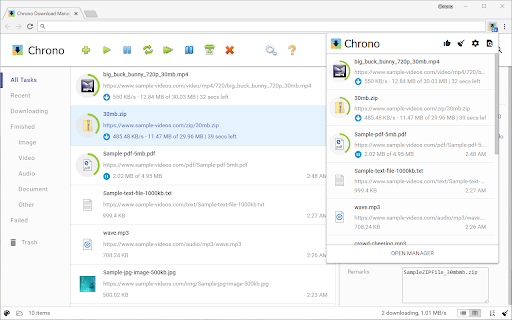
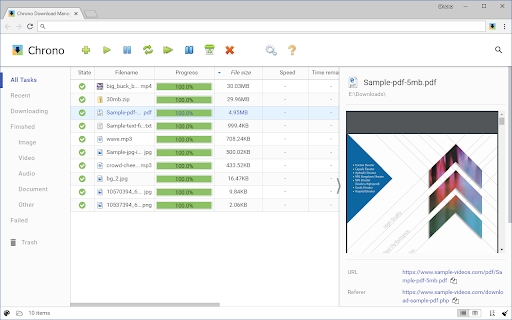

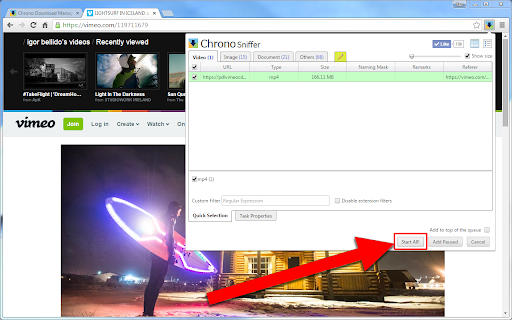

Reviews (200 cached)
Full of bugs, wont obey the only 1 download at the time most of the time (which almost the only reason to use this). No dark mode, interface designed by a 5y/o
Actually useless, tried to download this huge files twice, both times it said file not available on site, after it had downloaded over 40gb, no way to resume
I've just tried using this to download a large file from AA which I wasn't able to download conventionally. Sure enough the download broke twice after 25mb or less with the "Failed incomplete" error. Contrary to what the extension claims, I was not able to resume download - there was only a restart option which restarted the download from scratch. There is no option to replace the download link for the same file in cases like this, or to attach multiple links for a multithreaded experience. I do not see the point of this extension and consequently I am giving it 1 star.
Wrote a basic page of links to use with this and it wouldn't pick them up.
Reading browser histories, it is very suspicious. A normal download extension dosen't need this permission.
yep my bad should have read the reviews, just downloads an html file, this ones for the Trash
Trash, it downloads html links instead of files.
Don't have an option to notify when ALL DOWNLOADS are finished. The only reason I tried this out for.
When you click "clear completed tasks" it is intuitive that it would erase only the list... No, it erases the downloaded files as well. Lost 100+ GB, hours of my life and bandwith, trash. 0/10
NOT EASY TO USE.
Working so so and is harder to see wht goes wriong instead of just using the system
This is a nightmare, a disaster! It's not stable at all, not reliable! Too many connection lost. Even default web browser's downloader works better that this disapoinment!
file://
It's frustrating when you download almost 100% of a file, but suddenly it gets interupted permanently due to a second of network dismissting! I strongly prefer IDM s ince it manages the download process and has got memory for the files which have not been downloaded completely yet.
Just some fancy UI. Absolutely garbage in functionality! Just lost 3 Gb downloaded file because for a simple connection interruption.
This plugin has a big defect, it can't remember last location. On windows 10 and macOS 15, I use chrome browser to save an image from webpage, it always use "download" folder, so I have to manually select the folder location I want every time. This bothered me very long time. After I removed the plugin, the problem resolved.
I was a very happy user of downthemall until chrome disabled it. i decided to install chrono download manager and found it to be useless, in fact i would call it chronic download saboteur. Not only does it fail to download many files but when i simply try to download a file myself, this extension interferes with my downloading by hoarding all my attempted downloads like a malevolent fat toad and then failing to download them. I currently have a system message from this extension saying it is downloading 161 items at 0 bytes per second, and this message has been there for at least 30 minutes. i could have downloaded any of THE items manually in a second or two for each one, but foolishly used this extension instead. Now it looks like I will have to manually download 161 items one by one using the links in this extension manager. Be warned!
I did not find any benefit of this extention. It's not a manager, just a combination of UI elements, with no benefits over the built-in Chrome downloader feature. Constantly stops large downloads with a "Network Error" message, while the original Chrome downloader downloads those files.
Unusable IMO. I'm sure there is a way to click on downloads and open/save them but I don't care enough to find out. If it's not obvious, then you've screwed up your UI design.
This extension turned distrowatch.com to arabic. Uninstalled.
lots of ad
Absolute rubbish. Constantly stops large downloads with a "Network Error" message - the built-in Chrome download manager downloads the same files just fine.
Long delay between I click "save as" and your new redundant & ugly white "new task" confirm window pops up.
Not clear about how to use. Doesn't do what I expected (download PDF's on a page easily), so . . . it's gone. Not recommended
Used to be amazing and the perfect extension, now it crashes non-stop? Fully up to date so I'm not sure what's going on. Have been hoping it'd be fixed for some time but it's at the point where I need something functional
Seems like the perfect app until you use it at night and it blinds you with a huge white window! No dark theme! I thought all apps have a dark theme by now. Well i've posted in the message board that appears unmoderated from all the previous peoples unanswered issues so we'll see what happens and Ill update.
the downloading is taking days and hours can you repair so that downloading is done quickly in a few minutes
Why am I seeing dialog "Please click Cancel, this is Chrono testing download configuration..."?
One star because of the "Please click Cancel, this is Chrono testing download configuration. Ensure browser save-as dialog is off and the default downloads location is a writable, non-system folder.txt" message every time I download a file. Great way to scare off your users
The rule system is a complicated one for non-CODING human. it is so complicated to the point it defeats the fact of having the extension to begin with. can you simplify it... and with every updates it wipes out all rule you created
It cant recover a broken download like others managers... uninstalled now
Its new version is Broken, the download option to create a new file in case of conflict is actually overwritting files with the same name already on folder.
Tried to download 2 different ISO file multiple times, it will get part way through it and fails every time at a different point. It says complete but the file size is a third or half of what it should be, different every time and the file will not open, windows says it's corrupt.
Can't remember last location.
Unable to resume the download of big linux image ISO files.
not work, imposible to download from custom list
No dark mode = unusable
You can not see wether your download is downloading or not. You need to do few clicks to find out. First you need to click on three dots on top right corner of google chrome. Then click on downloads. This gonna open new window/page where if your download has started you will see it. This is such an absurd, unreal.
Just for the annoying rating popup have a 1 !!
doesn't work
Download failed on Google Drive. No option to retry. Clicking the refresh 'symbol' just restarted the download from zero. This extension has failed me and I have no use for it.
Immediately upon first use didn't complete the very first download I asked it to do, it started it and gave up after 500mb
Tired trying to set custom download path
suckds!!@!!@!!!
So much worse than the managers in the old days. And after x downloads it keeps wanting to verify it's settings by downloading a txt file. Very annoying. Also to much effort to open the containing folder. Also, what's up with it not remembering 'last downloaded location' even though that option is applied..?
every time i leave my laptop to download it failes "Netweork Error" :/
Doesn't have the ability to resume a download that failed (e.g. due to drop in network).
Doesn't work for me.
slow at downloads as f****
Does NOT work with Videos
Permissions (14)
Permissions
Details
| Version | 0.13.10 |
| Updated | Dec 20, 2025 |
| Size | 2.06MiB |
| First Seen | Mar 28, 2026 |
More by Chrono Extensions

Popular in workflow




Popular Extensions
