
Tab Manager for Chrome™ icon

Tab Manager for Chrome™

by 20Tabs

v1.0.5 Updated Sep 3, 2024 503KiB
CWS
10K
Users
★ 4.19
81 reviews
#5387
of 207.3K
functionality
#123 of 7.7K
⚠️Not updated in over a year

Description

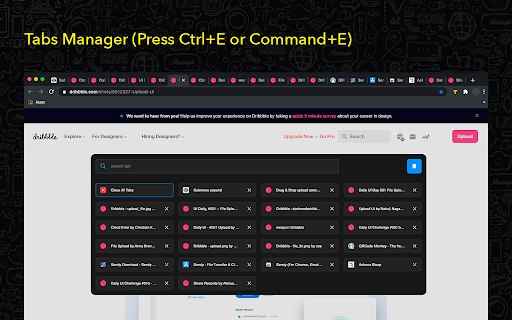
Tab Manager for Chrome is a must-have extension for anyone looking to streamline their browsing experience. Designed to give you quick and easy access to all your open tabs, this tool allows you to navigate between them with just a click. No more getting lost in a sea of open tabs—Tab Manager for Chrome provides a clear and organized overview, so you can instantly find and switch to the tab you need. Tab Manager for Chrome also lets you create custom tab groups, helping you keep related tabs organized and accessible. Whether you’re working on a project, researching multiple topics, or simply trying to keep your personal and work tabs separate, you can group your tabs and open them only when you need them. This not only declutters your browser but also improves your productivity by letting you focus on the task at hand. With a user-friendly interface and powerful features, Tab Manager for Chrome is the perfect solution for anyone who wants to take control of their browsing and enhance their efficiency. Say goodbye to tab overload and hello to a more organized, stress-free browsing experience. Organize browser tabs to a fully manageable list for quick search through opened tabs and easy access to any website you want. There can be created groups of opened tabs by theme, so you will be able to work exactly with needed websites and then collapse tabs altogether that will be saved for further until you want to edit or delete them. Navigation between opened tabs became so simple with 20 Tabs. There is an opportunity to use hotkeys to find saved domain names and open tabs. Every group of tabs is editable thus you can add or remove any tab from the list. As well there is an option to rename each group for more convenience. How you can use 20 Tabs: - Open a clear list of opened tabs with one click - Navigate between tabs using a search bar - Remove tab from the list in one click as well as add needed website - Create groups of browser tabs - Save to bookmark in a single click Take control of your tabs is the every - day assistant in working with browser tabs. Press the hotkey combination to open a search bar with a list of opened tabs. The search bar appears as well to simplify navigation between websites you visit. You are welcome with any suggestions about improvements. Visit our options page to contact us or rate.
Tab Manager for Chrome™ screenshot 1Tab Manager for Chrome™ screenshot 2Tab Manager for Chrome™ screenshot 3

Reviews (9 cached)

★☆☆☆☆2025-03-13
Art Spark (Artem)

THIS is Not Tab manager .... when i click at app its shows "No groups yet". even if i have opened groups ... well... useless trash....

★☆☆☆☆2023-10-28
lazghab karim

this extention deleted all of my tabs and i couldn't recover all of them

★☆☆☆☆2023-07-28
Rodrigo Bogado

Has the "replace current tags" options as default. Who was the idiot who thought that was a good idea? i just lost a lot of tags because of it while testing the extention. And it also doesn't have a "open in new window" option that should be the default

★☆☆☆☆2022-11-27
Đorđe Jović

Instead of saving tabs from the window where this extension was open, it just closed all of the tabs... A weird app that I'd recommend skipping.

★☆☆☆☆2022-10-11
Peanut

When I exit the tab manager, but press enter, it still switches taps, which is annoying. Sometimes I just click the wrong one.

★☆☆☆☆2022-03-20
Samuele gg

It doesn't work.

★★★☆☆2024-03-05
Hermann LaFleur

Kinda cringe that you can't open individual tabs by clicking on them lol.

★★★☆☆2024-02-15
joseph ousley

pressed enter after writing a paragraph for work and it closed every tab, with no easy way to restore them aside from spamming ctrl+shift+t until it looked right. extension options > open group > change "replace tabs" to "add new" -- i don't understand replacing all tabs would be default behavior, especially before you've even defined a group.

★★★☆☆2022-07-25
Ronald Greene

On Brave I have 42 tabs open but the pop up window only has space to view 24 of them. It would be great if the pop up could be expanded to see all tabs without arrowing downward to find the rest. Also, when clicking on a page, the pop up disappears and if I try to bring it back using Alt + E again, the menu in the upper right corner opens instead.

Permissions (4)

Permissions

activeTab Can access the current tab when you click the extension scripting Can inject scripts into web pages storage Can store data locally in your browser tabs Can see your open tabs and their URLs

Details

Version 1.0.5
Updated Sep 3, 2024
Size 503KiB
First Seen Mar 28, 2026

