
Core Web Vitals Visualizer
v1.20 Updated Mar 6, 2026 2.51MiB
⚠️Requests 1 sensitive permission ✅Recently updated
Description
Core Web Vitals Visualizer
Open the popup on any page. See your LCP, CLS, INP, FCP, and TTFB scores instantly, color-coded, live. No separate tool. No copy-pasting URLs into PageSpeed Insights.
What it shows
Real-time scores powered by the web-vitals library, the same library Chrome uses internally. Green means good. Orange means work to do. Red means it's hurting you.
LCP - Green overlay marks the LCP element on the page. Full timing breakdown: TTFB, Resource Load Delay, Resource Load Duration, Element Render Delay. For images: preload status, fetchpriority, 1st vs 3rd party origin, natural vs rendered dimensions, estimated preload savings.
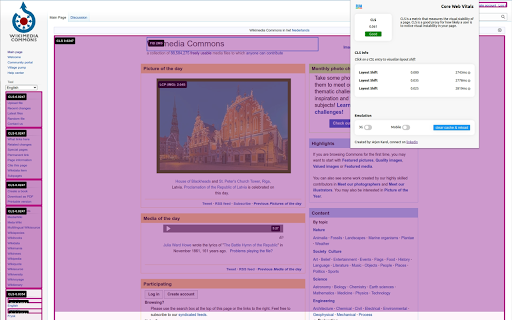
CLS - Pink overlays mark every layout shift source. Click any shift to see an animated before/after replay. Attribution shows the largest shift target and score.
INP - Broken down into Input Delay, Processing Duration, and Presentation Delay. Shows interaction type, target element, and page load state at time of interaction.
FCP and TTFB - -FCP splits into Time to First Byte vs First Byte to FCP. TTFB splits into Cache, DNS, Connection, Request, and Waiting.
CrUX history
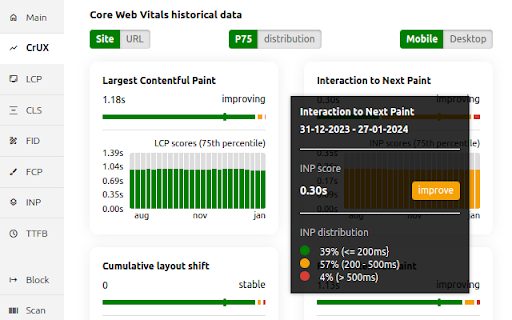
25 weeks of Chrome User Experience Report data for any site or URL. Toggle between P75 scores and good/needs-improvement/poor distributions. Switch between mobile and desktop. Trend lines show whether each metric is moving in the right direction.
Render-blocking resources
Every render-blocking stylesheet and script listed with individual file timings and total blocking duration.
Performance experiments
Test fixes without touching your code. Disable JS, defer all JS, or block third-party JS. Lazy load images, de-prioritize background images, disable web fonts or third-party CSS. Run any experiment with cache cleared to measure real cold-load impact.
Network throttling
Simulate slow 3G with CPU throttling. Clear cache and reload to measure cold performance.
Built for developers
Minimal permissions. No data collection. Everything runs locally. All vitals logged to the console for debugging.
One-click links to CrUX Dashboard, PageSpeed Insights, and the W3C HTML Validator for the current page.
changes:
1.19 New Signal scan and minor fixes
1.18 Fixed INP attribution logic
1.17 Redesign of Experiments and new Audit tab, Minor logic an UI fixes
1.16 Added content audit, refactored experiments and minor layout improvements
1.15 Minor fixes
1.14 Added Treo.sh link, removed depricated looker studio report, added crux lcp subparts, rtt. navigation types and lcp types
1.13 Added CrUX Vis link, better fallback for missing CrUX data and small bigfixes.
1.12 Better messaging + improved elementtiming, better logging to console
1.11 Removed the FID, the Web Vitals are now based upon the upcoming v4 of the web vitals library, new breakdown details, improved CSS visualization, small bugfixes, code cleanup.
1.10 Promote INP to a Core Web Vitals and demote FID to a metric of interest!
1.9 CrUX history API, small fixes, more CLS info
1.8 Better metric updates, better logging, minor improvements
1.7 Log Events, Long Tasks and Long Animation Frames to the console that happen during and might interfere with the INP.
1.6 Better INP Breakdown, minor code improvements.
1.5 code improvements, layout improvements, added page experiments (defer javascript, disable javascript, disable third party scripts, lazy load images, defer background images & disable webfonts).
1.4 left side menu, more information about render blocking resources and direct links to PSI, CrUX dashboard and W3C.
1.2 added lots of LCP information like preloading, fetchpriority, rendering breakdown, first or third party etc.



Reviews
Loading reviews...
Permissions (1)
Permissions
debuggerℹ Can use Chrome's debugging protocol on other tabs
Details
| Version | 1.20 |
| Updated | Mar 6, 2026 |
| Size | 2.51MiB |
| First Seen | Mar 28, 2026 |
More by MarketingTracer


Popular in developer

GoFullPage - Full Page Screen Capture
by GoFullPage
10M
★ 4.89
developer
10M
★ 4.89
developer

TouchEn PC보안 확장
by 라온시큐어
8M
★ 1.33
developer
8M
★ 1.33
developer

React Developer Tools
by Meta
5M
★ 3.95
developer
5M
★ 3.95
developer

Meta Pixel Helper
by Meta
4M
★ 3.91
developer
4M
★ 3.91
developer

ColorZilla
by colorzilla.com
4M
★ 4.59
developer
4M
★ 4.59
developer
Popular Extensions

Adobe Acrobat: PDF edit, convert, sign tools
by Adobe Inc.
331M
★ 4.40
workflow
331M
★ 4.40
workflow

AdBlock — block ads across the web
by AdBlock
63M
★ 4.48
workflow
63M
★ 4.48
workflow

迅雷下载支持
by Shenzhen Xunlei Network Technology Co., Ltd.
59M
★ 2.77
workflow
59M
★ 2.77
workflow

Grammarly: AI Writing Assistant and Grammar Checker App
by Grammarly
42M
★ 4.50
communication
42M
★ 4.50
communication

Adblock Plus - free ad blocker
by eyeo GmbH
41M
★ 4.39
workflow
41M
★ 4.39
workflow