
Description
🎯 Auto HD for YouTube™ - Watch Videos in Highest Quality Automatically!
⚡ Auto HD for YouTube™ ensures your videos always play in the best quality. Simply install and enjoy YouTube in HD!
✨ Why Choose Auto HD for YouTube™:
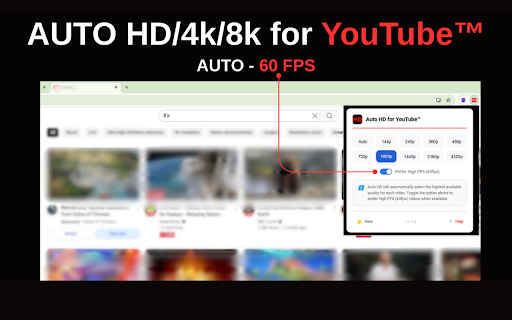
• 🎞️ High FPS Preference Feature (60fps)
• 🚀 Automatic HD/4K/8K quality selection
• 🎮 Easy quality preferences (144p to 8K)
• ⚡ Instant quality switching
• 🔄 Remembers your Auto HD settings
• 📱 Works on all YouTube™ pages
🎬 Auto HD for YouTube™ Quality Options:
• 📺 Standard: 144p to 480p
• 🌟 HD: 720p, 1080p
• 👑 Full 1440p, 4K, 8K*
• 🎞️ 60fps
🛡️ Auto HD for YouTube™ Features:
• No ads
• Zero configuration
• Privacy focused
• Regular updates
• Lightweight extension
💡 Perfect for Auto HD YouTube™ viewing:
• YouTube enthusiasts
• Content creators
• Quality-focused viewers
• Educational content
⭐ Make Auto HD for YouTube™ your default quality manager!
Note: Premium qualities require YouTube Premium subscription.
🔒 Safe & Secure | 🚀 Fast & Reliable | 💪 24/7 Support
Automatically set your default YouTube video quality with this great extension, supporting high definition resolution HD.
-------------------------------------------------------------------------------------------------------------------------------------------
Auto HD for YouTube™ - Version 1.1.0 🚀
🆕 What's New in This Update:
High FPS Preference Feature (60fps) - Choose smoother playback when available 🎞️
Standardized Localization Files - Better support for 50 languages 🌐
Performance Optimizations - Faster quality selection and reduced resource usage 💨
Improved YouTube Compatibility - Works with latest YouTube interface changes 🔄
UI Enhancements - Cleaner popup design and better visual feedback ✨
🐛 Bug Fixes:
Fixed issue with quality selection on embedded videos
Resolved initialization delay on some YouTube pages
Corrected premium video quality detection
Fixed consistency issues in language translations
📋 Technical Details:
Version: 1.1.0
Updated: 08.04.2025
Size: 2.75MB
Permissions: Only YouTube domain access
Privacy: No data collection or tracking
Enjoy watching YouTube videos in your preferred quality automatically! 🎥
-----------------------------------------------------------------------------------------------------------------------------------------------
Automatically set your default YouTube™ video quality with this great new Auto HD, supporting high definition resolution HD/4k/8k.
Auto HD for YouTube™
Auto HD Features:
✓ Automatically set your default quality for all YouTube videos
✓ All available HD formats and more - 4320p, 2160p, 1440p, 1080p, 720p, 480p, 360p, 240p, 144p
✓ Switch back to Automatic mode (YouTube's default)
✓ Beautiful and simple Auto HD User Interface
✓ Sync your selected Auto HD YouTube quality to other connected PCs
✓ Auto HD for YouTube™
Auto HD lets you watch YouTube videos in your preferred playback quality!
Choose any available resolution you wish and set it as your default option for any YouTube video you watch.
Select any quality with this Auto HD extension - 8k, 4k, 1440p, 1080p, 720p and more.
How to use?
Click the Auto HD for YouTube™ icon, choose your new default YouTube™ resolution and be done!
We hope you enjoy this ★new★ YouTube™ Auto HD!

Reviews (4 cached)
★☆☆☆☆2026-01-22
hen- L
Didn't work. And slowed down the loading of Youtube videos even after removing the extension (I added the extension again just to write this review).
★☆☆☆☆2025-08-13
Tenzenroth
Not working for now
★☆☆☆☆2025-04-07
Alex Balcanquall
Doesn't do the one essential thing - select 1080p Enhanced Bitrate that Premium offfers.
★★★☆☆2025-07-11
James Watts
Works but YT's resolution selection menu annoyingly pops up every few seconds. Very immersion breaking.
Permissions (2)
Permissions
storageℹ Can store data locally in your browser tabsℹ Can see your open tabs and their URLs
Details
| Version | 1.1.0 |
| Updated | Apr 10, 2025 |
| Size | 2.86MiB |
| First Seen | Mar 28, 2026 |
More by tab manager

Auto History Wipe
by tab manager
10K
★ 3.93
developer
10K
★ 3.93
developer

Adjust Page Brightness - Control Tab Brightness🔅
by tab manager
8K
★ 4.38
functionality
8K
★ 4.38
functionality

Clear Browsing History
by tab manager
65
★ 0.00
functionality
65
★ 0.00
functionality

View Chrome History
by tab manager
36
★ 0.00
workflow
36
★ 0.00
workflow

Side Tab Manager 📑
by tab manager
7
★ 0.00
tools
7
★ 0.00
tools
Popular in workflow

Adobe Acrobat: PDF edit, convert, sign tools
by Adobe Inc.
331M
★ 4.40
workflow
331M
★ 4.40
workflow

AdBlock — block ads across the web
by AdBlock
62M
★ 4.48
workflow
62M
★ 4.48
workflow

Adblock Plus - free ad blocker
by eyeo GmbH
41M
★ 4.39
workflow
41M
★ 4.39
workflow

Chrome Remote Desktop
by Chrome Remote Desktop Release Managers
38M
★ 3.14
workflow
38M
★ 3.14
workflow

Microsoft Single Sign On
by Microsoft
36M
★ 2.27
workflow
36M
★ 2.27
workflow
Popular Extensions
Adobe Acrobat: PDF edit, convert, sign tools
by Adobe Inc.
331M
★ 4.40
workflow
331M
★ 4.40
workflow
AdBlock — block ads across the web
by AdBlock
62M
★ 4.48
workflow
62M
★ 4.48
workflow

Grammarly: AI Writing Assistant and Grammar Checker App
by Grammarly
42M
★ 4.50
communication
42M
★ 4.50
communication
Adblock Plus - free ad blocker
by eyeo GmbH
41M
★ 4.39
workflow
41M
★ 4.39
workflow
Chrome Remote Desktop
by Chrome Remote Desktop Release Managers
38M
★ 3.14
workflow
38M
★ 3.14
workflow