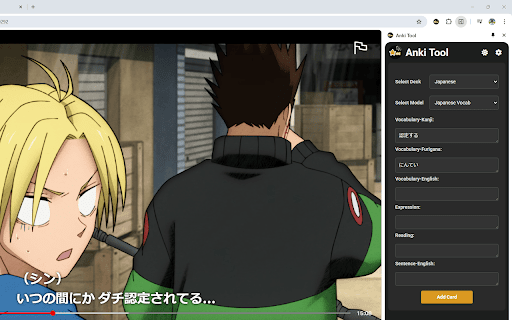
📚 Easily create and manage your Anki flashcards directly from your browser!
Anki Tool is the perfect solution for students, teachers, and lifelong learners looking to enhance their study efficiency. This powerful Chrome extension integrates seamlessly with your Anki profile, allowing you to create flashcards with ease and speed, directly from any webpage.
🚀 Setup Instructions (IMPORTANT)
🛠 AnkiConnect Setup:
1️⃣ Install AnkiConnect:
2️⃣ In the Anki desktop app, go to Tools > Add-ons > Get Add-ons.
3️⃣ Enter the code 2055492159 to install AnkiConnect.
4️⃣ Save changes and restart Anki.
⚙️ Anki Tool Setup:
1️⃣ Install Anki Tool from the Chrome Web Store.
2️⃣ Click the Anki Tool icon in your toolbar.
3️⃣ Enter flashcard details, select your deck and card type.
4️⃣ Click "Add Card" to sync with your Anki profile.
🌟 Key Features:
⚡ Quick Card Creation: Instantly generate new flashcards from web content, enhancing your study efficiency and knowledge retention.
👁️ Card Preview: Preview your cards before creating them with front/back views and your selected note type's styling for formatting verification.
📂 Deck & Model Selection: Easily choose from your existing Anki decks and card types for personalized learning.
✨ AI Auto-fill: Save time by automatically filling empty card fields. Simply fill one field and let the AI generate context-aware content for the others!
🔤 Cloze Deletion Toolbar: Create cloze cards using C1, C2, C3, and C+ buttons to test your knowledge.
🖼️ Image & Audio Uploads: Boost retention by adding images or audio recordings directly to your flashcards with simple copy-paste or file upload.
📝 Text Formatting: Use the formatting toolbar to bold, italicize, and style your flashcards for better clarity and structure.
🖱️ Highlight & Send: Select text on any webpage to instantly send it to your Anki Tool fields.
🌙 Light and Dark Themes: Customize your experience with light and dark themes to reduce eye strain and improve visual comfort.
🌐 Multi-Language Support: Use Anki Tool in your preferred language for a smoother experience.
💡 Why Anki Tool?
Whether you're preparing for exams, mastering a new language, or organizing study materials, Anki Tool is your go-to extension for efficient and effective flashcard creation. Simplify your study process and maximize your learning outcomes with this essential educational tool.
🔒 Privacy:
We respect your privacy. No personal data is collected.
🎉 Get Started:
Install Anki Tool today and revolutionize your study sessions. Enhance your learning with the power of seamless Anki integration!
📝 Version History:
🤖 v1.10: Introduced AI Auto-fill to automatically generate card content and added a Highlight Popup to instantly send selected text to specific fields.
🎯 v1.9: Added card preview, advanced cloze deletion toolbar, and added a shortcut to close the side panel.
🧩 v1.8: Added tags support, a formatting toolbar, highlight-to-send feature, and revamped the settings page with new toggles.
📌 v1.7: Introduced a side panel for a more convenient and persistent Anki card creation experience, allowing users to manage flashcards without interrupting their workflow.
🌟 v1.6: Added keyboard shortcuts for faster access, a settings page for customization, and support for multiple languages.
🌗 v1.5: Added light and dark themes for better user customization.
✨ v1.4: Added the ability to upload and attach audio recording files directly to text fields within your flashcards. Improved overall stability when syncing with Anki profiles.
🐛 v1.3: Fixed note type errors that previously displayed "empty notes." Cards can now be created with all note types.
🎨 v1.2: Updated the UI to match design rebranding, added image uploading features, and optimized text boxes.
🛠️ v1.1: Fixed UI elements and ensured text saves to local storage on extension close.