
Description


Reviews (9 cached)
Doesn't work anymore... used to be such a great extension
This used to work amazingly! ...Until it stopped, which I only discovered thanks to having a post I had spent several hours on eaten by accidentally clicking away. I'm pretty sure the whitelist feature just doesn't function properly, and without that it clogs up the browser memory with input I don't care about.
Seems promising, but when I click it, I get a popup error, "DataTables warning: table id=fhcTable - Requested unknown parameter '1' for row 0, column 1. For more information about this error, please see https://datatables.net/tn/4". And entries say NaN.
love to see some privacy policy and ideally being open source as it can save a lot of things. right now using it very limitedly to ensure credentials are safe.
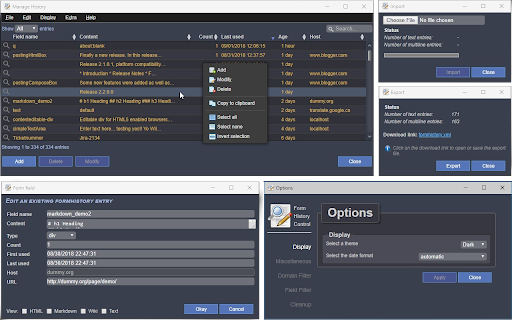
Better than nothing but not by much. Clunky interface, inconsistent in saving forms and a pain to retrieve previous saves.
After using Typio and Lazarus for years, i found and switched to Form History Control (ii) out of desperation from constantly losing typed text on websites. However I dont think Form History Control has ever worked for me, the context menus never restory anything and the main window is always loading
NOT a tool to edit Chrome's built in form-fill data. It's a replacement tool.
This remembers literally everything you wouldn't want it to and hardly anything you would hope for. Way too unprotected. If any unwanted individual or software infected your computer it is just a click away from revealing literally all of your personal info, what it belongs to, and matching website information along with timestamps. Moreover, saves things like credit card numbers when you tell google to NOT or NEVER remember the information when prompted, and without even obtaining verification or giving the option to password protect the numerous pages of logged fields within the extension at least. This is already breaking the content privacy & safety requirements that Google states it upholds through its offered extensions in the webstore.
This works to save and recover text on may sites (not passwords though in my experience), thus it can save a lot of work. However, it does not work on Quora.com. Nothing is as good in this realm as the old Firefox Lazarus extension, but Form History control is actually the only Chrome extension I have found that does save most.
Permissions (7)
Permissions
Details
| Version | 3.0.3.0 |
| Updated | Apr 28, 2025 |
| Size | 594KiB |
| First Seen | Mar 26, 2026 |
More by Stephan

Popular in workflow




Popular Extensions
