
⚠️Not updated in over 2 years
Description
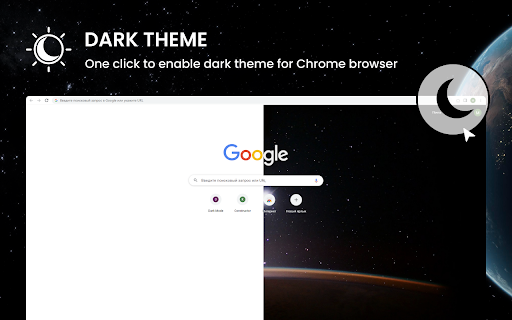
Dark Theme for Chrome is a convenient and stylish extension for Google Chrome browser that allows the user to enjoy a unique dark mode of web surfing. The app is designed to meet the needs of users who prefer a dark color scheme for working or viewing content at night. Whether you want to reduce eye strain or just give your browser a more modern look, Dark Theme will help make your online experience more enjoyable.
Main functions:
1. Dark Color Theme:Dark Theme transforms Chrome's standard light interface into an elegant dark color scheme. This reduces screen brightness and helps reduce eye strain in low light conditions.
2. Custom Settings:The app provides flexible settings that allow users to customize dark colors, backgrounds and fonts to suit their preferences. You can choose from several theme options or create your own unique combination.
3. Auto Power On: Dark Theme can automatically turn on at night or depending on the user's schedule. This saves time on manual configuration and improves usability.
4. Smart Detection: The extension can automatically detect when dark mode is most needed, such as when watching a YouTube video or while reading long articles, and turn on the dark theme automatically.
5. Minimum performance impact: Dark Theme is designed with performance optimizations in mind to minimize the negative impact on browser speed. The extension has low resource consumption and will not slow down Chrome.
6. Regular updates and support: Dark Theme for Chrome will be updated regularly to meet the latest Chrome requirements and add new features. Users can count on support and fast response to feedback.
How to start using:
1. Open the Google Chrome browser.
2. Go to the Chrome Web Store.
3. Type "Dark Theme" into the search bar.
4. Click "Install" next to the Dark Theme extension.
5. After installing the Dark Theme extension, open a new tab or restart your browser.
6. Now you can enjoy a nice dark interface while browsing the web.
Dark Theme for Chrome is an easy way to make your web surfing experience more comfortable and enjoyable, and give your browser a more modern and stylish look.

Reviews (3 cached)
★☆☆☆☆2025-07-14
Hazel Zadik
"File could not be accessed" error on install (I'm on Mac)
★☆☆☆☆2025-01-04
Gun Tech.
Upon install in Chrome 109, gives "file not found" error and doesn't change to dark mode.
★★★☆☆2023-11-11
Eric Ketzer
so so
Permissions (3)
Permissions
alarmsℹ Can schedule periodic background tasks contextMenusℹ Can add items to the right-click menu storageℹ Can store data locally in your browser
Details
| Version | 0.1.0 |
| Updated | Jul 23, 2023 |
| Size | 256KiB |
| First Seen | Mar 26, 2026 |
Popular in workflow

Adobe Acrobat: PDF edit, convert, sign tools
by Adobe Inc.
331M
★ 4.40
workflow
331M
★ 4.40
workflow

AdBlock — block ads across the web
by AdBlock
62M
★ 4.48
workflow
62M
★ 4.48
workflow

迅雷下载支持
by Shenzhen Xunlei Network Technology Co., Ltd.
59M
★ 2.77
workflow
59M
★ 2.77
workflow

Adblock Plus - free ad blocker
by eyeo GmbH
41M
★ 4.39
workflow
41M
★ 4.39
workflow

Chrome Remote Desktop
by Chrome Remote Desktop Release Managers
39M
★ 3.14
workflow
39M
★ 3.14
workflow
Popular Extensions
Adobe Acrobat: PDF edit, convert, sign tools
by Adobe Inc.
331M
★ 4.40
workflow
331M
★ 4.40
workflow
AdBlock — block ads across the web
by AdBlock
62M
★ 4.48
workflow
62M
★ 4.48
workflow
迅雷下载支持
by Shenzhen Xunlei Network Technology Co., Ltd.
59M
★ 2.77
workflow
59M
★ 2.77
workflow

Grammarly: AI Writing Assistant and Grammar Checker App
by Grammarly
42M
★ 4.50
communication
42M
★ 4.50
communication
Adblock Plus - free ad blocker
by eyeo GmbH
41M
★ 4.39
workflow
41M
★ 4.39
workflow