
Canopie - Find it, save it, use it.
v4.3.7 Updated May 15, 2022 770KiB
⚠️Not updated in over 2 years ⚠️Requests 1 sensitive permission
Description
WHAT'S NEW?
1. Reinvented our extension design, functionality, and user experience
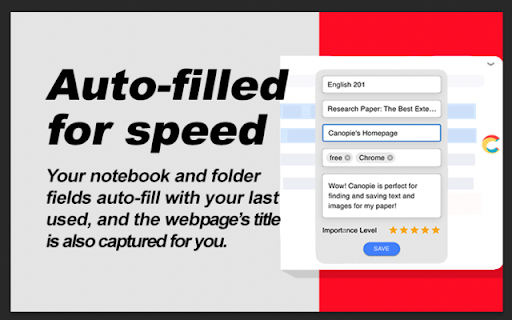
2. Implement auto-save last notebook/folder, so no need to re-select your notebook/folder if you don't want to.
3. Improved screenshot feature to allow for saving the entire visible screen area
TUTORIAL VIDEOS:
To watch tutorial videos, please visit our YouTube Channel: https://www.youtube.com/playlist?list=PLoVKPRvMklZ6qatYA5Jgmxre6ITqXAzNu
You could also visit: https://mycanopie.com/features or
https://mycanopie.com/faqs-%26-tips to learn more
Find it. Save it. Use it. Research smarter and write better papers with Canopie! FREE to use.
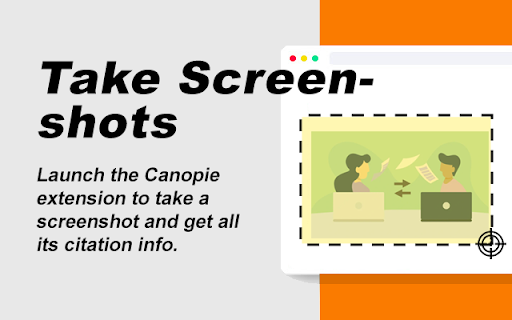
Canopie enables users to quickly capture, organize, bookmark, AND CITE their online research in one place for a more efficient, effective, and visual research-saving workflow.
Canopie helps college students do smarter research for papers by creating a bookmark from either:
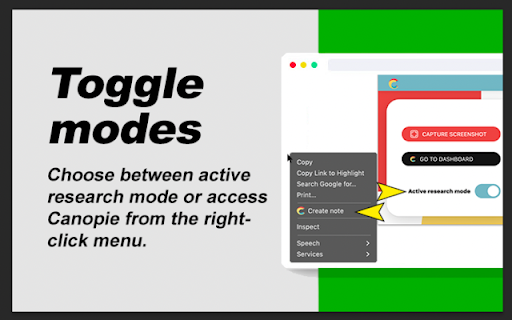
> Highlighting text, or
> Taking a screenshot
Next, users can save their bookmark as a note, complete with:
> Website URL
> Citation info
> Personalized tags
> Added comments
> 5-Star rating system
Create an organizational flow to your saved notes with Notebooks and Folders, personalized to specific classes or assignments, even using this feature as a "framework" to fill in according to a paper's outline.
Share notebooks and folders with other Canopie users and work collaboratively as a team.
Once tagged and/or annotated, come back to your Canopie Dashboard to put it all together. Canopie's visual, annotated style of saving your online research is far better than just saving a bookmark or keeping a bunch of tabs open. Knowing why you saved something makes it massively more efficient to put it all together for papers/ projects later.
IMPORTANT THINGS TO NOTICE:
> Please note that OCCASIONALLY when clicking into the pop-up icon after users highlight text, users will see a new, full-screen tab pop up instead of the normal top-left-corner popup screen. If this happens, please close and relaunch Chrome browser. If this problem persists, please reach out to support@mycanopie.com.
> While Canopie's extension popup works on most websites, please note that some websites have conflicting code that results in the extension popup not functioning properly.
FEATURE REQUESTS:
At Canopie, we welcome any feature requests to help us improve your user experience! Feel free to submit a request at https://m2.tm00.com/u/lp/MyCanopie/t/c-uvK7Gc3gXQ3nf0-QIOpsHBtDc6NwD-QBsYdKjMp-QkW8SJ/m/e/Feedback-Form.htm
CUSTOMER SUPPORT:
To contact us for customer support, please see https://m2.tm00.com/u/lp/MyCanopie/t/c-uvK7Gc3gXQ3nf0-QIOpsHBtDc6NwD-QBsYdKjMp-QkW8SJ/m/e/Feedback-Form.htm or email us at support@mycanopie.com
By installing the extension, you agree to Canopie's Terms and Conditions (https://mycanopie.com/terms-and-conditions)and Privacy Policy (https://mycanopie.com/privacy-policy)


Reviews
Loading reviews...
Permissions (4)
Permissions
activeTabℹ Can access the current tab when you click the extension contextMenusℹ Can add items to the right-click menu cookiesℹ Can read and modify browser cookies storageℹ Can store data locally in your browser
Details
| Version | 4.3.7 |
| Updated | May 15, 2022 |
| Size | 770KiB |
| First Seen | Mar 30, 2026 |
Popular in workflow

Adobe Acrobat: PDF edit, convert, sign tools
by Adobe Inc.
331M
★ 4.40
workflow
331M
★ 4.40
workflow

AdBlock — block ads across the web
by AdBlock
62M
★ 4.48
workflow
62M
★ 4.48
workflow

Adblock Plus - free ad blocker
by eyeo GmbH
41M
★ 4.39
workflow
41M
★ 4.39
workflow

Chrome Remote Desktop
by Chrome Remote Desktop Release Managers
38M
★ 3.14
workflow
38M
★ 3.14
workflow

Microsoft Single Sign On
by Microsoft
36M
★ 2.27
workflow
36M
★ 2.27
workflow
Popular Extensions
Adobe Acrobat: PDF edit, convert, sign tools
by Adobe Inc.
331M
★ 4.40
workflow
331M
★ 4.40
workflow
AdBlock — block ads across the web
by AdBlock
62M
★ 4.48
workflow
62M
★ 4.48
workflow

Grammarly: AI Writing Assistant and Grammar Checker App
by Grammarly
42M
★ 4.50
communication
42M
★ 4.50
communication
Adblock Plus - free ad blocker
by eyeo GmbH
41M
★ 4.39
workflow
41M
★ 4.39
workflow
Chrome Remote Desktop
by Chrome Remote Desktop Release Managers
38M
★ 3.14
workflow
38M
★ 3.14
workflow