
Description

Reviews (88 cached)
Crashed my HP Chromebook x360 so hard I had to use the power button to restart it. Uninstalled.
application error
Add Extension -> Start -> It Open a Window -> All white -> nothing happens. Deinstall On the Websites broken links to windows 8 (lol) app. Are You drunk ?
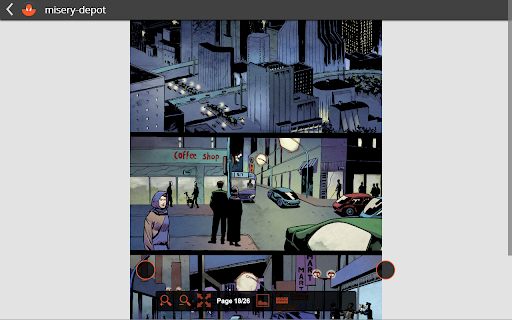
Even when I could get it to work it cut the bottoms off all the comics and the interface is clumsy and needs an overhaul.
After a few days the app stopped working. " Application error An error occurred in the application and your page could not be served. If you are the application owner, check your logs for details. You can do this from the Heroku CLI with the command heroku logs --tail "
This app doesn't seem to work anymore.
Won't open any of my locally stored CBR files. Needed to uninstall and look for something else.
Crashed on every issue I tried to open :/ Perhaps just my bad luck.
Unable to open PDF comic.
Wouldn't open my CBR files.
no full screen no chromcast ..
Doesn't ;pad any of my cbr files
Depends on the file extension to load files, so it must be named something.cbz or something.cbr. Sometimes, pages are badly out of order (starting on, e.g., page 7, and having pages 1-6 at the end).
Waste of time.
Can't even zoom out far enough to read the comic.
Crashes constantly on Chromebook Pixel. Unusable.
This app is pretty terrible in my opinion. I don't like the interface. You have the option to zoom in or out but the amount of zooming is very limited. This app doesn't always load the next page of the issue I'm reading; instead I'm met with just a blank screen. The drag and drop feature rarely works. I wish there were better options to read comics on Chromebook but I'm stuck with this app.
Doesn't work with cbr files in drive, which was the only reason I downloaded this app. Also doesn't work with large cbr files.
It loads the comic once then "forgets" that a comic was ever loaded after shutting the app down. Even if I add the comic back, it doesn't open it.
Opens up fine. That's about all it does. Try to open a file and it loads... and loads.... and loads.................... Save yourself a few minutes and don't download this POS app. Tell your friends and family not to download this. It's as bad as a KFC "Double Down".
Unable to use .cbr files in Drive. This was this reader's only selling point to me. Too simple, full screen button does not work. Controls not intuitive. Does not create a library (have to load file every time I want to read something).
Doesn't load anything, any comics I have work in all other readers. So for that I congratulate you.
Just doesn't work. Wasn't able to import from Google Drive or drag and drop a comic from my ChromeBook.
I installed it but nothing opens in it no matter what I tried. Might as well not be there. Rubbish.
Crashy, Google Drive integration returns errors.
Like other people have said the app just doesn't work with drive, doesn't zoom etc. Developers please sort it out!!
Crashes right away. Useless.
Chromebook Acer C720p The App eats way too many ressources. Slowed my Chromebook down so I was not able to read the cbr file nor use my browser properly. Cannot recommend this app.
Just like every other comic reader app on the webstore, false promises and a faulty app. Total crap.
doesn't show all pages, can't scroll in pages without it changing pages on it own, can't remove the buttons that are only useful for android users.
First obvious issue is that you can't zoom to fit the width of the page. You have to manually click zoom a few times, and then there is still gray space on the sides of the page. Second problem is that it doesn't actually read the pages accurately. Sometimes it shows only the middle chunk of a two page spread and I couldn't see the first half of the first page or the second half of the second page (vertically). And sometimes it changes the coloring on the pages. A few of the pages were completely neon green. Fix it please! I want to read comics on my chromebook!
Great, Simple GUI is the only pro-point I can think of. Other than that, the app is nothing but an unfinished product. It's a very messy app when it comes to changing pages, zooming, going fullscreen (can't go fullscreen at all, actually). The app window doesn't fit to my screen and a big part of the page I'm reading remains permanently hidden at all times. Has potenial, but definitely not worth downloading unless improved.
It didn't even load up when opened, just said the application couldn't be launched.
Doesn't work the way it's meant to be.
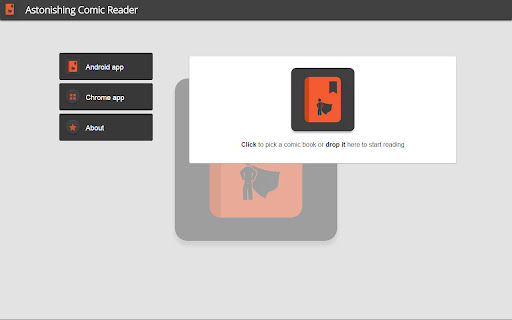
When opening cbr files, gets stuck loading and never opens them. "Drop files here to load" is either a lie or is broken, because it doesn't work. "Open files from drive" is either a lie or is broken, because the sign in button doesn't work. The "ABOUT" page is laughably unaligned. It kind of sits on top of a few buttons, I don't even understand why. Terrible extension. Skip it.
Well that was a short test. Program hangs when trying to log in to Google Drive. *shrug* On to the next.
doesn't work
Horrible! Impossible to use.
Failed to open file, and can't delete the broken library entry.
Rubbish.
Will not log in to google drive
After the newest Chrome update, the app crashes all the time. Please fix!
Crashed on opening a .cbr.
This app make my pc crash
unable to log into google drive to load comics.
Cuts off the bottom of the page and the next page buttons are often cover the text.
don't allow scroll down
Sucks
There... there is no zoom option. Or rather, there is, but it doesn't do anything. Mouse wheel doesn't work. I don't care if there's a hidden shortcut for it, I can't actually use this to read anything out of the box. You may want to work on this... you know, working. At all.
Was using this app for chromebook but their is something wrong with it as it opens a window but only fills about 1/8th of the window and has scroll bars, it is not usable, please fix so I can adjust my rating
Permissions (4)
Permissions
Details
| Version | 1.308 |
| Updated | Apr 29, 2015 |
| Size | 7.96KiB |
| First Seen | Mar 30, 2026 |
Popular Extensions




