
Description
✅ YouTube Ads will be accelerated & skipped automatically
------------------------------
PLEASE READ IN REGARDS TO AD-SKIPPING:
This extension can still skip video ads, even after YouTube's recent update (May 2025).
Since the ads aren't technically "blocked", it bypasses most of YouTube's Anti-Ad-Block measures.
But YouTube is always trying new things. If the extension runs into an ad that it cannot auto-skip, it will make the "Skip" button the size of the entire video for you, making it super easy to click.
------------------------------
-
YouTube Speed Controls:
------
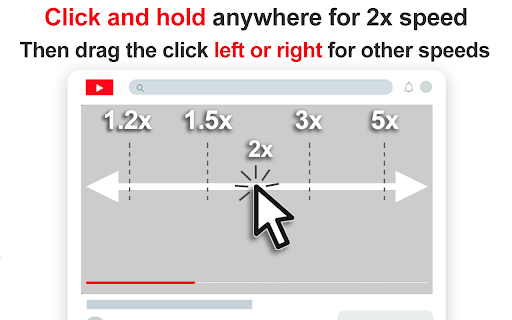
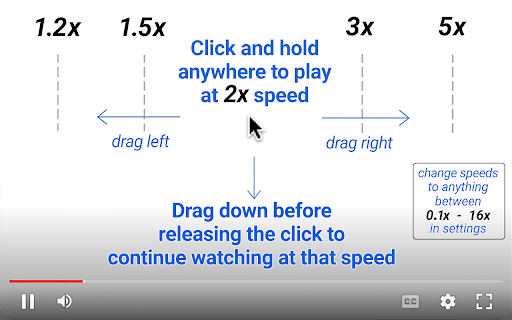
⏩ Click and hold anywhere on a video to play at 2x speed while the click is held down
➡️ Drag right for faster speeds
⬅️ Drag left for slower speeds
🔼 Release the click to return to normal speed
⬇️ Or, drag down before releasing to continue watching at that speed
YouTube AdBlock Features:
------
⚡Auto Ad Speed-Up - YouTube ads are fast-forwarded at 16x speed
👇 Auto Ad Skip - The skip button is pressed the second it appears to skip the ad as soon as possible
🙈 Disappearing Ads - In total, YouTube ads are skipped and disappear in less than half a second
🚫 Not Actually Ad-Block - since this doesn't technically block the ads, YouTube still thinks you are watching them, which gets around many of YouTube's anti-Ad Block features
YouTube Speed Control Features:
------
⏭️ Skim Over The Boring Stuff - Quickly skim over boring or sponsored content
👌 Set The Perfect Speed - By far the easiest way to change speed settings on YouTube
🎛️ Customize To Your Tastes - Set custom speed levels you prefer in the menu, anywhere from 0.1x to 16x (full range that YouTube supports for speed control)
🧠 Incredibly Intuitive - Works exactly how you expect it to work
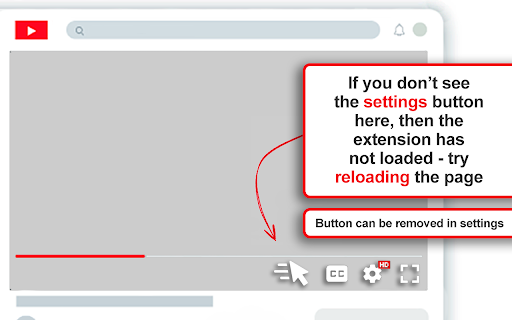
🥷 Never In Your Way - Adds speed control features but does not interfere with any native YouTube features
Hotkeys For YouTube Speed Control :
------
🔬 Micro Speed Adjustments - Tap comma or period to adjust the speed up or down by 5%
👇 Hold - Hold down either hotkey to play at the custom speed you selected in the settings
⏩ Double - Tap-hold to play at twice the custom video speed you selected in the settings (so if you've selected 5x speed, double-tap-hold will play the video at 10x)
What Else?
-
✅ Works on embedded youtube videos
✅ Minimal Permissions
✅ No data collection
✅ No ads or monetization


Reviews (3 cached)
★☆☆☆☆2025-03-17
MultiDakman
An extension adding more to an annoying new feature that Youtube added that is horrible
★★☆☆☆2025-03-15
Robean
Patched
★★★☆☆2025-07-02
Logan Butler
It does what it sets out to do but still triggers the adblocker warning no matter what i change
Permissions (3)
Permissions
activeTabℹ Can access the current tab when you click the extension scriptingℹ Can inject scripts into web pages storageℹ Can store data locally in your browser
Details
| Version | 3.52.6 |
| Updated | Jun 9, 2025 |
| Size | 557KiB |
| First Seen | Mar 30, 2026 |
More by CMDEV



Popular in functionality

Hola VPN - Your Website Unblocker
by Hola VPN LTD.
5M
★ 4.84
functionality
5M
★ 4.84
functionality

Video Speed Controller
by igrigorik
3M
★ 4.54
functionality
3M
★ 4.54
functionality

SponsorBlock for YouTube - Skip Sponsorships
by Ajay
2M
★ 4.65
functionality
2M
★ 4.65
functionality

OneTab
by OneTab
2M
★ 4.45
functionality
2M
★ 4.45
functionality

VPN Chrome extension - Best VPN by uVPN
by uVPN
900K
★ 4.52
functionality
900K
★ 4.52
functionality
Popular Extensions

Adobe Acrobat: PDF edit, convert, sign tools
by Adobe Inc.
331M
★ 4.40
workflow
331M
★ 4.40
workflow

AdBlock — block ads across the web
by AdBlock
62M
★ 4.48
workflow
62M
★ 4.48
workflow

迅雷下载支持
by Shenzhen Xunlei Network Technology Co., Ltd.
59M
★ 2.77
workflow
59M
★ 2.77
workflow

Grammarly: AI Writing Assistant and Grammar Checker App
by Grammarly
42M
★ 4.50
communication
42M
★ 4.50
communication

Adblock Plus - free ad blocker
by eyeo GmbH
41M
★ 4.39
workflow
41M
★ 4.39
workflow