
⚠️Not updated in over 2 years
Description
⬇️Easy to set up ⬇️:
1. Install the extension, and reload the page to let the extension work.
2. Click on the extension whenever you need to draw or highlight something. 🖌
3. Drawings are automatically saved.
4. Reload the page to exit the draw mode from the browser.
✨Features ✨
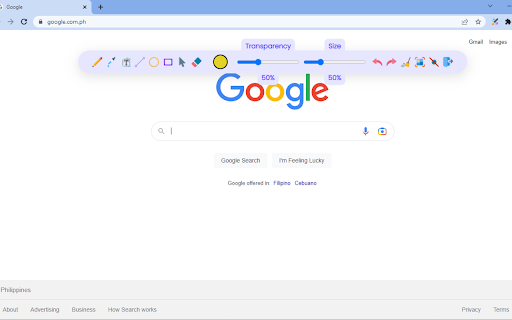
1. Has all the features of MS Paint.
2. Adjustable thickness, transparency, and preset color.
3. Take a screenshot of the page.
Pin this absolutely free extension to draw random things 🖼 while visiting any webpage. 👩

Reviews
Loading reviews...
Permissions (2)
Permissions
storageℹ Can store data locally in your browser unlimitedStorage
Details
| Version | 1.0.5 |
| Updated | Apr 11, 2023 |
| Size | 40.63KiB |
| First Seen | Mar 22, 2026 |
More by B & T

Popular in accessibility

Read&Write for Google Chrome™
by Texthelp
17M
★ 3.44
accessibility
17M
★ 3.44
accessibility

360 Internet Protection
by qihoosafe
17M
★ 4.54
accessibility
17M
★ 4.54
accessibility

Screenshot reader™
by Texthelp
7M
★ 2.57
accessibility
7M
★ 2.57
accessibility

OrbitNote
by Texthelp
7M
★ 2.95
accessibility
7M
★ 2.95
accessibility

Volume Master
by Peta Sittek
6M
★ 4.81
accessibility
6M
★ 4.81
accessibility
Popular Extensions

Adobe Acrobat: PDF edit, convert, sign tools
by Adobe Inc.
331M
★ 4.40
workflow
331M
★ 4.40
workflow

AdBlock — block ads across the web
by AdBlock
62M
★ 4.48
workflow
62M
★ 4.48
workflow

迅雷下载支持
by Shenzhen Xunlei Network Technology Co., Ltd.
59M
★ 2.77
workflow
59M
★ 2.77
workflow

Grammarly: AI Writing Assistant and Grammar Checker App
by Grammarly
42M
★ 4.50
communication
42M
★ 4.50
communication

Adblock Plus - free ad blocker
by eyeo GmbH
41M
★ 4.39
workflow
41M
★ 4.39
workflow