
Free Spell Checker for Google Chrome™
v3.0.0 Updated Oct 27, 2023 1.77MiB
⚠️Not updated in over 2 years
Description
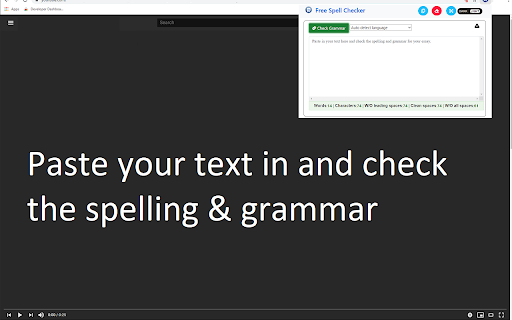
Need a free and simple spell checker solution?
This extension supports over 20+ languages for spell checking, check for typos.
Check the spelling of words and it comes up with suggestions for misspelled words.
This software helps finding spelling errors that the spelling checker cannot find.
For example, misuse of the words "there" and "them", "a" and "an" or repeated words.
Supports over 25 languages - for example: English, Spanish, French, German, Polish, Russian, etc are all supported.
Your text is remembered between visits. You can close the extension at any time and open it again without losing your work. Do a quick spellcheck for english language.
Clear the text area if you don't want the text to persist. The number of words and characters which you are checking is shown below the original text.
When counting words, a space is used as a separator. Light and dark themes are available to make this extension more comfortable to use.
Disclaimer: Please note this extension is NOT made by Google and is made by an independent development team. All copyrights belong to their respective owners.
Google doesn’t endorse or sponsor this extension. This extension Free Spell Checker for Google Chrome™ is not owned by, is not licensed by and is not a subsidiary of Google Inc.

Reviews (7 cached)
★☆☆☆☆2026-01-13
Julian Taylor
Absolutly useles, It does nothing. the old google spell checker worked automaticly but where the hell thats gone I do not know.
★☆☆☆☆2026-01-10
KissMyWhat
does NOTHING
★☆☆☆☆2024-02-25
Alesja Pušmucāne
no button "start capture"
★☆☆☆☆2023-02-06
J. S. (darkocean)
Destroys formatting taking away all my paragraph spaces and formatting. Can't use it for my chapters.
★★☆☆☆2024-02-18
HunzHurte
It technically works as a very rudimentary, external spellchecker app, but I was expecting to be able to select text on a website, and this plugin only works by copy-pasting text into it. Even worse: I have to click "check" every time after I corrected a mistake, just so it would show the typos again.
★★★☆☆2026-02-09
towbuster steven
does this extension have settings to autocorrect?
★★★☆☆2025-03-24
I don't know
How do you get it to work? Does nothing and it's on.
Permissions (2)
Permissions
contextMenusℹ Can add items to the right-click menu storageℹ Can store data locally in your browser
Details
| Version | 3.0.0 |
| Updated | Oct 27, 2023 |
| Size | 1.77MiB |
| First Seen | Mar 22, 2026 |
More by Free Software Utilities

Enable Right Click for Google Chrome™
by Free Software Utilities
500K
★ 3.51
workflow
500K
★ 3.51
workflow
CSS Viewer for Google Chrome™
by Free Software Utilities
50K
★ 4.10
workflow
50K
★ 4.10
workflow

Virtual Keyboard for Google Chrome™
by Free Software Utilities
20K
★ 3.20
workflow
20K
★ 3.20
workflow

Full Page Screenshot for Google Chrome™
by Free Software Utilities
10K
★ 3.58
workflow
10K
★ 3.58
workflow

Sketchpad for Google Chrome
by Free Software Utilities
8K
★ 3.87
education
8K
★ 3.87
education
Popular in workflow

Adobe Acrobat: PDF edit, convert, sign tools
by Adobe Inc.
330M
★ 4.40
workflow
330M
★ 4.40
workflow

Chrome Remote Desktop
by Chrome Remote Desktop Release Managers
38M
★ 3.14
workflow
38M
★ 3.14
workflow

Microsoft Power Automate
by Microsoft Corporation
10M
★ 1.99
workflow
10M
★ 1.99
workflow

Screencastify - Screen Video Recorder
by castify-ext-dev
9M
★ 3.95
workflow
9M
★ 3.95
workflow

Mendeley Web Importer
by Mendeley
3M
★ 2.25
workflow
3M
★ 2.25
workflow
Popular Extensions
Adobe Acrobat: PDF edit, convert, sign tools
by Adobe Inc.
330M
★ 4.40
workflow
330M
★ 4.40
workflow
Chrome Remote Desktop
by Chrome Remote Desktop Release Managers
38M
★ 3.14
workflow
38M
★ 3.14
workflow

Cisco Webex Extension
by cisco.chromestore
24M
★ 2.34
social
24M
★ 2.34
social

Kami for Google Chrome™
by Kami
17M
★ 4.56
education
17M
★ 4.56
education

Read&Write for Google Chrome™
by Texthelp
17M
★ 3.44
accessibility
17M
★ 3.44
accessibility