
Description
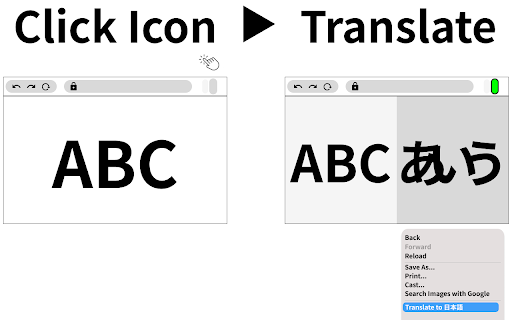
This extension creates an additional window for translator.
Check source and translated page side by side.
This feature helps you with translation.
Usage
- Navigate to the web article you want to translate.
- (Optional) Pin the this extention icon to your toolbar to make your experience more great!
- Click the extension icon in your browser toolbar to activate the split pane for translation.
- Alternatively, right-click on your page and click on the icon in the context menu.
- Translate whole web page with Google Translator or DeepL ,etc.
- Enjoy an enhanced reading experience with side by side translation!
v0.0.9 Add aligning src/dst height feature as possible & support button
v0.0.8 minor env update
v0.0.7 Support local files (Allow access to file URLs in the extension details)

Reviews
Loading reviews...
Permissions (1)
Permissions
contextMenusℹ Can add items to the right-click menu
Details
| Version | 0.0.13 |
| Updated | Feb 12, 2026 |
| Size | 95.74KiB |
| First Seen | Mar 22, 2026 |
More by Yuto

Popular in accessibility

Read&Write for Google Chrome™
by Texthelp
17M
★ 3.44
accessibility
17M
★ 3.44
accessibility

SYTools
by wasaby
4M
★ 3.16
accessibility
4M
★ 3.16
accessibility

Screenshot Tool - Screen Capture & Editor
by screenshot-tool.app
1M
★ 4.70
accessibility
1M
★ 4.70
accessibility

Помощник диагностики
by kontur.extension
1M
★ 3.00
accessibility
1M
★ 3.00
accessibility

WebCRX
by webcrx
1M
★ 4.87
accessibility
1M
★ 4.87
accessibility
Popular Extensions

Adobe Acrobat: PDF edit, convert, sign tools
by Adobe Inc.
330M
★ 4.40
workflow
330M
★ 4.40
workflow

Chrome Remote Desktop
by Chrome Remote Desktop Release Managers
38M
★ 3.14
workflow
38M
★ 3.14
workflow

Cisco Webex Extension
by cisco.chromestore
24M
★ 2.34
social
24M
★ 2.34
social

Kami for Google Chrome™
by Kami
17M
★ 4.56
education
17M
★ 4.56
education
Read&Write for Google Chrome™
by Texthelp
17M
★ 3.44
accessibility
17M
★ 3.44
accessibility