
Description
Google Calendar Tonton seamlessly connects your Google Calendar with the Tonton scheduling interface, keeping your availability up to date without any extra effort.
Key Features
- Automated schedule synchronization using your private Google Calendar ICS link
- 24‑hour local cache to minimize fetch requests and speed up performance
- One‑click marking of busy time slots directly on Tonton’s booking page
- Easy URL management: set, reset or clear cache at any time
- Built with Manifest V3, React 19, TypeScript and Vite for security and performance
How It Works
1. On first use you will be prompted to enter your Google Calendar ICS URL.
2. That URL is stored locally and is refreshed every 24 hours.
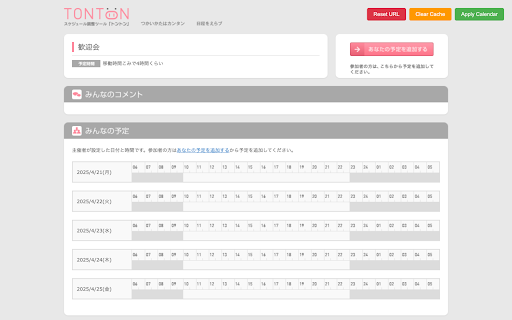
3. When you visit any Tonton schedule page, click the Apply Calendar button.
4. The extension fetches and parses your calendar events, then highlights and blocks all overlapping time slots in Tonton’s UI.
5. Use the Clear Cache button to force a fresh fetch or Reset URL to switch to a different calendar.
Installation and Usage
1. Install the extension from the Chrome Web Store.
2. Click Reset URL to enter your ICS link.
3. Visit a Tonton page and click Apply Calendar to sync your busy times instantly.
Eliminate manual entry and avoid double‑bookings—Google Calendar Tonton does the work for you.

Reviews
Loading reviews...
Permissions (2)
Permissions
storageℹ Can store data locally in your browser unlimitedStorage
Details
| Version | 1.4.0 |
| Updated | Oct 31, 2025 |
| Size | 103KiB |
| First Seen | Mar 22, 2026 |
More by Minagishl


Popular in accessibility

Read&Write for Google Chrome™
by Texthelp
17M
★ 3.44
accessibility
17M
★ 3.44
accessibility

SYTools
by wasaby
4M
★ 3.16
accessibility
4M
★ 3.16
accessibility

Screenshot Tool - Screen Capture & Editor
by screenshot-tool.app
1M
★ 4.70
accessibility
1M
★ 4.70
accessibility

Помощник диагностики
by kontur.extension
1M
★ 3.00
accessibility
1M
★ 3.00
accessibility

Copyfish 🐟 Free OCR Software
by Ui.Vision / a9t9 software GmbH
800K
★ 4.03
accessibility
800K
★ 4.03
accessibility
Popular Extensions

Adobe Acrobat: PDF edit, convert, sign tools
by Adobe Inc.
330M
★ 4.40
workflow
330M
★ 4.40
workflow

Chrome Remote Desktop
by Chrome Remote Desktop Release Managers
38M
★ 3.14
workflow
38M
★ 3.14
workflow

Cisco Webex Extension
by cisco.chromestore
24M
★ 2.34
social
24M
★ 2.34
social

Kami for Google Chrome™
by Kami
17M
★ 4.56
education
17M
★ 4.56
education
Read&Write for Google Chrome™
by Texthelp
17M
★ 3.44
accessibility
17M
★ 3.44
accessibility