Baxter - Email Organizer & Unsubscriber icon

Baxter - Email Organizer & Unsubscriber

by devteam

v1.20.1 Updated May 30, 2024 6.02MiB
CWS
10K
Users
★ 3.84
37 reviews
#5139
of 197.8K
workflow
#1560 of 30.4K
⚠️Not updated in over a year ⚠️Requests 1 sensitive permission

Description

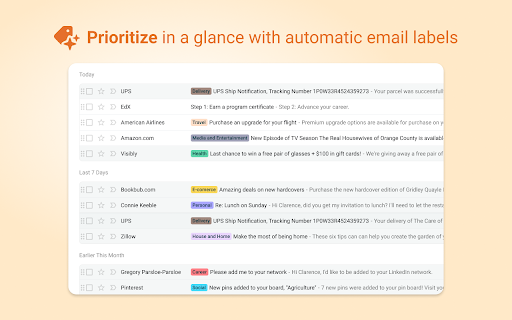
Need to organize your inbox? Baxter, your AI email assistant, is at your service! As an AI assistant in your Gmail, Baxter helps you clean your Gmail more efficiently than ever before, bringing ChatGPT to your Gmail inbox so you can get through your inbox and respond to the important stuff with ease. Useful for both personal and professional Gmail accounts! WHAT BAXTER DOES: * Gives you a super-powered Unsubscribe button Baxter adds a foolproof Unsubscribe button to Gmail, so you can unsubscribe from & clean out marketing emails you don't want anymore. Select multiple emails and unsubscribe from them all at the same time! * Brings ChatGPT to your inbox! Now, tap into the power of AI and ChatGPT right within Gmail! Need to ask ChatGPT questions about a collection of emails? Just select them from your inbox and Baxter AI lets you ask your preferred AI model about them. No need to copy or paste. You can also summarize those emails with one click, helping you get context on the latest inbox activity and be more productive! * Adds an AI-powered Dictate Draft button to Gmail! Easily reply to lengthy emails with Baxter's Dictate Draft feature in Gmail. Just click the 'Dictate Draft' button, conveniently located at the bottom of email threads, and tell Baxter AI how to respond; Baxter's context-aware AI drafts accurate, grammatically correct replies, saving you time and effort! * Automatically organizes your inbox with Labels Gmail's Labels are great for organization, but it's a pain to label every email manually. That's why Baxter has the ability to label emails automatically for you! :) If you're using Baxter with a personal email account, your emails can get tagged with useful labels, such as Taxes, Travel, Health, Career, and more, so you can scan your inbox more quickly to read what's important. And if you're using Baxter to organize a professional Gmail account, you can set up your own custom labels in seconds. Labels help you stay on top of important emails from clients, for certain projects, or any other source of email you can think of. * Adds a Bulk Remove button to the Gmail interface If you come across email senders that you want to purge from your inbox, the Bulk Remove button allows you to select and delete ALL emails from them in one click. If you're up against Gmail's storage limits, Bulk Remove is a lifesaver! And that's not all! Install Baxter to Google Chrome and connect to your Gmail to experience all of the little ways Baxter makes your inbox cleaner and less stressful. WHY CHOOSE BAXTER? No other Chrome Extension and Gmail Plugin offers the powerful simplicity of Baxter. With Baxter, you can Unsubscribe, Delete, and Filter emails from Senders, or entire Domains, right within the Gmail interface. And Baxter's AI tools give you the power of ChatGPT from OpenAI or other LLMs right in your inbox, allowing you to draft emails with your voice, create summaries of multiple emails, and chat with email threads to get insights from AI without opening and scrolling through endless messages. Have you always wanted to be better at using Folders or Labels? Baxter's powerful labeling engine helps you scan your inbox more quickly. Don't get blinded by the mass of marketing emails in your inbox every morning; color-coded labels and folders, automatically applied by Baxter, act as visual cues so you can pay attention to what matters most. When it comes to Unsubscribing, Deleting marketing emails, Organizing your inbox, or Automatically Labeling and categorizing, Baxter is a convenient and simple solution that elevates your Gmail experience. Baxter has been officially verified by Google's 3rd party security partners. No data is kept or sold by Baxter.
Baxter - Email Organizer & Unsubscriber screenshot 1Baxter - Email Organizer & Unsubscriber screenshot 2Baxter - Email Organizer & Unsubscriber screenshot 3Baxter - Email Organizer & Unsubscriber screenshot 4Baxter - Email Organizer & Unsubscriber screenshot 5

Reviews (11 cached)

★☆☆☆☆2025-02-07
Aidan J Hickey

Went through all the steps to allow them access to my email then they hit you with a paywall. $35 a month. I'm not opposed to paying for a service but this felt very sleezy.

★☆☆☆☆2024-09-10
Rebecca Manor

Does not work. Just on a loop. Don't buy until fixed.

★☆☆☆☆2024-05-07
entropic I.T. Admin

We don't know why this extension is broken, hopefully the developer is ok, for all we know this person could care and just not be able or available to fix it right now. Maybe Google can fix it, if they get enough feedback. To submit feedback, got to a page you are having difficulty with, go to the dots in the upper corner for google settings, scroll down to "I need help" Click "report issue" Allow google to read your system settings and explain your issues with baxter. This thing is listed 2x in Google Extensions, sadly the other version doesn't even connect to google period. This version here, installs and you can use the labelling and organization up to a point from your usebaxter.com login, however the auto-clean rule function does not work at all.

★☆☆☆☆2024-04-19
Robert MacKay

Does not work, no support response after several requests and emails. Removing.

★☆☆☆☆2024-01-18
AE

Do not use! I cancelled the last day of the trial because they do not permanently unsubscribe you from mailing lists, just bulk delete and I needed something to also unsubscribe (this is listed as a feature but it clearly was not working in my inbox as I unsubscribed multiple times from more than one list and continued to get emails still from the senders). They still charged me! I contacted immediately through their chat in my account and have weekly since seeing the charge for over a month now and it just keeps saying "Received. Waiting for an answer" but no one ever answers. I have sent screenshots showing that in my inbox it says, "Your Baxter trail has concluded! Subscribe now for $5 to continue receiving email labeling, foolproof Unsubscriptions, Inbox Auto-Clean, and many more features to come! Subscribe now". I have also filled out the "Give Feedback" form on the site, no one replies to that either. I'm hoping my credit card will use the screenshots I have provided showing that the trial was cancelled, the app is no longer active, I was wrongly charged and unable to get assistance from the vendor, and refund it. I am seeing the vendor is actually replying to people here so maybe they will see this and fix the issue before my credit card does.

★☆☆☆☆2023-12-29
Rek Tech

Directly ask for cradit card details. Hate this type of things.

★☆☆☆☆2023-12-09
Amiya Ranjan

This does not serve the purpose I wanted. I want to cancel the trail before you charge me. Guide me how do I do it or you do it from your side effective immediately.

★☆☆☆☆2023-11-30
Nicholas

Very predatory when you cancel trial it auto ticks to cancel the plan but to sign back up in a year - very very predatory - avoidddddd like the plague.

★☆☆☆☆2023-11-29
Daniel Trezub

Makes you sign in with your Google Account, asks for permission to "write emails on your behalf," and only then asks for your credit card number for a trial. Nope. Uninstall and remove access immediately.

★☆☆☆☆2023-07-28
Matt Wetherington

Paid for premium plan. Cannot get support to respond to my requests. The auto cleanup function does not work.

★★★☆☆2024-01-20
Ellen Billingsley

Forgot to cancel the yearly subscription before the end of my trial (which I understand is my fault) but I did not want access to this and have contacted them to ask for a refund and to lose access. They are still yet to respond which is disappointing. The actual tool is good if you have difficulty organising your emails but its not worth the yearly cost IMO especially with the lack of customer service.

Permissions (5)

Permissions

alarms Can schedule periodic background tasks cookies Can read and modify browser cookies notifications Can show desktop notifications storage Can store data locally in your browser tabs Can see your open tabs and their URLs

Details

Version 1.20.1
Updated May 30, 2024
Size 6.02MiB
First Seen Mar 30, 2026
