
⚠️Not updated in over 2 years
User Count Trend
Loading...
Description
参考文档:https://github.com/microvoid/notion-ai-anywhere
1. 安装该插件
2. 点击插件打开设置弹窗,如果你没有登录 Notion 会提示你去登录 Notion,然后再打开设置弹窗,选择一个 Notion 空间 (最好选择一个办理了 Notion AI Plus 的空间,否则使用次数受限)
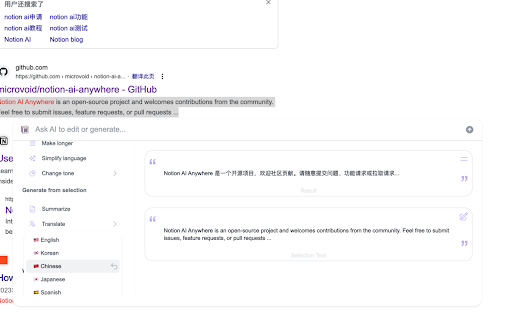
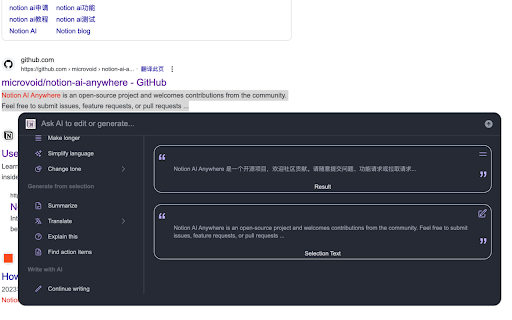
3. 现在,你可以刷新任何浏览器的页面,并选中一段内容,会有一个按钮(设置中可以关闭这个按钮,关闭后选择内容使用 cmd+k 唤起 AI 弹窗),点击就可以正常使用了。

Reviews
Loading reviews...
Permissions (3)
Permissions
activeTabℹ Can access the current tab when you click the extension scriptingℹ Can inject scripts into web pages storageℹ Can store data locally in your browser
Details
| Version | 1.1.8 |
| Updated | Apr 19, 2023 |
| Size | 502KiB |
| First Seen | Mar 21, 2026 |
Ad space
Popular in workflow

Adobe Acrobat: PDF edit, convert, sign tools
by Adobe Inc.
330M
★ 4.40
workflow
330M
★ 4.40
workflow

Microsoft Defender Browser Protection
by Microsoft Corporation
2M
★ 4.15
workflow
2M
★ 4.15
workflow

Pop up blocker for Chrome™ - Poper Blocker
by dingosolutions
2M
★ 4.76
workflow
2M
★ 4.76
workflow

Keep Awake
by extensions@chromium.org
1M
★ 4.00
workflow
1M
★ 4.00
workflow

Tab Resize - split screen layouts
by Peter Shin
1M
★ 4.31
workflow
1M
★ 4.31
workflow
Popular Extensions
Adobe Acrobat: PDF edit, convert, sign tools
by Adobe Inc.
330M
★ 4.40
workflow
330M
★ 4.40
workflow

Cisco Webex Extension
by cisco.chromestore
24M
★ 2.34
social
24M
★ 2.34
social

Kami for Google Chrome™
by Kami
17M
★ 4.56
education
17M
★ 4.56
education

uBlock Origin
by Raymond Hill (gorhill)
15M
★ 4.70
privacy
15M
★ 4.70
privacy

Custom Cursor for Chrome™
by BLife Team LLC
5M
★ 4.67
fun
5M
★ 4.67
fun