
⚠️Requests 1 sensitive permission
Description
You can easily review & share meeting takeaways, meeting records and transcriptions from your Sembly account ⭐
Sembly is available in English across Web, iOS & Android mobile apps.
ℹ️ HOW TO USE SEMBLY FOR GOOGLE MEET | ZOOM | MS TEAMS MEETINGS
• Add Sembly extension to your Chrome browser
• Pin the extension to the Chrome toolbar
• Click on the Sembly icon in your toolbar to open the extension, sign up or log in
• Start meeting in your browser or copy the meeting link from your calendar
• Open extension and paste the meeting invite URL address
• Push the “Invite” button and Sembly Agent will join your meeting automatically
• Pause and stop the recording right from the extension
• Review your meeting results
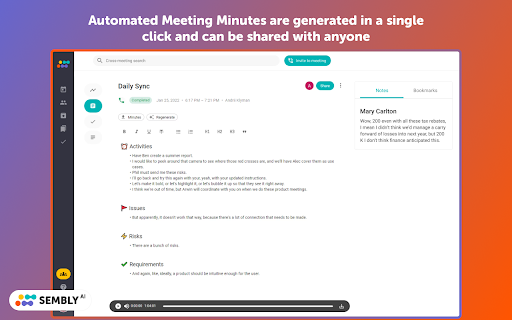
• Automated Meeting Minutes are generated in a single click and can be edited, exported or shared with anyone
ℹ️ HOW TO USE SEMBLY WITH GOOGLE & OUTLOOK CALENDAR:
• Connect your Calendar in the settings of Sembly web application
• Set the agent to join all your meetings, only the meetings you created, or manually join the meetings
• You're all set!
🔥 Sembly AI features that save you tons of time:
• Calendar integration and quick invite by link or email
• VoiceID & Speaker identification
• In-meetings voice commands
• Cross- and in-meeting search
• Sentiment analysis
• AI-generated meeting summary Glance View
• Key Items detection (Risks, Issues, Events, Actions, Requirements & Due Dates)
• Automatic Meeting Minutes
• Automated note-taking
• Workspaces for your team
• Export transcripts, meeting summaries, and key items to the PDF or easily copy tasks and tickets to the cloud collaboration tools like Trello, HubSpot, Slack, Notion, Jira, etc.
🚀 Suits for any type of meetings:
• Internal or clients meetings
• Customer interviews, feedback or demos
• Product & user research
• Hiring and recruiting calls
• Online webinars & events
• Online classes & lectures
• Marketing surveys & market research
• Meeting follow ups
• Presentations & masterclasses
• Scrum & Agile meetings
• Transcribing video calls into Google Docs
🔒 SECURITY & PRIVACY:
Privacy and security are our top priorities. Our technology and processes undergo rigorous audits to ensure compliance with all applicable regulatory requirements.
• Sembly is GDPR compliant
• SOC2 certified
📧 CONTACT US
• Support: https://sembly-ai.zendesk.com/hc/en-us
• Facebook: @SemblyAI
• LinkedIn: Semblyai
• Twitter: @sembly_ai


Reviews (1 cached)
★☆☆☆☆2023-03-13
Iris J.
The app (and extension) don't work. You will have to fight very hard to get your money back, for a clearly defective product.
Permissions (1)
Permissions
cookiesℹ Can read and modify browser cookies
Details
| Version | 1.5.2 |
| Updated | Mar 2, 2026 |
| Size | 955KiB |
| First Seen | Mar 31, 2026 |
Popular in workflow

Adobe Acrobat: PDF edit, convert, sign tools
by Adobe Inc.
322M
★ 4.40
workflow
322M
★ 4.40
workflow

AdBlock — block ads across the web
by AdBlock
62M
★ 4.48
workflow
62M
★ 4.48
workflow

迅雷下载支持
by Shenzhen Xunlei Network Technology Co., Ltd.
59M
★ 2.77
workflow
59M
★ 2.77
workflow

Adblock Plus - free ad blocker
by eyeo GmbH
40M
★ 4.39
workflow
40M
★ 4.39
workflow

Chrome Remote Desktop
by Chrome Remote Desktop Release Managers
37M
★ 3.13
workflow
37M
★ 3.13
workflow
Popular Extensions
Adobe Acrobat: PDF edit, convert, sign tools
by Adobe Inc.
322M
★ 4.40
workflow
322M
★ 4.40
workflow
AdBlock — block ads across the web
by AdBlock
62M
★ 4.48
workflow
62M
★ 4.48
workflow
迅雷下载支持
by Shenzhen Xunlei Network Technology Co., Ltd.
59M
★ 2.77
workflow
59M
★ 2.77
workflow

Grammarly: AI Writing Assistant and Grammar Checker App
by Grammarly
42M
★ 4.50
communication
42M
★ 4.50
communication
Adblock Plus - free ad blocker
by eyeo GmbH
40M
★ 4.39
workflow
40M
★ 4.39
workflow