Adobe Experience Cloud Visual Editing Helper icon

Adobe Experience Cloud Visual Editing Helper

by Adobe Inc.

v1.5.5 Updated Mar 25, 2026 201KiB
CWS
20K
Users
★ 2.56
16 reviews
#4170
of 207.2K
developer
#352 of 18.1K
⚠️Requests 2 sensitive permissions ⚠️Below average rating Recently updated

Description

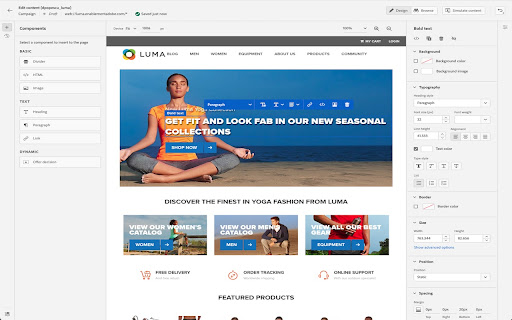
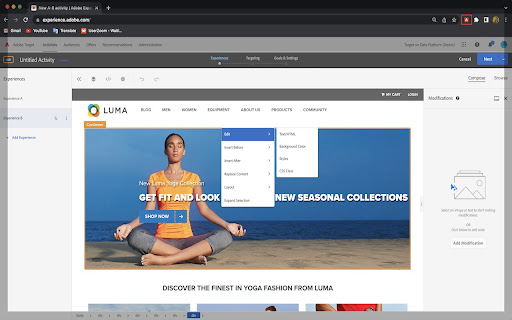
The Visual Editing Helper Chrome extension allows Adobe Experience Cloud users to load their website into Adobe Target or Adobe Journey Optimizer and to use a visual WYSIWYG editor to personalize it. The extension solves site-loading issues for which customers now rely on the Target Enhanced Experience Composer or third-party extensions to be able to author their websites. Benefits of using the Visual Editing Helper extension: - All iframe busting headers, such as X-Frame-Options and Content-Security-Policy, are implicitly removed from the website to enable authoring. - Extension sets SameSite attribute to the value "None" for the website's session cookies in order to be able to login using the visual editor. - Customers new to Target or to Journey Optimizer can use the extension to experiment even if their IT developers have not yet implemented Target or Journey Optimizer on their websites.
Adobe Experience Cloud Visual Editing Helper screenshot 1Adobe Experience Cloud Visual Editing Helper screenshot 2

Reviews (9 cached)

★☆☆☆☆2025-11-07
Molly Thibault

As of 11/3/25, this extension is incompatible with the most recent versions of Chromium, preventing users from viewing or editing content in the DEV environment in AJO.

★☆☆☆☆2025-09-15
Aman Gupta

Not able to load the page

★☆☆☆☆2025-07-11
Joey Kant

This extension isn't even referenced by Adobe's official documentation. It still recommends the old one: https://experienceleague.adobe.com/en/docs/target/using/experiences/vec/troubleshoot-composer/vec-helper-browser-extension Luckily that doesn't matter as this extension - in conjuction with the new AT frontend - will only work about 50% of the time. Also, WHY do I need an extension just to edit some HTML? Get with the times. Please.

★☆☆☆☆2025-05-28
milosz

doesn't work

★☆☆☆☆2025-05-12
Roberto Jose Meijide Faraldo

Not working at all...

★☆☆☆☆2024-12-01
Keith Davidson

For anyone reading this, from Compose view you need to click -> Cog icon (Configure) -> Page Delivery -> toggle Enable Enhanced Composer ON then toggle Enable Enhanced Composer OFF. Then the visual composer should work

★☆☆☆☆2024-07-08
Melissa Macpherson

Does not work. I end up having to install the old extension if I want the VEC to work. This one doesn't do anything.

★☆☆☆☆2024-05-22
Amy Hively

Does not work. Have to use older VEC extension in order to use adobe target in chrome.

★★☆☆☆2025-03-17
Hennie Martens

Most of the time it doesn't work. I have to constantly click between "Targetting" and "Experiences" to try and get the VEC to load. The old plugin "Adobe Target VEC Helper" was good but Chrome doesn't allow it to work anymore due to "This extension is no longer available because it doesn't follow best practices for Chrome extensions." unfortunately :(

Permissions (7)

Permissions

browsingData Can delete browsing history and data cookies Can read and modify browser cookies declarativeNetRequest Can block or redirect network requests scripting Can inject scripts into web pages storage Can store data locally in your browser webNavigation Can monitor navigation events webRequest Can observe and analyze network traffic

Details

Version 1.5.5
Updated Mar 25, 2026
Size 201KiB
First Seen Mar 31, 2026




