
⚠️Not updated in over a year
Description
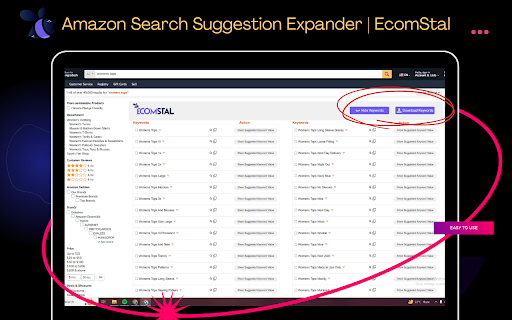
Install Amazon Search Suggestion Expander | EcomStal Chrome Extension to Find Hidden Amazon Keywords.
Are you having trouble finding product niches on Amazon?
Your hidden weapon is the Amazon Search Suggestion Expander by EcomStal! With the help of this seller Chrome extension, you may find a wealth of hidden keywords by seeing EVERY recommendation that Amazon conceals behind its search results.
🔳 This is how it greatly increases your research on products:
◾ Give up on narrow suggestions: Stop depending on a small number of keyword suggestions. View the entire list of phrases that Amazon uses to confuse users, including synonyms you may not have known existed before and after.
◾ Discover popular niches: Explore unexplored markets and popular keywords by examining the entire range of suggested searches. Before your competitors, identify niches with minimal competition and high demand.
◾ Improve your listings: Make sure your product descriptions and names are optimized with relevant long-tail keywords and recommended by Amazon. Boost your conversion rates and draw in more focused visitors.
◾ Save time that matters: Put an end to your manual keyword research. With this plugin, you can rapidly access them while you type, expediting your research process and freeing you more time to concentrate on the important things.
◾ Functions flawlessly in every Amazon marketplace: The Search Suggestion Expander adjusts to your local Amazon platform, whether you're selling in the US, UK, Germany, or somewhere else.
Take control of your Amazon specialty right now! To fully utilize Amazon's secret keyword data, install the Amazon Search Suggestion Expander by EcomStal.
ℹ️ Extra: There's no cost to extend! Why then wait? Take the first step toward success on Amazon today!
🔳 AMZ Search Suggestion Expander FAQs:
♦️ What is the Expander for Amazon Search Suggestions?
With the help of this Chrome extension, you can see every search suggestion that Amazon conceals behind the search results, including terms that come before and after the keywords you type. This aids in identifying lucrative product categories, long-tail keywords, and popular queries.
♦️ What advantages does using AMZ Search Suggestion Expander offer?
◾ Discover untapped markets: Look for underserved markets with minimal competition and strong demand.
◾ Increase the visibility of your product: Improve listings by adding pertinent long-tail keywords to increase traffic and ranking.
◾ Save time by Immediately receiving thorough keyword ideas to expedite your study.
◾ Functions everywhere: Fit for all the main Amazon online stores.
♦️ Is it without cost?
Yes, it is free to use the basic version!
♦️ Does the free version have any restrictions?
The free edition restricts the ability to filter suggestions but displays them all. More sophisticated capabilities like data export, competition analysis, and filtering are available in paid editions.
♦️ Does it support additional languages?
It supports English at the moment, but translations into additional languages are in the works.
♦️ Is using it safe?
Amazon Search Suggestion Expander Chrome extension complies with all Amazon terms of service and is safe.
♦️ How can I begin?
Get the Chrome Web Store extension, install it, and get typing on Amazon! Automatic suggestions will show up.
♦️ Do you provide any materials or tutorials?
Yes, EcomStal offers articles, videos, and instructions to assist you in making the most of the extension.
♦️ Is customer service available?
Yes, email help is available to both premium and free customers on EcomStal.
♦️ I would like additional information; where can I find it?
See the EcomStal website or get in touch with their support staff for more details and help.
🔳 P.S. Desire to proceed even further? EcomStal provides an array of potent tools for Amazon sellers to help them take control of every facet of their business. Check them out to see how much money you can make!

Reviews (1 cached)
★☆☆☆☆2024-11-13
Rahamat Ullah
There are many great add-ons available, but this one is the worst tool I’ve ever used. The review section is spammed with fake reviews, all posted around the same time😂😂😂. Most importantly, many of its services are misleadingly advertised as free, but require payment after creating an account. This one crashes a lot and you have to restart the browser again, also it only works on images not videos.
Details
| Version | 3.4.3 |
| Updated | Nov 17, 2024 |
| Size | 281KiB |
| First Seen | Mar 31, 2026 |
More by EcomStal

Amz Image & Video Downloader | EcomStal
by EcomStal
4K
★ 4.10
tools
4K
★ 4.10
tools

Amazon Reviews Scraper and Exporter | Ecomstal
by EcomStal
1K
★ 3.43
workflow
1K
★ 3.43
workflow

Free Amazon Product Scraper and Exporter | Ecomstal
by EcomStal
564
★ 5.00
accessibility
564
★ 5.00
accessibility

AliEx Image And Video Downloader | Ecomstal
by EcomStal
491
★ 4.17
tools
491
★ 4.17
tools

AliEx Review Exporter | Ecomstal
by EcomStal
175
★ 4.33
tools
175
★ 4.33
tools
Popular in workflow

Adobe Acrobat: PDF edit, convert, sign tools
by Adobe Inc.
331M
★ 4.40
workflow
331M
★ 4.40
workflow

AdBlock — block ads across the web
by AdBlock
63M
★ 4.48
workflow
63M
★ 4.48
workflow

迅雷下载支持
by Shenzhen Xunlei Network Technology Co., Ltd.
59M
★ 2.77
workflow
59M
★ 2.77
workflow

Adblock Plus - free ad blocker
by eyeo GmbH
41M
★ 4.39
workflow
41M
★ 4.39
workflow

Chrome Remote Desktop
by Chrome Remote Desktop Release Managers
39M
★ 3.14
workflow
39M
★ 3.14
workflow
Popular Extensions
Adobe Acrobat: PDF edit, convert, sign tools
by Adobe Inc.
331M
★ 4.40
workflow
331M
★ 4.40
workflow
AdBlock — block ads across the web
by AdBlock
63M
★ 4.48
workflow
63M
★ 4.48
workflow
迅雷下载支持
by Shenzhen Xunlei Network Technology Co., Ltd.
59M
★ 2.77
workflow
59M
★ 2.77
workflow

Grammarly: AI Writing Assistant and Grammar Checker App
by Grammarly
42M
★ 4.50
communication
42M
★ 4.50
communication
Adblock Plus - free ad blocker
by eyeo GmbH
41M
★ 4.39
workflow
41M
★ 4.39
workflow