Filter Anything Everywhere icon

Filter Anything Everywhere

by Procrastinating Student

v1.3.2 Updated Apr 15, 2023 198KiB
CWS
5K
Users
★ 4.43
82 reviews
#1327
of 29.5K
workflow
#363 of 3.7K
⚠️Not updated in over 2 years

Description

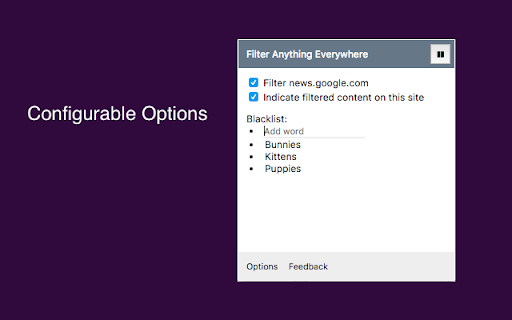
Tired of information overload? Take control of your browsing experience with this powerful Chrome extension! It filters out unwanted content from Facebook, Google News, Reddit, Twitter, YouTube, and more, all in one place. Key features: - One-click access to filter settings. - Block unwanted topics, clickbait, and spam. - Customize settings for each website. To get started, simply install the extension and click the icon next to the address bar to access the control panel. Fine-tune your settings to enjoy a clutter-free, personalized online journey. Embrace a cleaner, more personalized browsing experience – try Filter Anything Everywhere today! --- Feel free to submit issues and pull requests: https://github.com/yeahpython/filter-anything-everywhere --- History: * 1.3.2 - Improved language support, e.g. Cyrillic characters, Chinese, Korean, Japanese - Better support for emojis and special characters - Migration to Manifest V3 - Start using TypeScript/Node/Rollup/Jest/Prettier * 1.3.1 - The code has been cleaned up a bit for upload to GitHub. The latest version of the extension includes the cleanup. * 1.3.0 - Fix for YouTube search results - Support for Chinese characters - Performance improvements * 1.2.4 - Fixes issue where entire YouTube page is hidden. * 1.2.3 - Wildcard matching is now supported. "*" matches any number of non-whitespace characters, and "?" matches exactly one non-whitespace character. Examples: - - "col*r" matches "color" and "colour". - - "gr?y" matches both "gray" and "grey", but not "gravy" since "?" can only match one character. - - "*?coin" matches "bitcoin" and "dogecoin" but not "coin", since "?" requires at least one character.
Filter Anything Everywhere screenshot 1Filter Anything Everywhere screenshot 2Filter Anything Everywhere screenshot 3

Reviews (11 cached)

★☆☆☆☆2026-01-10
J J

Completely useless.

★☆☆☆☆2024-05-10
FatheredPuma81

Cares about capitalization. Complete and utterly worthless right now.

★☆☆☆☆2022-12-20
1ng kilkil

seemingly useful but useless

★☆☆☆☆2022-12-20
Anony mous

Junk.

★☆☆☆☆2020-01-20
RGTube

12 months ago: This is the extract thing I needed. I was looking for something very specific on YouTube and had to blacklist many YouTube channels to find the right video. I do however want like to suggest a hard-reset button to remove all blacklisted words Today: There was an unknown update that disallowed me from filtering videos on YouTube and Twitch. This means I can't find the content I am looking for. This is a huge issue for me since this was the main reason I used this program. It helped me filter things on streaming platforms at much faster rates; it no longer does this.

★★★☆☆2024-11-05
Charlie Morris

It works. Kinda. I visited a social website, blocked a word, and it took out posts with that word. Great! I opened it again in a new window, visited the website, and it didn't do anything. I then had to manually go to the extension and turn it on and off again to make it work. So... 3/5 stars.

★★★☆☆2024-05-03
Mo Mauve

Can you make it so when it filters a Reddit comment, all of the replies are hidden too?

★★★☆☆2024-04-06
Kate Awesome

does it filter YouTube comments too?

★★★☆☆2024-02-06
Melissa “Mel” Garcia

This extension was slowing down some websites I use like YouTube. Twitter also takes a while to load with the filter.

★★★☆☆2023-12-13
nox player74

-doesn't work properly on all pages (sometimes it hides only the word and nothing else) ex. https://demotywatory.pl/ -no separate filters for EACH page separately -no option to change the color of the indicator (invisible on black pages) -no options for blocked word: exactly match, begin with, contain ,end with, case sensitive, diacritic sensitive -no option for what element to hide - by default hides WHOLE elements (blocks) instead of their pieces (CSS elements indicated earlier) -no option to hide an element if the text color in the element is... -no option on the extension icon of the NUMBER of blocked items With a few tweaks, the plugin could be a replacement for an old extension that is no longer developed: CustomBlocker 4.1.4 elnfhbjabfcepfnaeoehffgmifcfjlha

★★★☆☆2023-05-10
Liam

can i have different filter for each website? My overall filter is too big now, website like reddit.com takes a very long to load

Permissions (3)

Permissions

activeTab Can access the current tab when you click the extension scripting Can inject scripts into web pages storage Can store data locally in your browser

Details

Version 1.3.2
Updated Apr 15, 2023
Size 198KiB
First Seen Mar 21, 2026