
Description


Reviews (85 cached)
PLEASE I NEED SOME HELP ASAP!! Is there a solution to when you open dosbox, it automatically closes, before i even drop my cursor.
this does NOT WORK
it doesnt work
I JUST SAW ON A VIDEO HOW TO OPEN EXE FILES AND I HAD TO DOWNLOAD IT IT DID NOT WORK AND THERE IS NO UNDOWNLOAD BUTTON
App ceases to function whenever I attempt to boot up Daggerfall. I've done everything right.
i don't like it every time i go on it there is a blank screen (WOULD NOT RECOMMEND)
Does not work: The logo shows for a brief second then no display; black screen. Would not reccomend.
Bad app doesn't run I launch the app there is the start up screen but then there is a black screen!!!
wont work at all. the only thing that appears upon start up is the quwstion mark at the bottom of the sceen. this is complete rubbish.
Just didn't work, if your using dosbox you have some technical skill and can use it in Linux compatibility in chrome os. Don't bother with this guy.
i couldnt get it to work and I am on chrome 76
my brother went on my computer and downloaded this, and now i dont know how to get it off my computer. Can someone please help????
make it for chrome 69 plz
All I get is a blank screen. Heard that it's not compatible with Asus C202
it dont work
how do i get rid of it plz tell me
black screen after app launches
it didnt work i selected the file restarted dosbox and says dosbox succesfully loaded but its just black
ever time i would load it , it would be a black screen and in the corner there would be a yellow Question mark please help
it just showed a black screen even after i chose my folder it didnt load
I love dosbox for the PC but on chromebook it does not work because I get a black screen while runing DOSBOX ;-;
I CAN RUN A DARN THING IT WONT BRING UP DOS AT ALL IT JUST STAYS BLACK EXCEPT WITH THE ? MARK ON IT WHY DOESNT IT WOK
Black screen please fix and I'll download and I think a whole lot of other people will too
so, i've used this app before on the same chromebook i'm typing with now and it worked perfectly, but now that i try to use it, i get a black screen. fix??
It Wont show the DOS. So i cant do anything With it.
Just loads an empty black screen. No text or anything. This chrome edition is clearly... bad.
Used to work but not any more. I get a message saying it successfully loaded then just a black screen with a question mark in the corner that opens the options.
I normally like DosBox, and use it for all my dos emulation on my PC, but this is simply a bad port. It doesn't run properly on Chrome. It has a different settings file, mounting doesn't 100% work properly (i.e., getting entire downloads instead of right folder), and it simply won't run Doom. I don't understand why, as earlier, I had it running on Linux, on the same device using Crouton, and it worked fine. TLDR: Normally a good emulator, and would recommend for PC, but this is a bad port.
IT WONT LOAD
Totally useless. CTRL+F1 closes app, impossible to get spanish keyboard and after executing a game, mouse move with diagonal offset without reaching all the screen zone, impossible to touch parts of the screen. Not recommended
Message when launched: The Chrome web store says that it's compatible so I installed it with no issues. When launched it gives this message: "This plugin is not supported." Used on OpenSUSE Linux 13.2 and Chromium Version 42.0.2311.135 (64-bit)
I see NO command-line. Cannot use
It crashes when I open it. Shame, I would love to have an app like this. Any ideas?
I was never able to mount anything. Everytime I tried, it said "Directory (directory I was trying to acces) Does Not Exist"
Exits abruptly after displaying the hint. Also, navigating to a game folder through the browser only displays folders, contents are greyed out.
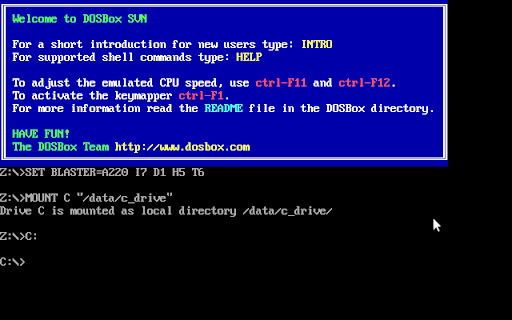
I can't figure out how to change the C drive mount, it's defaulting to /data/c_drive.
it didnt come up for me i cant run it
doesnt load games tried changing to all different settings but nowt
When I launched it, it gave me a black screen
when i opened it, it showed the hint then emedently closed
it didnt work
stoped working for me
It's fantastic that we have our beloved DosBox as a Chrome Extension. But since it won't recognize the changes made in the config file, it is useless imho. I even can't change from windowed to fullscreen mode although I added the correct lines into the config file. Besides: We need a frontend like D-Fend in ChromeOS!
i downloaded it and it would not show the camand menu would not show up and that means i could not do anything
eh... All it is is a big black window. My lg metro phone works for this but when I use the chromebook for this and turn on the DOSBox, it just shows nothing. I am not greeted to the big blue window. And when I type, the letters are invisible. I am learning dos or atleast trying to learn dos, but this dos is not working. If you would like to have my 4 or 5 stars, please fix this issue or inform me if I am making a mistake.
i make the window big but the game does not go big like the window
Nothing Shows up when I start it up, there is no blue thing with words in it
The app inexplicably never asks for a command prompt. I just have a black screen.
As soon as i opened it there was just a black screen. There was no text as shown in the pic, just the little '?' on the bottom corner.
No longer working at this point in ChromeOS. Will install Crouton and run the linux version from there...
Permissions (2)
Permissions
Details
| Version | 0.1.5 |
| Updated | Jun 12, 2014 |
| Size | 4.83MiB |
| First Seen | Mar 30, 2026 |
Popular Extensions




