
⚠️Not updated in over a year
Description
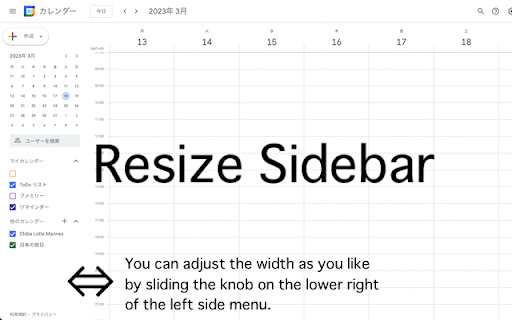
A simple yet powerful extension that enhances your Google Calendar experience by adding a resizable sidebar feature.
Key Features:
• Intuitive drag handle to adjust sidebar width
• Double-click to reset to default width
• Automatically saves your preferred width
• Smooth and responsive resizing
• Clean and minimal design that matches Google Calendar's aesthetics
• Support for both light and dark themes
Perfect for users who:
• Need more space for calendar lists
• Want to see longer calendar names
• Prefer a customized layout
• Work with multiple calendars
This extension respects your privacy and requires no special permissions - it simply adds a resize functionality to the existing Google Calendar sidebar.
How to use:
1. Hover over the right edge of the sidebar to reveal the resize handle
2. Click and drag to adjust the width (200px - 600px)
3. Double-click the handle to reset to default width
4. Your preferred width is automatically saved for future sessions
Lightweight and maintenance-free - install and forget while enjoying the enhanced functionality.
Reviews
Loading reviews...
Details
| Version | 0.0.4 |
| Updated | Nov 12, 2024 |
| Size | 10.34KiB |
| First Seen | Mar 28, 2026 |
Popular in workflow

Adobe Acrobat: PDF edit, convert, sign tools
by Adobe Inc.
331M
★ 4.40
workflow
331M
★ 4.40
workflow

AdBlock — block ads across the web
by AdBlock
62M
★ 4.48
workflow
62M
★ 4.48
workflow

迅雷下载支持
by Shenzhen Xunlei Network Technology Co., Ltd.
59M
★ 2.77
workflow
59M
★ 2.77
workflow

Adblock Plus - free ad blocker
by eyeo GmbH
41M
★ 4.39
workflow
41M
★ 4.39
workflow

Chrome Remote Desktop
by Chrome Remote Desktop Release Managers
38M
★ 3.14
workflow
38M
★ 3.14
workflow
Popular Extensions
Adobe Acrobat: PDF edit, convert, sign tools
by Adobe Inc.
331M
★ 4.40
workflow
331M
★ 4.40
workflow
AdBlock — block ads across the web
by AdBlock
62M
★ 4.48
workflow
62M
★ 4.48
workflow
迅雷下载支持
by Shenzhen Xunlei Network Technology Co., Ltd.
59M
★ 2.77
workflow
59M
★ 2.77
workflow

Grammarly: AI Writing Assistant and Grammar Checker App
by Grammarly
42M
★ 4.50
communication
42M
★ 4.50
communication
Adblock Plus - free ad blocker
by eyeo GmbH
41M
★ 4.39
workflow
41M
★ 4.39
workflow