Creative Image Clipper icon

Creative Image Clipper

by Pada X

v1.0.1.1 Updated Jan 5, 2018 9.46KiB
CWS
2K
Users
★ 2.71
35 reviews
#15209
of 207.2K
Other
Category
⚠️Not updated in over 2 years ⚠️Below average rating

Description

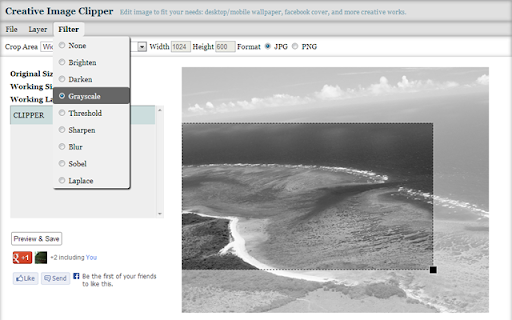
What's new: 2014/04/09 1. Open/Edit image from local files is supported. Edit image to fit your needs: 1. Choose an existing image from Google Drive or your computer. 2. Select what you want: desktop standard/wide wallpaper, android landscape/portrait wallpaper, iphone/ipad wallpaper, facebook cover, and custom image size. 3. Drag to move/resize crop area. 4. Apply filters: grayscale, sharpen, and etc. 5. Add some text layers if you like. 6. Add some effect layers if you like. 7. Apply transformation: Rotate or Flip. 8. Select output format: JPG or PNG. 9. Download output image or save to Google Drive. Supported image formats: JPG, PNG ------------- Release Notes: 2013/11/29 1. Support image transformation: Rotate and Flip. 2. More customized filters: You can adjust output effects of filters from now on. 2013/10/18 1. Text layer: Define stroke color and weight. Support fill by transparent(No fill color). 2. Effect layer: Support two special effects: Highlight and Mosaic. 2013/07/10 1. Redesign app interface. 2. Text layer: Add your own text with various setting.
Creative Image Clipper screenshot 1Creative Image Clipper screenshot 2Creative Image Clipper screenshot 3Creative Image Clipper screenshot 4Creative Image Clipper screenshot 5

Reviews (9 cached)

★☆☆☆☆2017-06-11
Harold Dorsett II

No removal area. It sucks!!! Dont download this!!!!!!

★☆☆☆☆2016-03-21
Galactic Populators

Maximum resulting size is 640 x 428 pixels.

★☆☆☆☆2015-09-18
Greg Murphy

JUNK

★☆☆☆☆2014-01-22
David Douglas

Doesn't work

★☆☆☆☆2013-11-20

Could not download product following ASP specific instructions. Google has become a junkyard of apps that can't even be downloaded, frustrated to say the least.

★☆☆☆☆2013-08-09
Anthony Rubano

will NOT let me do another app.

★★★☆☆2015-12-19
Denise “Tunstall” Chamberlain

This app isn't formatted for the beginner pictures editors or computer beginners. It seems to give the purpose of the app but doesn't explain with any depth on how to fix/edit the images. It has left me more confused than when I started. I am sure the app is a great app for someone who either is a professional computer science major or one that designed the app or even for a professional editor,but not for common people who still are learning the proper terminology for this kind of task and how to actually put that knowledge to use.

★★★☆☆2014-08-06
Rochelle SL

meh. I normally use Picasa - has many more options & easy to use. This is just kinda lame. I suppose not bad if you're on a chromebook or something...?

★★★☆☆2014-03-14
Aubrey Haskell

This was an okay app it was not what I had in mind and not as cool as the images shown when first downloaded. This is when you really should not judge a book by it's cover :(

Details

Version 1.0.1.1
Updated Jan 5, 2018
Size 9.46KiB
First Seen Mar 22, 2026