Tab Extract icon

Tab Extract

by Monting Lin

v1.5.0 Updated Aug 2, 2025 14.9KiB
CWS
1K
Users
★ 4.52
89 reviews
#3748
of 49.1K
workflow
#966 of 6.1K
Highly rated

Description

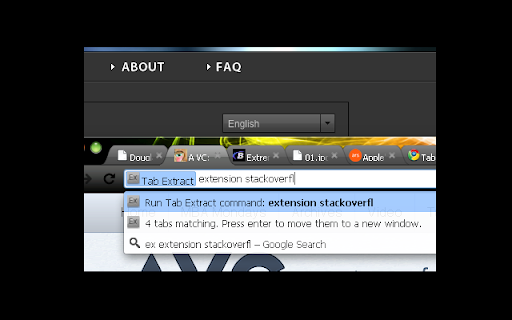
● Too many disorganized tabs open? ● Slow to find the tab you're looking for? ● Want to reduce tab and window clutter quickly? Tab Extract helps you easily re-organize your tabs according to the subject or site, or quickly find a tab, or easily remove multiple tabs. How it works: Tab Extract will move all tabs from any window with a keyword match (in their URL or page title), into a new window. To use, type "ex" followed by a tab/space into the address bar, then enter keywords. ✓ "ex facebook news" will extract all facebook tabs and any tab with "news" or "facebook" in their title or URL, into a new window. ✓ "ex ." merges all tabs into the same window. This works because all URLs have a "." in them. ✓ Batch-remove tabs by extracting tabs to a new window using Tab Extract, and then closing the window. ✓ Tab Extract can merge tabs from across different windows into the same window by using a common keyword amongst the tabs. Notes: There is no need to select anything in the auto complete box, just press enter. If your Chrome has saved some "ex <keyword>" as a search term for autocomplete, clear your history. Firefox version: https://addons.mozilla.org/en-US/firefox/addon/tab-extract-port/ Version 1.5.0 release notes - credit goes to Vlad Lasky: Migrated from Chrome Extension Manifest v2 to Manifest v3 - Background script now runs as a service worker - Updated minimum Chrome version to 88 - Removed alert() for service worker compatibility (omnibox already provides feedback) Support for Marvellous Suspender suspended tabs - Extension now searches within the original URL and title of suspended tabs - Suspended tabs are moved while maintaining their suspended state Support for Chrome's natively unloaded tabs - Removed status filter to include tabs in all loading states - Fixes issue where unloaded tabs were not being found Fixed compatibility with modern Chrome versions that use tab unloading for memory management ============================== tab management, tabs, Find tabs, TabKit, FoxTab, TabMixPlus, TreeStyleTabs, Too Many Tabs, Tab Menu, tab move, tab organize, duplicate, batch remove, tab split, window split
Tab Extract screenshot 1Tab Extract screenshot 2

Reviews (5 cached)

★★★☆☆2025-04-17
Paul Dowsett

This extension was fantastic when it worked. Unfortunately now, when I type "ex keyword" into the address bar, it opens my default search engine and searches for "ex keyword". Also, it's sad to see this isn't supported by the latest Chrome, as it now frequently gets disabled.

★★★☆☆2024-06-27
Alexey “aamonster” Monastyrenko

The extension was extremelly useful formerly but now (when Chrome unloads tabs by itself) it became unuseable and needs a fix: Extension searches tabs with { status: "complete" } but nowadays a lot of tabs have { status: "unloaded" } instead so tabs with this status should be processed too.

★★★☆☆2024-05-24
Jonas Bülow

Great extension but it does only find tabs in the current window.

★★★☆☆2023-04-11
Google Store

It probably is Chrome's fault, but when I want to extract, e.g., all wikipedia tabs, it barely extracts half of them (say 100 out of 250) and on the next take only 3, the next take another 3.... so it seems to ignore the so-called sleeping tabs, hence it loses its appeal, because it's faster to copy tabs manually, tab by tab, than to extract three to a new window and then use another extension to export the tabs. Any way to address the presumably sleeping-tabs issue?

★★★☆☆2013-12-31
Alex Lee

Wish it did pinned tabs as well.

Permissions (1)

Permissions

tabs Can see your open tabs and their URLs

Details

Version 1.5.0
Updated Aug 2, 2025
Size 14.9KiB
First Seen Mar 22, 2026


