
⚠️Not updated in over 2 years
User Count Trend
Loading...
Description
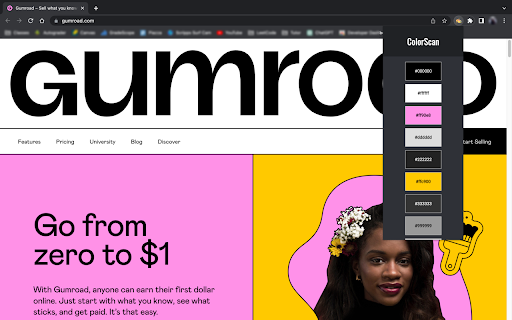
ColorScan is a tool that allows users to easily extract and save color values from any website they visit. It provides a simple and convenient way to create color palettes and keep track of them while browsing the web.
With this extension, users can quickly generate a color palette from any webpage by clicking on the extension icon and pressing "Get Palette". The extension will scan the webpage for all the color values used in the CSS, and display them in a convenient and easy-to-use interface.
The extension displays the most frequently used colors and allows one to click on a color to copy its HEX code.
Overall, the "Color Palette Finder" Chrome extension is a powerful tool for designers, developers, and anyone else who works with color. It streamlines the process of creating and managing color palettes and helps users stay organized and efficient while working on web projects.
Reviews
Loading reviews...
Permissions (1)
Permissions
tabsℹ Can see your open tabs and their URLs
Details
| Version | 1.1.3 |
| Updated | Apr 6, 2023 |
| Size | 33.31KiB |
| First Seen | Mar 22, 2026 |
Ad space
Popular in workflow

Adobe Acrobat: PDF edit, convert, sign tools
by Adobe Inc.
330M
★ 4.40
workflow
330M
★ 4.40
workflow

Chrome Remote Desktop
by Chrome Remote Desktop Release Managers
38M
★ 3.14
workflow
38M
★ 3.14
workflow

Microsoft Defender Browser Protection
by Microsoft Corporation
2M
★ 4.15
workflow
2M
★ 4.15
workflow

Pop up blocker for Chrome™ - Poper Blocker
by dingosolutions
2M
★ 4.76
workflow
2M
★ 4.76
workflow

Screen Recorder
by Erich Behrens
2M
★ 3.75
workflow
2M
★ 3.75
workflow
Popular Extensions
Adobe Acrobat: PDF edit, convert, sign tools
by Adobe Inc.
330M
★ 4.40
workflow
330M
★ 4.40
workflow
Chrome Remote Desktop
by Chrome Remote Desktop Release Managers
38M
★ 3.14
workflow
38M
★ 3.14
workflow

Cisco Webex Extension
by cisco.chromestore
24M
★ 2.34
social
24M
★ 2.34
social

Kami for Google Chrome™
by Kami
17M
★ 4.56
education
17M
★ 4.56
education

Read&Write for Google Chrome™
by Texthelp
17M
★ 3.44
accessibility
17M
★ 3.44
accessibility