XLS Editor icon

XLS Editor

by officeonlinesystems

v2.15.2 Updated Aug 27, 2024 492KiB
CWS
80K
Users
★ 3.63
156 reviews
#316
of 34.2K
workflow
#104 of 4.3K
⚠️Not updated in over a year

Description

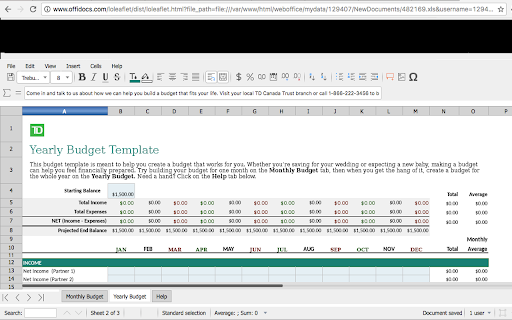
XLS Editor is an extension that allows to create, edit and view any Microsoft Excel document in both XLS and XLSX format. It also handles the standard Open Office format ODS. It is an integration with LibreOffice Online and a file manager. It is a spreadsheet editor integrated with our file manager to manage only XLS, XLSX and ODS file types with this online app. XLS Editor main features are: - A direct link to create xls, xlsx or off spreadsheets with this XLS Editor. - It intercepts when you access to xls, xlsx, csv or odf spreadsheets, and it automatically opens it directly using this XLS Editor. - Edit and view XLS spreadsheets written using OpenOffice Calc, LibreOffice Calc or Microsoft Excel. - Styles management. - Font sizes. - Font colours. - Background colours. - Search for texts. - Insert columns / rows / tables / images.. - Delete rows / columns. - Advanced find & replace / regular expressions / special characters. - Spreadsheet functions. - Export to PDF. - Auto save files. - Open source code. - Supports multiple formats for spreadsheets that are detailed here https://wiki.openoffice.org/wiki/Documentation/OOo3_User_Guides/Getting_Started/File_formats. * Microsoft Excel 97/2000/XP (.xls) * Microsoft Excel 4.x–5.0/95 (.xls) * Microsoft Excel 2007 XML (.xlsx) * LibreOffice ODF spreadsheet (.ods) * OpenOffice ODF spreadsheet (.ods) * Text and CSV (.csv and .txt) - Handle files and directories in the Cloud. - Operations with files and folders: copy, move, upload, create folder/file, etc - Search for files This XLS Editor extension uses the platform http://www.offidocs.com. It is available for free online users but it also allows the integration with premium users and on-premises OffiDocs deployments where the OffiDocs LibreOffice Calc online is installed. IMPORTANT: This extension scans the URLs browsed in order to detect XLS files. The XLS files detected appear in a file list located in the extension popup that are retrieved from our servers. The scanning is performed from our servers so your URL are reported to our system. No personal data is collected. This scan can be disabled with a checkbox that appears in the extension popup. If you disable this scanning, this functionality is not available so then the extension functionality is very limited.
XLS Editor screenshot 1XLS Editor screenshot 2XLS Editor screenshot 3

Reviews (11 cached)

★☆☆☆☆2026-01-05
Eric Paroissien

Not working for me, simple xls file is not detected; I don't understand how it got a special presentation at the top of google search "chrome extension xls".

★☆☆☆☆2023-02-10
Пелагон Громойло

Worthless junk. Doesn't scroll sheets horizontally so can't access the stuff on the right. Delete.

★☆☆☆☆2020-03-27
Matt

does not work

★☆☆☆☆2020-03-07
lorbhaim1

wasted time!!!!!

★☆☆☆☆2019-01-02
John Cottam

I am an engineer.. and cant even figure out how to open an existing file on my computer.. There isa NOTHING intuitiive about this at all..

★☆☆☆☆2017-06-07
Chris Tyler

All it did was ask you to download more of their programs so you could use it, and as soon as you do it ask that you download another. Never ending.

★☆☆☆☆2017-03-19
Scott Thompson

Will disable your existing excel software and then ransom it for a monthly subscription. This adequately demonstrates Microsoft's contempt for small business' and why they are no longer market leaders!

★☆☆☆☆2017-02-12
Lampyridae Wards

Installed this because Google docs spreadsheet wouldn't read the charts/scatterplots correctly from Excel documents. This extension doesn't even recognize charts. You cannot make or edit them.

★★☆☆☆2019-11-18
Internutt 1960

It seemed to work OK at first, but...... after I used it to edit a spreadsheet, and saved my changes every edit, it didn't save them. Also, I created some piles to save PDF documents in , and it can't seem to find or navigate to those files and folders. Chrome has a default editor that seems to do much better and I'm switching to using that one

★★★☆☆2018-02-26
RAMESH MOHANLAL KUMAVAT

like it

★★★☆☆2017-07-23
ana clara monteiro santos

no lik

Permissions (2)

Permissions

storage Can store data locally in your browser tabs Can see your open tabs and their URLs

Details

Version 2.15.2
Updated Aug 27, 2024
Size 492KiB
First Seen Mar 22, 2026