
Analytics Debugger icon

Analytics Debugger

by David Vallejo

v2.4.6 Updated Sep 20, 2023 300KiB
CWS
100K
Users
★ 4.60
229 reviews
#1098
of 207.2K
developer
#97 of 18.1K
⚠️Not updated in over 2 years ⚠️Requests 1 sensitive permission Highly rated

Description

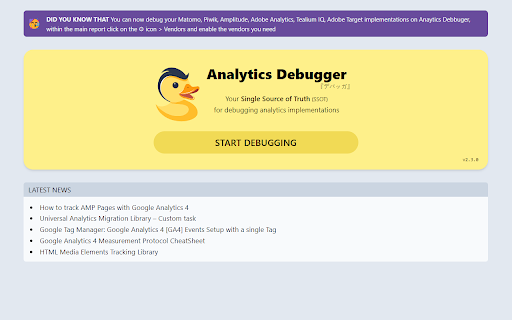
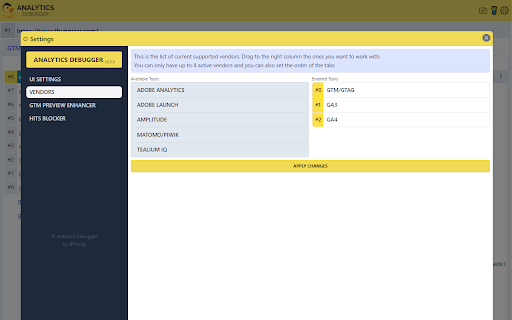
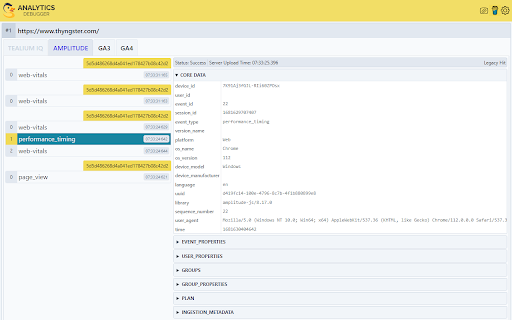
Formerly known as "GTM/GA Debugger," our tool is your ultimate Single Source of Truth (SSOT) for debugging analytics implementations! Are you a developer, analyst, or marketer committed to achieving top-tier web analytics and tracking results? Look no further! Our powerful debug tool is meticulously crafted to simplify your life. Analytics Debugger streamlines your daily debugging tasks, boasting user-friendliness for all while delivering in-depth insights to advanced users. v2.4.6 - Adds support for Chartbeat - Fixed Amplitude Regional Collection Endpoints Key Features: 🛠️ Wide Compatibility: Our tool seamlessly supports a variety of analytics and tracking tools, including: - Google Tag Manager - Google Analytics - Tealium - Piwik Pro / Matomo - Adobe tools - and most commonly used Marketing Pixels. to mention some of them (Check the full list here) 🔒 Privacy Enhancement: Rest assured, our tool injects code only after DevTools has loaded, with no background monitoring. 🚀 Tools: Supercharge your tracking implementation with a rich toolkit including - GTM Preview Enhancer: USe this tool to bypass all the limitations from the original Preview Mode - Google Analytics Debug Libraries Loader - Block GA3/GA4 Hits: Prevent your - Export Features - Real-Time Data - Enhanced Ecommerce Reports - Data Filtering for Focused Insights - Clicks Blocker: Prevent being redirected to next page - and much more! Get started today and elevate your analytics debugging and optimization process effortlessly. Unlock the full potential of your analytics and tracking endeavors – streamline your workflow, enhance privacy, and gain profound insights seamlessly. Download now and experience the transformation! Changelog: You can check out our latest updates on our GitHub repository. https://github.com/analytics-debugger/analytics-debugger-browser-extension Support / Feedback: Offered via the Store or using the Github Repository Official Documentation: For detailed guidance, visit our official documentation at https://www.analytics-debugger.com/tools/browser-extension Don't miss out on this game-changing tool. Elevate your analytics game today!
Analytics Debugger screenshot 1Analytics Debugger screenshot 2Analytics Debugger screenshot 3Analytics Debugger screenshot 4

Reviews (18 cached)

★☆☆☆☆2025-03-21
Pablo Roberto Aguiar de Souza Melo

I recently tried this plugin hoping it would help me debug issues on my website, but I was incredibly disappointed with its performance. Instead of actually providing any useful debugging tools or insights, it simply redirects you to another page that tries to sell you a service that I found to be of poor quality. The plugin doesn’t work as advertised and fails to provide any real functionality. It’s frustrating when you're looking for a tool to help with website development, and all you get is a sales pitch. This feels more like a marketing ploy than a genuine tool for web developers. I wouldn’t recommend it to anyone. The user experience is misleading and the quality of service offered through the redirected page is subpar at best. I expected more from a plugin that promised to help with debugging websites but ended up wasting time instead. I would advise looking elsewhere for more reliable and functional options.

★☆☆☆☆2024-10-09
Rúna Van Beeck

Great tool, but keeps

★☆☆☆☆2024-08-28
Keith Purtell

Self-promotional tool only. When clicked, launches a web page in a new tab that talks about the extension developer. Does nothing to help me with analytics.

★☆☆☆☆2024-08-08
Matt

Doesn't work at all. There is no functionality, just redirect to some personal page of the dude.

★☆☆☆☆2024-02-23
Igor Chudy

Extension not working, can't open it in Developer Tools console.

★☆☆☆☆2024-01-24
Ellie Tredrea

just a link to a 'hire me' page

★☆☆☆☆2024-01-10
perry manzel

Is not working

★☆☆☆☆2021-07-14
malikiz

dont work with localhost

★☆☆☆☆2021-04-07
Brian Foor

Doesn't work at all.

★☆☆☆☆2020-09-16
M M

Only works when it wants to. Will randomly open when the tag manager assistant is open but so far it's only done it once. Will not open on it's own. Trying to open using the tang manager assistant manually does nothing, then when clicking on the debug icon it just takes me back to this page.

★★☆☆☆2026-01-22
EG - Columbus

The debugger stopped working in edge can you please check

★★☆☆☆2021-11-18
Dawid Maleszka

after the last update the debugging mode in GTM does not work properly. After turning off the plug, it is ok

★★☆☆☆2020-11-19
Jemma Ayre MAG

The GA4F tab isnt working now

★★★☆☆2023-07-17
Cary Dean

Seems great, but still need to test the security. The page says it is listed in the Privacy Policy, but the website doesn't have one. I am curious to know what you are doing with my data.

★★★☆☆2021-12-04
Naresh KumarN

Good

★★★☆☆2020-07-27
T P

I'm sure it would be very good if it worked, but it stays on the hello page, with a 404 error for the driver.min.js.map file, tried on my desktop and laptop and the same for both.

★★★☆☆2020-01-10
Matt Latimer

Good tool for debugging GA calls but it crashes any Microsoft online SharePoint site. With the extension enabled online SharePoint will throw JavaScript errors and result in a blank page, disabling the extension allows them to load properly.

★★★☆☆2019-10-15
Zevent Kat (zeventkat)

looks good but sadly I can't use it, each time that I try to use it my browser get broken with the "aw, snap!" message.

Permissions (5)

Permissions

declarativeNetRequest Can block or redirect network requests scripting Can inject scripts into web pages storage Can store data locally in your browser webNavigation Can monitor navigation events webRequest Can observe and analyze network traffic

Details

Version 2.4.6
Updated Sep 20, 2023
Size 300KiB
First Seen Mar 23, 2026




