ChatGPT Exporter - ChatGPT to PDF, MD, and more icon

ChatGPT Exporter - ChatGPT to PDF, MD, and more

by Mark

v3.6.0 Updated Mar 17, 2026 1.1MiB
CWS
100K
Users
โ˜… 4.83
1.4K reviews
#250
of 49.1K
workflow
#89 of 6.1K
โœ…Highly rated โœ…Recently updated

Description

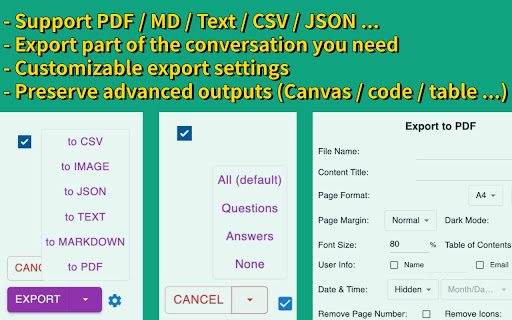
Transform your ChatGPT conversations into beautifully formatted, shareable files effortlessly! Whether for work, study, or personal reference, ChatGPT Exporter is the ultimate tool to download ChatGPT results as PDF, Markdown, Text, or JSON formats. ChatGPT is an advanced language model developed by OpenAI that can converse with humans like a human. ChatGPT conversations can be used for various purposes, such as research, training, or entertainment. However, extracting these conversations from ChatGPT can be a challenging task, especially if you have a large number of conversations or need to extract specific conversations only. ChatGPT Exporter is a tool that has been designed specifically to address this challenge. ๐Ÿ’ก Key Features ๐Ÿ–จ๏ธ Beautiful, Professional PDFs - No Unnecessary Clutter: Generated PDFs are free of distracting browser UI elements. - Customizable PDF Settings: a. Set your preferred filenameโ€”no need to rename files post-download. b. Define the content title, even if itโ€™s different from the conversation name. c. Adjust the PDF format (size and orientation). d. Choose between dark or light mode without altering the ChatGPT interface. e. Includes page numbers for easier navigation in long PDFs. f. Set page margins (Normal, Narrow, Wide) to match your formatting needs. g. Fine-tune font size with percentage-based scaling for better readability or space-saving. h. Choose your preferred font family for improved aesthetics or accessibility. i. Optionally include a table of contents for better structure and navigation. j. Add user info (name and/or email) for documentation or attribution. k. Control the visibility of date and timeโ€”choose to hide or display with custom formatting. l. Remove page numbers or interface icons for a cleaner, presentation-ready output. m. Page break per prompt option for better document structure and readability. โœ… Selective Content Download Export only the parts of the conversation you need. Unlike other extensions, youโ€™re not forced to download the entire chatโ€”just select the specific responses you want! ๐Ÿ“‚ Versatile File Format Support Export your ChatGPT conversations in multiple formats, including: - PDF - Markdown - Text (TXT) - JSON - and more ๐Ÿ“‹ Copy to Clipboard Skip the download step entirely! Copy your exported content directly to your clipboard for instant use in other applications. ๐Ÿ‘ฅ Anonymous GPT Conversations No login? No problem! Download your GPT chats before logging in to ensure your data is captured seamlessly. ๐Ÿงฎ Preserves Advanced Outputs Retains essential GPT formatting, such as: Canvas, Mathematical formulas (block and inline). Code blocks for developers. Tables and structured content. ๐ŸŒŸ User-Friendly Interface A clean, intuitive design ensures ease of use for beginners and advanced users alike. ๐ŸŒ Available in Multiple Languages The extension interface supports English, and exported files maintain text in your chosen language, making it ideal for international users. โšก Performance You Can Count On - Lightweight extension that won't slow down your browser. - Optimized for smooth performance with large conversations. - Regular updates to ensure compatibility with ChatGPT. ๐Ÿ’ฐ Free to Use with Optional Premium - Most features are completely free to use. - Markdown, Text, JSON, and CSV exports are always free. - PDF export: 3 free exports per day. Additional exports require a small fee to help cover tool maintenance costs. - For more details, visit our pricing page. ๐ŸŽฏ Use Cases and Benefits ๐Ÿ“Š Ideal for Professionals Save customer interaction logs, brainstorming sessions, or project ideas. Share polished PDFs or Markdown files with colleagues or clients. ๐Ÿ“š Perfect for Students & Educators Archive study notes or Q&A sessions for later review. Export code snippets, formulas, or tables for assignments. ๐Ÿ’ป For Developers Export JSON or CSV for data manipulation or analysis. Preserve code snippets with syntax highlighting in Markdown or PDFs. โœ๏ธ Content Creators' Companion Effortlessly save ideas or scripts. Use Markdown files directly in content management systems (CMS). Copy content directly to clipboard for quick pasting into blogs, social media, or writing apps. ๐Ÿ’ฌ FAQs 1๏ธโƒฃ Can I export only part of the conversation? Absolutely! Use the checkbox feature to select specific responses for export. 2๏ธโƒฃ Are canvas, formulas, code, and tables retained? Yes! All rich contentโ€”canvas, formulas, code blocks, and tablesโ€”is preserved in the export. 3๏ธโƒฃ What browsers does ChatGPT Exporter support? We officially support Chrome. It also works on Edge, Brave, and other Chromium-based browsers via the Chrome Web Store. 4๏ธโƒฃ How do you handle my conversation data? I have privacy concerns. We never store your data. PDF exports are processed temporarily on our server and deleted immediately. All other formats are handled entirely in your browser. 5๏ธโƒฃ Do I need to log in to use the extension? Most features work without logging in. Only PDF export requires signing into the extension. Other formats like Markdown, Text, and CSV don't require login. 6๏ธโƒฃ Can I use ChatGPT Exporter for free? Yes, most features are free. PDF export provides 3 free exports per day. Additional exports require a small fee to help cover tool maintenance costs. For more details, visit our pricing page. โœจ Why Choose ChatGPT Exporter? With unmatched versatility, advanced features, and a focus on user experience, ChatGPT Exporter is the only extension youโ€™ll ever need to save and share your ChatGPT results. ๐Ÿ”— Install now and experience the difference! ๐Ÿ“ง Support & Feedback Got questions or suggestions? Weโ€™re here to help! Contact us via our email support@chatgptexporter.com. โค๏ธ Changelog v2.26.1 1. Fixed date formatting for non-PDF exports v2.26.0 1. Improved PDF date and time formatting with timezone support v2.25.0 1. Added page break per prompt setting for PDF exports 2. Improved PDF layout with better margins and page breaks 3. Enhanced deep research report formatting in PDFs v2.24.1 1. Fixed button positioning issues v2.24.0 1. Fixed image rendering for PDF v2.23.0 1. Fixed message selector compatibility issues 2. Enhanced PDF styling for thinking processes and user messages v2.22.0 1. Added copy to clipboard feature v2.20.0 1. Added download location setting 2. Added auto-open thought process option 3. Reorganized settings into common and PDF-specific sections 4. Improved markdown formatting by removing duplicate line breaks 5. Enhanced PDF styling for thinking processes and typography v2.19.0 1. Added support for exporting conversation links 2. Added font family selection for PDF exports v2.18.0 1. Users can now input name and email for all export formats 2. Added a toggle to show/hide export buttons v2.17.1 1. Added "None" option for the select button 2. Selecting now automatically expands all "Thought Process" sections v2.17.0 1. Fixed several bugs v2.16.0 1. PDF export now supports full canvas rendering 2. Fixed several bugs v2.15.0 1. Added keyboard shortcut for the PDF export button 2. Fixed several bugs v2.14.0 1. Fixed several bugs v2.13.0 1. Added support for setting a filename prefix v2.12.0 1. Users can now input name and email for PDF generation v2.11.0 1. Fixed several bugs v2.10.0 1. [Pro] Added option to disable export success dialog v2.9.0 1. [Pro] Added support to remove branding across all formats v2.8.0 1. Added common settings section in the extension options and popup window v2.7.0 1. Users can now input any font size 2. Improved performance and reduced export wait time v2.6.0 1. Added option to remove page numbers from PDF footers 2. Added option to remove conversation role icons in PDFs v2.5.0 1. Added export options for user info (name and email) 2. Added export options for date info: creation, modification, or export time v2.4.0 1. Now remembers user selections and export options for quicker future use v2.3.0 1. Added font size selection (predefined options) v2.2.0 1. Added table of contents to PDF exports 2. Improved code block styling with syntax highlighting and line wrapping v2.1.0 1. Added localization for multiple languages 2. Tutorial page now opens on first install v2.0.0 1. Major update: introduced PDF export functionality
ChatGPT Exporter - ChatGPT to PDF, MD, and more screenshot 1ChatGPT Exporter - ChatGPT to PDF, MD, and more screenshot 2

Reviews (26 cached)

โ˜…โ˜†โ˜†โ˜†โ˜†2025-12-04
Bobby Clark

Tech Support/Billing Support is impossible to get in touch with. The product no longer works after I paid for the subscription for 100 downloads. What does work however is all you have to do is go to Print, when you click print change to "save as PDF" it will then save the entire file. This extension was suppose to help download every thread selected, it doesn't it continues to have a failed fetch error.

โ˜…โ˜†โ˜†โ˜†โ˜†2025-11-20
Michael Nolan

This extension IS NOT free (despite appearing so) and there also is a SERIOUS privacy concern with the extension. The extension further implies it is free by stating to the user "Buy Me A Coffee" with a link to (what seems to be) donate to the author; Mark Zhao. It is only AFTER you attempt to export a THIRD pdf within 24 HOURS, that the extension then informs you that you're on a "free plan", and THEN it gives additional info to pay the developer in the form of a SUBSCRIPTION. Anything - and everything - that you "export" is sent to their server.. not a big deal until you lookup the domain name and see that the domains registered address is somewhere off in Jiangsu (Eastern China)! There are serious implications with this; and those are the same implications that drive bi-partisan support in the US Congress, to get China to sell TikTok to a US based company. NO ONE is a solo developer in China; EVERY Chinese native WORKS for China; If, or better said, WHEN China wants your data from ChatGPT Exporter, they will get it - No ifs ands or buts. USE THIS EXTENSION WITH CAUTION!!!!

โ˜…โ˜†โ˜†โ˜†โ˜†2025-11-04
Chris L

Rubbish! It doesn't work at all! took me a lot of time selecting all the messages I wanted to download, but then fail to download! I tried downloading all, also failed!

โ˜…โ˜†โ˜†โ˜†โ˜†2025-10-26
Iggy White

Asking for money every other click and stopped working after only three exports. Like it's written by Adobe or Unity.

โ˜…โ˜†โ˜†โ˜†โ˜†2025-10-22
Cave Eagle

Dosn't work pdf export without registration

โ˜…โ˜†โ˜†โ˜†โ˜†2025-09-29
Joel Lagace

This plugin is a scam, It forces you to buy a subscription and complaints that the dev is poor and works hard as a reason. This should not even be aloud as a plugin. Why does Google allow demos. If I could I would flag all these scams.

โ˜…โ˜†โ˜†โ˜†โ˜†2025-09-07
mehrdad

Works fine but it was partially free once before, now I can't use it even once a day if I don't pay.

โ˜…โ˜†โ˜†โ˜†โ˜†2025-08-23
Qee Shaw

Only Select button is shown, Export button is hidden now. Please fix it. If it works well, i will modify my star rating.

โ˜…โ˜†โ˜†โ˜†โ˜†2025-08-05
Lovro Horvat

Doesnt work getting "Failed to export PDF: get session failed: 503 " error

โ˜…โ˜†โ˜†โ˜†โ˜†2025-07-22
Thundereus

Unfortunately not working in brave. Will change rating if it works of course.

โ˜…โ˜†โ˜†โ˜†โ˜†2025-06-20
Curtis Gilbert

Just installed 2 days ago and disappointingly Exports garbage on the CSV option? I only see the Chat details but no content. Wanted this for the "beautiful PDFs? and Markdown. Is there patch or ??

โ˜…โ˜†โ˜†โ˜†โ˜†2025-06-18
freedm

When I read the Overview, the word "FREE" immediately caught my attention. However, after installing and using the web extension, I discovered that it's only free for three uses before requiring a paid monthly subscription. This feels misleading. If it had been clearly stated upfront in the Overview that the free usage is limited to just three times, I wouldnโ€™t have bothered installing it. Now itโ€™s just another piece of unnecessary software I have to remove.

โ˜…โ˜†โ˜†โ˜†โ˜†2025-02-12
Thomas

It doesn't work!

โ˜…โ˜†โ˜†โ˜†โ˜†2024-10-26
Chris Drake

Pointless - only exports one single chat at a time, which you can already do with Ctrl-A (select all) and Ctrl-C (copy)

โ˜…โ˜†โ˜†โ˜†โ˜†2023-04-15
Gert Bhat

Did not work.

โ˜…โ˜†โ˜†โ˜†โ˜†2023-04-03
O Z

not working ;(

โ˜…โ˜…โ˜†โ˜†โ˜†2025-08-15
creative guy

it wont work unless you register and login to their website. so PASS from me. no thanks

โ˜…โ˜…โ˜†โ˜†โ˜†2025-08-05
Michael Wood

This app would be perfect if it provided the full URL source for Web Search chats (not just the domains). Please add this feature in, and I'll gladly give it five stars. (The information is available in the HTML.) Without this feature, one cannot extract chats for fact checking.

โ˜…โ˜…โ˜†โ˜†โ˜†2025-07-30
phรกt nguyแป…n

It makes my ChatGPT history panel disappear!

โ˜…โ˜…โ˜†โ˜†โ˜†2025-07-22
Bonnie MacKellar

This does not work on a Ubuntu installation of Chrome. All of the exports are empty even though I selected All, clicked the checkbox to get all messages, and exported to text. The text export is always empty and so is the png

โ˜…โ˜…โ˜†โ˜†โ˜†2025-04-26
Blu Tve

Error when i click 'EXPORT' for any methods (image, text, json, md..): ยด Failed to export Markdown: Cannot read properties of null (reading 'userData') ยด Used : Incognito window, without login. I also tried without selecting 'Content Title' and 'User Info' and still same. ----- I also tried with logged in and it work good but without login is no longer working.

โ˜…โ˜…โ˜†โ˜†โ˜†2023-05-16
Diogo Verรญssimo

Does not include space between paragraphs.

โ˜…โ˜…โ˜…โ˜†โ˜†2025-11-18
Echo Ding

too expensive

โ˜…โ˜…โ˜…โ˜†โ˜†2025-01-25
Alex _

looks solid for ONE conversation, but I need to export them all and didn't find how to do it with this :(

โ˜…โ˜…โ˜…โ˜†โ˜†2024-06-06
Amadeus H.

so

โ˜…โ˜…โ˜…โ˜†โ˜†2023-09-12
Douglas Cerutti

It doesn't copy the line breaks correctly, I need to fix them manually.

Permissions (1)

Permissions

storageโ„น Can store data locally in your browser

Details

Version 3.6.0
Updated Mar 17, 2026
Size 1.1MiB
First Seen Mar 23, 2026

More by Mark

Popular in workflow

Popular Extensions