
Volume Booster With Shortcuts
v1.2 Updated Aug 15, 2024 115KiB
⚠️Not updated in over a year
Description
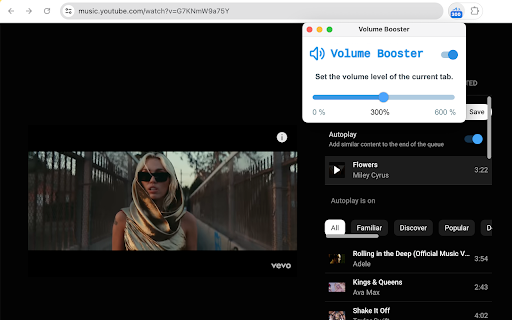
Volume Booster With Keyboard Shortcuts helps boost video or music volume to up to 600%.
After installation, you can click the extension icon and control the volume using the slider, or use the toggle to turn off/on the extension.
Volume level is per tab. You can set different volume levels for different tabs.
You can use "Alt+Up" to increase the volume and "Alt+Down" to decrease the volume. Sometimes you need to click the extension icon for at least once.

Reviews
Loading reviews...
Permissions (4)
Permissions
storageℹ Can store data locally in your browser system.display tabCaptureℹ Can capture tab audio/video tabsℹ Can see your open tabs and their URLs
Details
| Version | 1.2 |
| Updated | Aug 15, 2024 |
| Size | 115KiB |
| First Seen | Mar 23, 2026 |
More by goodmoviesinfo

Popular in workflow

Adobe Acrobat: PDF edit, convert, sign tools
by Adobe Inc.
330M
★ 4.40
workflow
330M
★ 4.40
workflow

Chrome Remote Desktop
by Chrome Remote Desktop Release Managers
38M
★ 3.14
workflow
38M
★ 3.14
workflow

Microsoft Power Automate
by Microsoft Corporation
10M
★ 1.99
workflow
10M
★ 1.99
workflow

Screencastify - Screen Video Recorder
by castify-ext-dev
9M
★ 3.95
workflow
9M
★ 3.95
workflow

Mendeley Web Importer
by Mendeley
3M
★ 2.25
workflow
3M
★ 2.25
workflow
Popular Extensions
Adobe Acrobat: PDF edit, convert, sign tools
by Adobe Inc.
330M
★ 4.40
workflow
330M
★ 4.40
workflow
Chrome Remote Desktop
by Chrome Remote Desktop Release Managers
38M
★ 3.14
workflow
38M
★ 3.14
workflow

Cisco Webex Extension
by cisco.chromestore
24M
★ 2.34
social
24M
★ 2.34
social

Kami for Google Chrome™
by Kami
17M
★ 4.56
education
17M
★ 4.56
education

Read&Write for Google Chrome™
by Texthelp
17M
★ 3.44
accessibility
17M
★ 3.44
accessibility