Movie Subtitles icon

Movie Subtitles

by gignu

v1.10.0 Updated Aug 10, 2025 218KiB
CWS
8K
Users
★ 3.93
44 reviews
#8688
of 207.1K
workflow
#2557 of 31.8K

Description

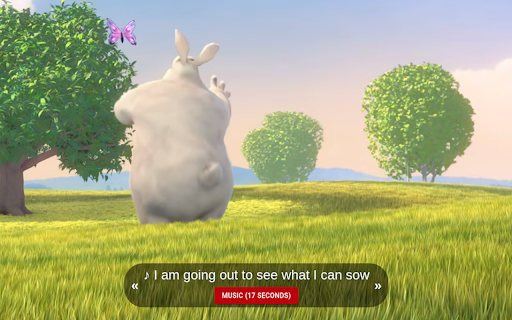
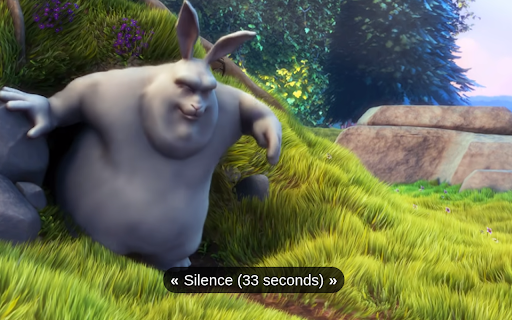
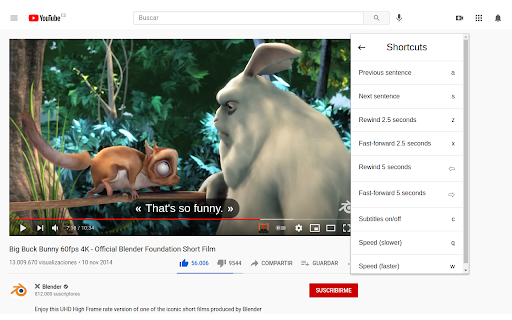
Add your own subtitles on almost any video/movie streaming platform you can think of, such as Amazon Prime, Netflix (with some restrictions), Disney+ (with some restrictions), Youtube, Twitch and many more! Unfortunately, Movie Subtitles does not have a subtitle search. You have to download the subtitles online before you can use them in the extension. There are many websites that offer free subtitles. Two of the most popular ones are opensubtitles.org and yts-subs.com. Once you’ve got the subtitles you're good to go! Movie Subtitles was originally developed to facilitate language learning and comes with many useful features for that purpose, such as the ability to jump between dialogues, skip silence and many more! Features: - Skip silence (scenes between dialogues) - Skip music (if supported by the subtitle file) - Synchronize subtitles - Adjust subtitle style - Select/Copy subtitle text (in edit mode) - Upload subtitles in 40+ languages - Supported formats (.txt, .srt, .sub) - Shortcuts (not on Netflix) Shortcuts: - Previous sentence - Next sentence - Rewind (2.5 or 5s) - Fast-forward (2.5 or 5s) - Speed (slower) - Speed (faster) - Subtitles on/off - Sync subtitles (1s earlier) - Sync subtitles (1s later) Movie Subtitles is an open-source project. If you have any ideas for improvement, found a bug, or want to contribute in some other way, you're welcome to do so! https://github.com/gignupg/Movie-Subtitles If you want to use Movie Subtitles to skip certain scenes of a movie, such as violent scenes, sexual scenes etc. check out the article on Medium I wrote about this topic: https://gignu.medium.com/how-to-skip-violent-scenes-and-adult-content-in-movies-3c7d89b813ad Credits: - Logo inspired by icons8 https://icons8.com/icons/set/movie-theater - The extension was built using Ixieyang's React Boilerplate https://github.com/lxieyang/chrome-extension-boilerplate-react - Screenshots from Big Buck Bunny https://www.youtube.com/watch?v=aqz-KE-bpKQ License: This project is licensed under the MIT License
Movie Subtitles screenshot 1Movie Subtitles screenshot 2Movie Subtitles screenshot 3Movie Subtitles screenshot 4

Reviews (10 cached)

★☆☆☆☆2025-09-10
Josh Thompson

scam

★☆☆☆☆2024-12-19
Isabel Ahumada

Please add twitch.tv!!!

★☆☆☆☆2024-09-26
Salep

u cant kidnap all the shortcuts without letting people customise them

★☆☆☆☆2023-03-19
Johann Blake

Extremely difficult to adjust the offset to match the actual spoken text. Not worth it.

★★☆☆☆2021-11-07
Igor Babic

It worked few days, now say wrong format, please use srt, I put srt all the time. Now not work.

★★☆☆☆2021-05-19
Michal Kucytowski

Skipping boring scenes? What an ridiculous addon. How about just don't watch a movie at all, just read the subtitle file in a notepad? There surelly should be an option to disable this "Silence (x seconds)" absurd. I cannot find any other chrome plugin, this one works perfect but why did you put this "skip boring scene" option?!

★★★☆☆2025-02-04
Chris Vydas

Decent but needs a built-in subtitle search which it doesn't have currently

★★★☆☆2024-03-16
Hayden Galloway

Several critical features missing: -No way to move the subtitles up or down. They are overlapping my existing subtitles and i want to move them above them. -My subtitle file and sync position should be maintained when I close the video url and reopen it. -No way to display multiple subtitles simultaneously. Fortunately my existing video has English already so I just needed to add Japanese over it and it worked. But in case there are no subtitles at all, displaying two at once is critical (as the description claims this app was designed for language learning). Non critical feature: Asian languages should optionally support vertical display instead of horizontal. This way I can put the English subtitles at the bottom (reading from left to right) and the Japanese subtitles on the right side of the video (reading from top to bottom).

★★★☆☆2023-06-12
Veronica Karen

It works decent, but has one flaw. When you put your cursor on the subtitles, the video pauses. That is very irritating, and I would love it if instead, users could put their cursors on the imported subtitles and the video kept on playing as usual. Please, please, please, please fix this.

★★★☆☆2022-07-01
Đặng Tiến Đông

Don't work with HBO Max

Permissions (2)

Permissions

activeTab Can access the current tab when you click the extension storage Can store data locally in your browser

Details

Version 1.10.0
Updated Aug 10, 2025
Size 218KiB
First Seen Mar 29, 2026
