
⚠️Requests 1 sensitive permission
Description
Analytics Data QA is a Chrome extension that automatically verifies whether the data collected by analytics tools like GA4 and Amplitude accurately matches your log definitions.
Say goodbye to the hassle of manually checking countless events one by one. Analytics Data QA offers developers, planners, data analysts, and all users a unique and valuable way to validate data quickly and easily.
Key Features
Automatic Log Definition Comparison: The extension automatically checks if the actual events happening on your website match your log definitions and shows you the results at a glance.
Event Details at Your Fingertips: Instantly view detailed descriptions for each event, helping you clearly understand the data's meaning.
Automated Page Screenshots and Organization: It automatically takes a screenshot when you navigate to a new page and organizes events by page for systematic management.
Recording Functionality: Record how events are generated to visually understand data flow and easily diagnose issues.
How to Use
With Analytics Data QA, data validation becomes much easier and more accurate. Just follow these simple steps:
Install the Extension: First, search for "Analytics Data QA" in the Chrome Web Store and install it.
Open Developer Tools: On the webpage you want to validate, press F12 on your keyboard or go to "View > Developer > Developer Tools" to open the developer console.
Activate the Extension: In the developer tools menu, click the "AQA" tab to activate the extension.
Log In and Start a Project: Log in on the extension's login screen, then click the "Start Project" button.
Upload Log Definitions: Upload the log definition file needed for validation.
Trigger Events on Your Site: Now, on the site you want to validate, directly trigger events like button clicks or page navigation.
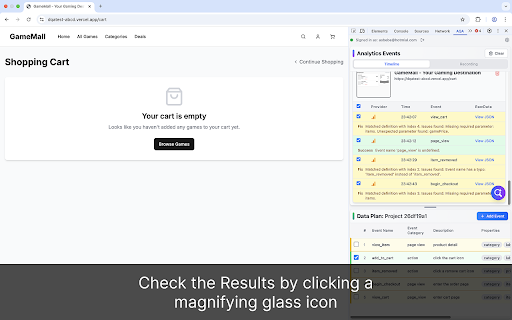
Check the Results: Click the verification icon in the extension to easily see if the actual events match your log definitions. If there's a mismatch, it will immediately show you the details of what's different.
Experience data QA like never before! If you have any suggestions for modifications or additions, feel free to let us know!


Reviews
Loading reviews...
Permissions (7)
Permissions
activeTabℹ Can access the current tab when you click the extension notificationsℹ Can show desktop notifications offscreen storageℹ Can store data locally in your browser tabCaptureℹ Can capture tab audio/video webNavigationℹ Can monitor navigation events webRequestℹ Can observe and analyze network traffic
Details
| Version | 1.0.3 |
| Updated | Oct 5, 2025 |
| Size | 418KiB |
| First Seen | Mar 29, 2026 |
Popular in developer

GoFullPage - Full Page Screen Capture
by GoFullPage
10M
★ 4.89
developer
10M
★ 4.89
developer

TouchEn PC보안 확장
by 라온시큐어
8M
★ 1.33
developer
8M
★ 1.33
developer

React Developer Tools
by Meta
5M
★ 3.95
developer
5M
★ 3.95
developer

Meta Pixel Helper
by Meta
4M
★ 3.91
developer
4M
★ 3.91
developer

ColorZilla
by colorzilla.com
4M
★ 4.59
developer
4M
★ 4.59
developer
Popular Extensions

Adobe Acrobat: PDF edit, convert, sign tools
by Adobe Inc.
331M
★ 4.40
workflow
331M
★ 4.40
workflow

AdBlock — block ads across the web
by AdBlock
63M
★ 4.48
workflow
63M
★ 4.48
workflow

迅雷下载支持
by Shenzhen Xunlei Network Technology Co., Ltd.
59M
★ 2.77
workflow
59M
★ 2.77
workflow

Grammarly: AI Writing Assistant and Grammar Checker App
by Grammarly
42M
★ 4.50
communication
42M
★ 4.50
communication

Adblock Plus - free ad blocker
by eyeo GmbH
41M
★ 4.39
workflow
41M
★ 4.39
workflow