
Description

Reviews (20 cached)
This does nothing more than group tabs, which is built into many browsers, in my case Brave. Waste of time.
The tabs you put into a workspace are not saved, so after you reopen the browser and try to click on the workspace, you'll find that the workspace is empty... I really don't get the point of this extension.
If it does not include the option to save a tab group to the workspace it is redundant. Then it is just another form of tabgroups. It is a new(open) window with too many open unorganised tabs. How do I add a tab to a workspace???
Works well 99% of the time. The other 1%? Well, it loses all tabs inside the workspace. If it happens to be workspace not visited for a long time you're doomed getting your tabs back.
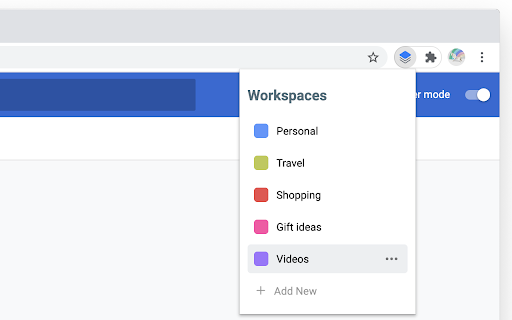
Works. Except when it doesn't. And it doesn't tell you. Chrome is missing the functionality of "Contexts", and this extension seeks to implement it via "Workspaces". First, the Workspaces are really a wrapper around a single window comprised of tabs. You're basically naming a window. There is some initial overhead in naming a window. Be sure to click the button to add the existing tabs (*). Problems: - You can have multiple workspaces with the same name (*) - You might find when you close a workspace and reopen it, SURPRISE, there are no tabs! (*) - Limited set of pre-selected colors available Feature requests: - Nested workspaces. Or workspace groups. Or "Contexts" :) Allows for grouping of windows (workspaces) that can all open at once or can be opened directly. Implemented as nested workspaces in the workspace window - Menu bar access (not just toolbar access) - Quick way to save all windows into workspaces (at least windows not currently in workspaces) (*) These are a bug. I suspect what happens is if you create a workspace, realize you forgot to click the magic button, delete the workspace, then re-create the workspace with the same name, this extension hasn't fully deleted (only hid) the deleted workspace, and when you correctly re-create the workspace, adding windows, the windows get added to a now-hidden workspace, the deleted workspace is instead what shows up in the list. And this is a show-stopping bug. If it weren't for this bug, it would be a 4-star review. The feature requests being implemented would raise it to 5-start. The problem is with data loss being non-deterministic (you have my hypothesis, but it's untested), the extension is non-usable. Bummer, as the competing extension has unfortunate permissions required.
It's basically just opening your tabs in a NEW WINDOW and therafter grouping them
always go wrong, the things I saved to one workspace always lost....
garbage. need some tools like implemented in Opera or Firefox
All it does it making use of group tabs functionality of google chrome. it also removes all your current groups so good luck re-organizing your tabs if you have groups.
Doesn't save new tabs and doesn't save groups at all
Not like workspaces in Opera or Vivaldi. Those are way better
Good idea and implementation looks nice, but this breaks tab grouping so not as useful as could be. I absolutely prefer to have tab groups rather than workspaces
Sometimes when I just open the browser and click on this extension icon, there's no response—it doesn't pop up.
Was okay until a recent Chrome update, and now it duplicates the underlying tab group every time you open a workspace.
It's ok. Workspaces in other browsers (like Edge) are more integrated, allowing (for example) multiple tab groups (or none) in a workspace. This plugin requires one, and only one, tab group, and results in some unexpected behavior if you try to open multiple tab groups (or forget to include a new tab in the existing tab group). Still, it's nice that it remembers the tabs you had open, which frees me up to close the window when I'm not using them.
It is disappointing that this feature isn't baked into the Chrome base yet, but so great to have this plug-in instead even if it is too basic. What I am missing is the ability to sync these workspaces across the different devices that I run Google Chrome on with this plug-in. The plug-in should also automatically set the window name to match the workspace name; something that needs to be otherwise done manually by the user.
For me, it is easily a 5-star tool. I've been using Beta/Dev versions of tabs for years. I agree, it was a productivity and sanity game-changer from the start. Except... I cut one star because a (very obviously needed) feature is missing, and a second one because it has been missing for so long. Of course it's technically possible...those are resource decisions that I do not make whether you are Google or third party. For everyone else, you need and want Workspaces if you don't need an Active/Inactive Status for an entire Window (Tabs, Groups, and all). I'm not certain when the Tab Search was included (I can easily look at a new feature and not see it); It is a fabulous and very effective addition to sanity management. When I do see or trip over a new feature while I'm working, I click it. If I need info, I'll click or search for details. Here's the down. My core reason for using Tab Groups is active memory. Tab Groups and named Windows are FAB even if they did contribute to my "Tabs Gone Wild" habit, which is now folded into "Windows Gone Wild." Tab Groups seemed to be the solution because once in a while I noticed the inactive>active lag. To that end, the newer feature of showing which tabs are inactive (whited-out favicon with a dotted line around) is very reassuring that help is on the way. It's not here yet. I need a master switch per Window that makes all of the tabs, groups and whatever in that Window inactive. I have "standing" or constant Named Windows for business functions, identities, projects, vendors, Admin...you get the idea. The ability to minimize memory by making some Windows inactive, to make the current Window(s) faster and me more productive, will be a quantum leap forward. And yes, naming windows is largely useless other than when viewing Alt+Tab. That, and it appears to kick in and work beautifully after an update or if I crash. It does not work as expected if I politely close the Window. So, I now trust hard shutdowns only. Now, where was I when I started this...can you give me a hint? Seriously.
Why does a workspace always has to open in a new window? can't we just close the old one and reopen in the same window?
Have an issue here i've made 3 workspaces, but only 1 opens, other - just don't react Any suggestions how to fix it?
I was expecting different behaviour. Workspaces are only in one chome window, it would be much more logical and functionall to create workspaces that include multiple windows with multiple tabs. So you could open whole project with one click. This is pretty much not usable for me.
Permissions (4)
Permissions
Details
| Version | 0.7 |
| Updated | Feb 18, 2024 |
| Size | 1006KiB |
| First Seen | Mar 26, 2026 |
More by Vojtěch Smejkal

Popular in functionality




Popular Extensions




