Voice Typing icon

Voice Typing

by chromium-devs

v7.0.2 Updated Oct 14, 2023 60.29KiB
CWS
40K
Users
★ 3.23
71 reviews
#351
of 26.8K
workflow
#117 of 3.3K
⚠️Not updated in over 2 years

Description

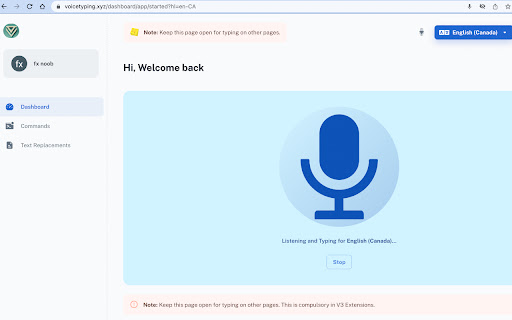
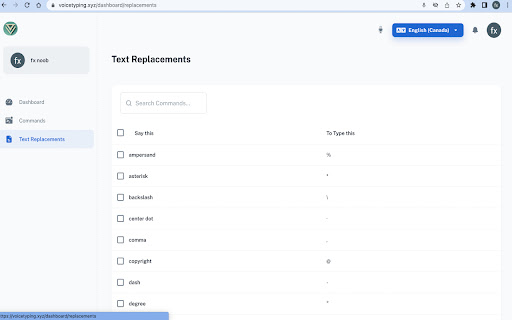
voice typing --- it makes it easy to type text and emoji in the browser using voice-to-text. Whether it is writing emails in Gmail, answering assignments in Classroom, responding to customer tickets, replying to chats or learning pronunciations, Voice Typing - Voice-To-Text capability lets you do them all using your voice. Works on google docs, google spreadsheets, fb messenger, instagram chats, Gmail or write blog posts on Wordpress or send messages in Slack and in any site that contains a text box. It can recognize a wide variety of languages. In order to work with this extension, simply open the addon's UI and then press on the big microphone icon to start converting your voice to text. Please note that, when the add-on is first started, it asks for microphone permission. Please accept the permission to start working with the add-on. Works on google docs, google spreadsheets, fb messenger, instagram chats, Gmail or write blog posts on Wordpress or send messages in Slack and in any site that contains a text box. Greatest feature of all is, that it works on all the websites. :) website: https://www.voicetyping.xyz/ Some Features: ✅ Integration with ChatGPT with "Computer" command. ✅ Type text and emoji with your voice on any website in more than 100 languages. ✅ TTS (Text to Speech) and copy on single click for recognized text. Comes with voices commands such as ✅ emoji - to search from more then 1800 emoji in your language to type a emoji with your voice. ✅ Commands such as undo, redo, newline, press enter etc. ✅ Word Expander. ✅ Word Replacements. ✅ Speech Translation. ✅ Free to use. Note: Listed commands name changes according to selected language. If you feel any issue, please write to fxnoob71@gmail.com
Voice Typing screenshot 1Voice Typing screenshot 2Voice Typing screenshot 3

Reviews (21 cached)

★☆☆☆☆2026-02-09
Rashed Sahawneh

Double-charged $26 via PayPal. Premium service NOT activated. Transaction IDs provided to PayPal. This is a scam.

★☆☆☆☆2024-11-13
Vince OKeefe

When I pay for a service, I expect to receive it. Paid $13.00, and was not upgraded!

★☆☆☆☆2024-10-28
Salvatore Pisanelli

ATTENTION! I paid for the Premium version but it still doesn't work and they don't even reply to my email :-(

★☆☆☆☆2024-09-23
purple narwal

dosent work

★☆☆☆☆2024-04-06
Deeper With Diego

An extension that requires me to sign onto a sketchy website to use? No thanks.

★☆☆☆☆2024-01-28
Christie N Hendrick

I cant get it to do anything.

★☆☆☆☆2023-12-14
kashu ash

NOT WORKING

★☆☆☆☆2023-11-18
Mo Hagar

Does nothing at all for me. And I've poured over the help page many times hoping this would work. :(

★☆☆☆☆2023-10-16
Motasim Fuad

Doesn't work

★☆☆☆☆2023-09-16
Bhushan Joshi

Useless

★☆☆☆☆2023-03-05
Islam

this is not an extension, it just redirects you to a web page

★☆☆☆☆2023-01-31
Kauai Computer Repair - Mac & PC Expert

you have to sign in with your Google or Facebook account and then find out it's only a trial with nags to upgrade to pro version. punctuation commands don't work and when you click on the microphone to start typing into a web page text field it takes you away from the page that you're on to their page. when you go back and start talking it doesn't work and punctuation is useless this app is useless and a waste of time.

★☆☆☆☆2023-01-25
Fabio Quinci

The speed of dictation has reduced a lot, it was a hundred thousand times better before. Automatic (unwanted) capitalization repeats, when dictating commands you have to stop, dictate the command, pause again and resume dictating, same thing when dictating punctuation. On Microsoft Edge, however, automatic dictation is inserted (annoying and inaccurate). After each sentence, the letter u is transcribed. too bad, it has become a useless extension.

★☆☆☆☆2022-09-20
Göktürk Güngör

s

★☆☆☆☆2022-07-31
TonyD_NYC

This don't work. There's no show full commands if you right or left click the icon, & there's no emojis in the settings . I tried everything to make it work . If anyone knows how to get it to show & type emojis , please let me know. Thanks

★★☆☆☆2023-12-02
dv d

Not working after update....Only “loading” is displayed on the screen and is not translated..........

★★☆☆☆2023-06-20
Bryan Gallardo

trash. we need better software

★★☆☆☆2023-05-09
Johanna “MissJadecat” Willner

Says its free but it isnt. Just standard trial and then you have to pay

★★☆☆☆2023-01-24
Doc J

Doesn't work for me . Does nothing in Chrome 109 on PC

★★★☆☆2023-02-17
Cory Sakai

It works but the interface is huge and not very intuitive. There is a lot of wasted space. Maybe the next version will be cleaner and smoother. It would be nice if you could just click on a web form and start talking/typing right into it instead of having to copy and paste.

★★★☆☆2023-01-25
Bule Bule

Hi. I tried it in German. Unfortunately it doesn't work accurately. After the punctuation marks there is always the letter U. If you can fix this mistake, I would buy it immediately.

Permissions (3)

Permissions

activeTab Can access the current tab when you click the extension contextMenus Can add items to the right-click menu storage Can store data locally in your browser

Details

Version 7.0.2
Updated Oct 14, 2023
Size 60.29KiB
First Seen Mar 22, 2026



