
⚠️Not updated in over 2 years
Description
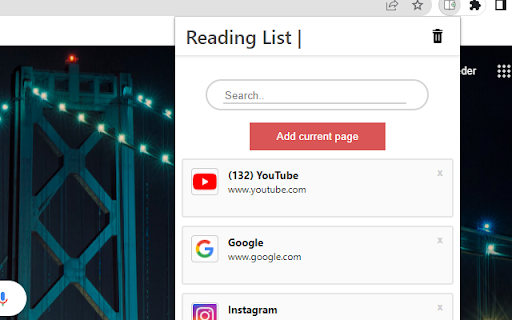
This exstention saves links to pages for a later use.
This readinglist and bookmark exstention is simple and easy to use. You can easily find the link you are looking for by using the search functionality, which helps keep your tab count down.
By turning on chrome synchronization your saved links from one device will be automaticly be shown to you on all your devices.
How to use the exstention:
1. Go to the page youn want to save for later
2. Open the exstention by clicking on the icon in the top right of your browser.
3. Click the add current page button.
4. When you want to open a page, click the reading item you want to read.
(If you cannot find it, you can use the search bar)
5. When you are done with a page, just click the - X - in the right cornor of the reading item

Reviews
Loading reviews...
Permissions (2)
Permissions
storageℹ Can store data locally in your browser tabsℹ Can see your open tabs and their URLs
Details
| Version | 0.0.1 |
| Updated | May 25, 2022 |
| Size | 72.38KiB |
| First Seen | Apr 1, 2026 |
Popular in workflow

Adobe Acrobat: PDF edit, convert, sign tools
by Adobe Inc.
331M
★ 4.40
workflow
331M
★ 4.40
workflow

AdBlock — block ads across the web
by AdBlock
62M
★ 4.48
workflow
62M
★ 4.48
workflow

迅雷下载支持
by Shenzhen Xunlei Network Technology Co., Ltd.
59M
★ 2.77
workflow
59M
★ 2.77
workflow

Adblock Plus - free ad blocker
by eyeo GmbH
41M
★ 4.39
workflow
41M
★ 4.39
workflow

Chrome Remote Desktop
by Chrome Remote Desktop Release Managers
38M
★ 3.14
workflow
38M
★ 3.14
workflow
Popular Extensions
Adobe Acrobat: PDF edit, convert, sign tools
by Adobe Inc.
331M
★ 4.40
workflow
331M
★ 4.40
workflow
AdBlock — block ads across the web
by AdBlock
62M
★ 4.48
workflow
62M
★ 4.48
workflow
迅雷下载支持
by Shenzhen Xunlei Network Technology Co., Ltd.
59M
★ 2.77
workflow
59M
★ 2.77
workflow

Grammarly: AI Writing Assistant and Grammar Checker App
by Grammarly
42M
★ 4.50
communication
42M
★ 4.50
communication
Adblock Plus - free ad blocker
by eyeo GmbH
41M
★ 4.39
workflow
41M
★ 4.39
workflow