QuickForm - Autofill & Form Filler icon

QuickForm - Autofill & Form Filler

by quickform.pro

v1.10.5 Updated Mar 31, 2026 2.11MiB
CWS
30K
Users
β˜… 4.02
58 reviews
#3454
of 207.1K
workflow
#1087 of 31.8K
βœ…Recently updated

Description

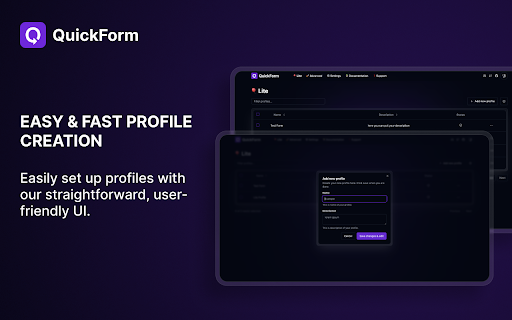
QuickForm is a free form autofill Chrome extension and form filler that lets you fill out any online form in one click. Unlike browser autofill or other auto fill extensions, QuickForm works on complex web apps: React, Angular, Vue, dynamic SPAs, internal tools, staging environments, and enterprise portals. πŸ”΄ How It Works: 1. Activate Record Mode on any web form 2. Fill it out naturally - QuickForm saves every field automatically 3. One click to autofill that form anytime, instantly and accurately ⚑ Features: πŸ”₯ Record Mode - Automatically detect and capture form fields. No manual configuration needed. πŸ–±οΈ Auto-Click - Automate clicks between form steps, buttons, and navigation. ⏳ Smart Delays - Set timed pauses for pages with loading states or dynamic content. βœ… All Field Types - Input, textarea, checkbox, radio buttons, select dropdowns, date pickers, and more. 🏎️ Multiple Profiles - Create different profiles for different forms or environments. πŸ“„ Duplicate Profiles - Clone and modify profiles for similar forms. πŸ”— URL-Specific Profiles - Link profiles to specific websites for automatic form filling. πŸ“₯πŸ“€ Import/Export - Backup, share, and transfer profiles between devices. 🎨 Autofill Animation - Customize the speed of form filling. ⚑ Fast Access - Fill forms from the toolbar icon or right-click context menu. 🎯 Built For: - QA testers who fill the same test forms hundreds of times - Developers working with admin panels, staging forms, and internal tools - Job seekers filling out repetitive application forms across multiple sites - Data entry teams who need fast, accurate, repeatable form filling - Anyone who's tired of typing the same information into forms πŸ† Why QuickForm Over Other Autofill Extensions? - Works where others fail - Supports React, Angular, Vue, and dynamic web apps that break generic autofill tools. - Record Mode means zero setup - No CSS selectors, no field mapping, no technical knowledge needed. - 100% free - No premium tier, no paywalled features, no usage limits. - No account required - Install and start using immediately, no sign-up. πŸ”’ Privacy & Security: Note: Profiles are stored in plain text locally, so ensure your device is secure to prevent unauthorized access. Automate form filling in Chrome today. Download QuickForm, the fast, free, and private form filler and autofill extension trusted by 30,000+ users 🌟
QuickForm - Autofill & Form Filler screenshot 1QuickForm - Autofill & Form Filler screenshot 2QuickForm - Autofill & Form Filler screenshot 3

Reviews (10 cached)

β˜…β˜†β˜†β˜†β˜†2025-10-30
ArtedEye

Not what I expected: does not automatically fill out forms from one website to the other (based on what you start to type, or just the form input ID/class)

β˜…β˜†β˜†β˜†β˜†2024-12-16
Maria C.

Doesn't work

β˜…β˜†β˜†β˜†β˜†2024-10-17
M 4Equity

So difficult to use, inspect the element -> grab the selector -> set 1 by one. Super difficult for long forms... I just migrated to Easy Autofill

β˜…β˜…β˜†β˜†β˜†2025-10-09
Sachin Karhana

don't work on dropdown menu and also doesn't work on meesho supplier add product page

β˜…β˜…β˜†β˜†β˜†2024-09-07
krish :]

Well, it doesn't work for multichoice questions or checkboxes.

β˜…β˜…β˜†β˜†β˜†2024-09-04
Ed Weng

The record functionality seems to be broken on my browser (unable to create a new profile). If I manually add all of the text fields through the interface, the auto filling does work (but it's animated and slow to fill in).

β˜…β˜…β˜…β˜†β˜†2026-01-14
Md Mahabur Rahman

Currently Working pretty well for everything but drop downlist list, selset country date of birth some field not working

β˜…β˜…β˜…β˜†β˜†2025-09-13
Sujeet Kumar

autofill on website load does not work.

β˜…β˜…β˜…β˜†β˜†2025-09-06
Rahul

I’ve now switched to QuickFill β€” it offers wider use cases and is much simpler to use. Apologies for the switch, but I believe this will serve better. For other users, I’ve attached the link below: https://chromewebstore.google.com/detail/quickfill-autofill-your-a/ggmpijajgbagacnnnlghjjlneigfdbmh

β˜…β˜…β˜…β˜†β˜†2025-06-12
Gokay Yildiz

would be better if it had hotkey to execute filling forms.

Permissions (4)

Permissions

activeTabβ„Ή Can access the current tab when you click the extension contextMenusβ„Ή Can add items to the right-click menu storageβ„Ή Can store data locally in your browser tabsβ„Ή Can see your open tabs and their URLs

Details

Version 1.10.5
Updated Mar 31, 2026
Size 2.11MiB
First Seen Apr 1, 2026