
Description

Reviews (19 cached)
Does not work
Is this a joke? Installed and all I could find was a "text width" adjustment that doesn't work. Why are theses developers wasting our time? Is this supposed to make text darker?
Breaks emojis. Emojis on webpages all turn dark and unviewable once this is installed.
hopeless. chrome will never imorove
did not work
POOR !
Useless! Didn't do a single thing, even after making adjustments on the slider.
Did not work for me. First, it was not clear you had to adjust a setting (thought it auto-adjusted for you), and second, it did not make any difference even after I played with the settings. The jagged fonts in Chrome is more of a problem with the browser, but this extension did not solve that problem as it claims to.
Font Rendering Enhancer is very good but it makes certain fonts e.g. emoji from Segoe UI Emoji look bad. The developer should add some "Exclusion list" for certain fonts e.g. emoji fonts so they are not touched at all in the browser.
This was working fine until a Chrome update a few months ago. Now it causes the Chrome Print Preview to hang, take forever to load, and consume 100% of CPU even after canceling the print dialogue. After much troubleshooting, I narrowed it down to this extension. Problem exists when it is enabled, and immediately disappears when it is disabled.
I was very hopeful that Font Rendering Enhancer would work for me because I use Chrome a lot. However, installing it made no difference even though I moved the font width slider from 0% to 100% and back again, and refreshed pages after each slider movement. Web sites checked included Wikipedia (which normally looks just fine), hackernews.com (which uses quite faint text; mentioned at contrastrebellion.com), and Google search results. BTW, the extension was last updated in 2014. The web store says the extension is compatible with my device. Am I doing something wrong?
Doesn't do much for my fonts, but does black all emojis on Facebook (turning them into solid black circles) on my Chromebook. So no.
I can't really tell the difference of text with or without the extension. What I can notice (after a long troubleshoot to find the source of the problem) is that having this extension active disables YouTube subtitles' character edge style. Whichever style I click, it's not applied to the subs. Now that I disabled this extension, I finally have the character edge style applied to the YouTube subs again. I'll be uninstalling this extension now.
!!!problem!!! please fix it !! When I type in google search bar and the word is misspelled the text gets distorted!! please fix this thanks.
Love it but has a major flaw, if you watch YouTube videos and you've subtitles on, and assuming that you're not a monster and you do have Drop Shadow enabled in the subtitles settings. This extension will somehow magically kill the drop shadows, making it an annoyance to use. I wish if the dev can add a method to exclude YouTube specifically from it's rendering.
How do you activate this? I moved the bar to 40 and nothing happened. I hate Google Chrome for making me waste my time on this! WHo ever thought of light gray text on light gray background???!!!!!
It do nothing with font rendering. Until you reload the page.
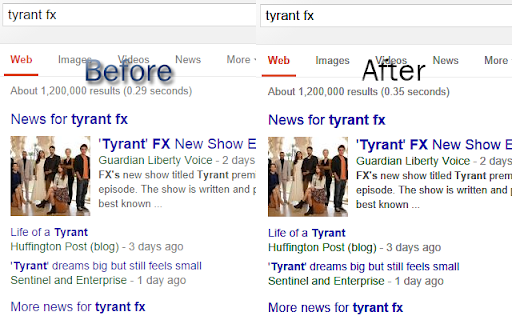
Extension needs an update - Currently it breaks the proper rendering of emojis on many web pages (like Facebook). In the past, it has definitely helped with darkening the text (be sure to adjust the font width slider in the 'Options' page - I used a value of 30 on my system).
Still allows gray-on-white style; the most idiotic concept since Al Gore invented the interwebs. NoSquint should get going on this "Chrome" thing, in case of the unlikely event that it catches on. Firefox FTW.
Permissions (1)
Permissions
Details
| Version | 0.3.0 |
| Updated | May 7, 2024 |
| Size | 573KiB |
| First Seen | Apr 1, 2026 |
More by Festum

Popular in workflow




Popular Extensions
