
⚠️Not updated in over a year
Description
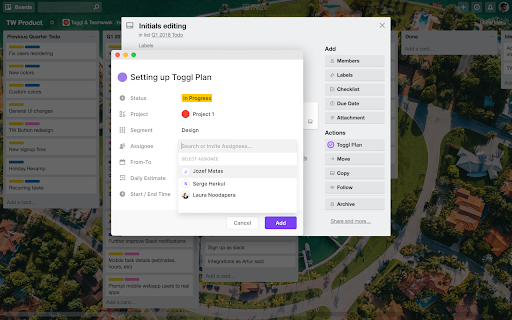
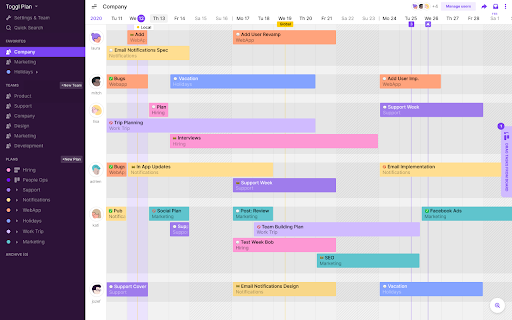
Highlight a task description anywhere on the web, attach a project and an assignee from the simple pop-up, and it’s automatically added to your Toggl Plan timeline.
This extension also adds a 1-click button inside several popular web tools for quick task integration. Toggl Plan extension is open source, and user contributions are highly appreciated!
How to use it?
1. Sign up for a free Toggl Plan account
2. Add Toggl Plan extension to your Chrome browser
3. Highlight + right-click on any text and choose “Add to Toggl Plan”
4. Add additional details: user, project, dates
6. The task is sent to your Toggl Plan timeline


Reviews
Loading reviews...
Permissions (5)
Permissions
contextMenusℹ Can add items to the right-click menu identityℹ Can use your Google account identity storageℹ Can store data locally in your browser tabsℹ Can see your open tabs and their URLs webNavigationℹ Can monitor navigation events
Details
| Version | 3.2.1 |
| Updated | Mar 26, 2025 |
| Size | 5.77MiB |
| First Seen | Apr 1, 2026 |
Popular in workflow

Adobe Acrobat: PDF edit, convert, sign tools
by Adobe Inc.
322M
★ 4.40
workflow
322M
★ 4.40
workflow

AdBlock — block ads across the web
by AdBlock
62M
★ 4.48
workflow
62M
★ 4.48
workflow

迅雷下载支持
by Shenzhen Xunlei Network Technology Co., Ltd.
59M
★ 2.77
workflow
59M
★ 2.77
workflow

Adblock Plus - free ad blocker
by eyeo GmbH
40M
★ 4.39
workflow
40M
★ 4.39
workflow

Chrome Remote Desktop
by Chrome Remote Desktop Release Managers
37M
★ 3.13
workflow
37M
★ 3.13
workflow
Popular Extensions
Adobe Acrobat: PDF edit, convert, sign tools
by Adobe Inc.
322M
★ 4.40
workflow
322M
★ 4.40
workflow
AdBlock — block ads across the web
by AdBlock
62M
★ 4.48
workflow
62M
★ 4.48
workflow
迅雷下载支持
by Shenzhen Xunlei Network Technology Co., Ltd.
59M
★ 2.77
workflow
59M
★ 2.77
workflow

Grammarly: AI Writing Assistant and Grammar Checker App
by Grammarly
42M
★ 4.50
communication
42M
★ 4.50
communication
Adblock Plus - free ad blocker
by eyeo GmbH
40M
★ 4.39
workflow
40M
★ 4.39
workflow