
⚠️Not updated in over 2 years
Description
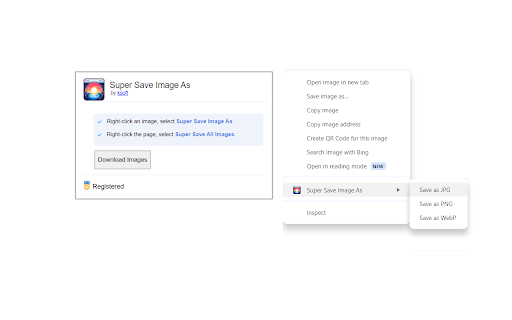
Save images as PNG, JPG, or WEBP by right-clicking on an image. Adds a new context menu to the web browser to save images in a variety of formats. Also allows one-click to save all images on the page.
* Save images as PNG, JPG, or WEBP.
* Adds a new option in the right-click menu to save images in a variety of formats.
* Click a button to save all images on the page.
The free version allows saving unlimited images (with a limit of 30 images per single batch download). The registered version unlocks unlimited images in a single download.
Super Save Image As is the quickest and easiest way to save images in a web page.


Reviews
Loading reviews...
Permissions (6)
Permissions
activeTabℹ Can access the current tab when you click the extension contextMenusℹ Can add items to the right-click menu downloadsℹ Can manage and monitor downloads offscreen scriptingℹ Can inject scripts into web pages storageℹ Can store data locally in your browser
Details
| Version | 1.0 |
| Updated | Jan 22, 2024 |
| Size | 94.82KiB |
| First Seen | Apr 1, 2026 |
More by ksoft



Popular in functionality

Hola VPN - Your Website Unblocker
by Hola VPN LTD.
5M
★ 4.84
functionality
5M
★ 4.84
functionality

Video Speed Controller
by igrigorik
3M
★ 4.54
functionality
3M
★ 4.54
functionality

SponsorBlock for YouTube - Skip Sponsorships
by Ajay
2M
★ 4.65
functionality
2M
★ 4.65
functionality

OneTab
by OneTab
2M
★ 4.45
functionality
2M
★ 4.45
functionality

VPN Chrome extension - Best VPN by uVPN
by uVPN
900K
★ 4.52
functionality
900K
★ 4.52
functionality
Popular Extensions

Adobe Acrobat: PDF edit, convert, sign tools
by Adobe Inc.
331M
★ 4.40
workflow
331M
★ 4.40
workflow

AdBlock — block ads across the web
by AdBlock
63M
★ 4.48
workflow
63M
★ 4.48
workflow

迅雷下载支持
by Shenzhen Xunlei Network Technology Co., Ltd.
59M
★ 2.77
workflow
59M
★ 2.77
workflow

Grammarly: AI Writing Assistant and Grammar Checker App
by Grammarly
42M
★ 4.50
communication
42M
★ 4.50
communication

Adblock Plus - free ad blocker
by eyeo GmbH
41M
★ 4.39
workflow
41M
★ 4.39
workflow