
⚠️Not updated in over 2 years
Description
Feature :
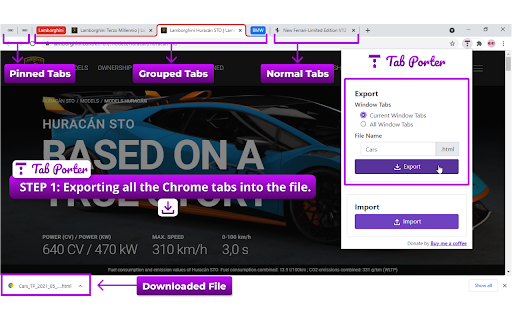
- Export/Reopen also work for Current Chrome Window or All Chrome Window.
- Automatically all tabs are reopened in Chrome Window using the extension.
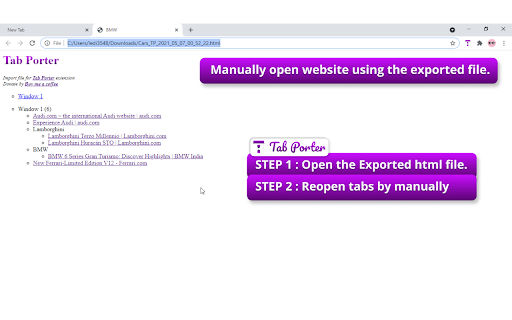
- Manually open website using the exported HTML file. The file having all website links is present according to Windows and Tabs order.
- Normal Tabs, Pinned Tabs, and Grouped Tabs properties also will be restored.
- Reopen will support collapsed/expand for grouped tabs on the Chrome Window.
You are researching something called research1. In-between of research1 you need to move to other research. At this point, you can export research1 by using the TabPorter. After completing the other research you can resume research1 by importing the file.
Or you can send the exported file to a friend or colleague. He can resume the resarch1.
Export Step:
1. Select the TabPorter.
2. Select the options Window Tabs - Current/All Window Tabs
3. Enter the File name prefix.
4. Click the Export button.
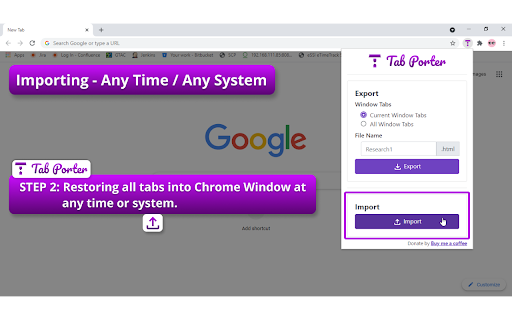
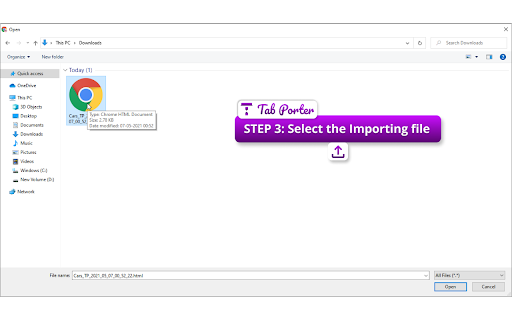
Import Step:
1. Select the TabPorter.
2. Click the Import button.
3. Select the importing research file.
4. Automatically all tabs are reopened in Chrome Window.
Html Step:
1. Open the Research HTML file.
2. Website link will under the Window(Single/Multiple Window) or Groups.
3. You can manually reopen the website.
Export or backup all the Google Chrome tabs into an HTML file. Reopen all tabs into Google Chrome Window at any time or any system.

Reviews (4 cached)
★☆☆☆☆2025-01-04
Bill Fuller
Be nice if this actually worked. I exported using all 3 available file formats (.txt, .json, .csv) then tried the import. Not seeing ANY of the tabs show up in my Chrome Window.
★☆☆☆☆2024-12-01
Karolina Jankowska
exported, reinstalled system, tried to import and it imports only 2 tabs. file has more entries, still does not import all 80 tabs.
★★☆☆☆2025-08-03
Kijung Hong
Korean Charaters are broken
★★★☆☆2024-11-16
Creative Sanas
its good but does not saves tab groups. opens all tabs without grouping when import.
Permissions (2)
Permissions
tabGroupsℹ Can organize tabs into groups tabsℹ Can see your open tabs and their URLs
Details
| Version | 1.0.0.1 |
| Updated | May 10, 2021 |
| Size | 804KiB |
| First Seen | Mar 31, 2026 |
More by Ledison

Popular in functionality

Hola VPN - Your Website Unblocker
by Hola VPN LTD.
4M
★ 4.84
functionality
4M
★ 4.84
functionality

Video Speed Controller
by igrigorik
3M
★ 4.54
functionality
3M
★ 4.54
functionality

SponsorBlock for YouTube - Skip Sponsorships
by Ajay
2M
★ 4.65
functionality
2M
★ 4.65
functionality

OneTab
by OneTab
2M
★ 4.45
functionality
2M
★ 4.45
functionality

Noble Ninja Name Generator
by stokanbiamonteni599
1M
★ 0.00
functionality
1M
★ 0.00
functionality
Popular Extensions

Adobe Acrobat: PDF edit, convert, sign tools
by Adobe Inc.
322M
★ 4.40
workflow
322M
★ 4.40
workflow

AdBlock — block ads across the web
by AdBlock
62M
★ 4.48
workflow
62M
★ 4.48
workflow

迅雷下载支持
by Shenzhen Xunlei Network Technology Co., Ltd.
59M
★ 2.77
workflow
59M
★ 2.77
workflow

Grammarly: AI Writing Assistant and Grammar Checker App
by Grammarly
42M
★ 4.50
communication
42M
★ 4.50
communication

Adblock Plus - free ad blocker
by eyeo GmbH
40M
★ 4.39
workflow
40M
★ 4.39
workflow