Web Activity Time Tracker - Block Websites, Pomodoro & Web Analytics icon

Web Activity Time Tracker - Block Websites, Pomodoro & Web Analytics

by EonF Media SL

v2.2.5 Updated Jun 27, 2025 1.22MiB
CWS
40K
Users
★ 4.82
883 reviews
#2978
of 207.1K
workflow
#944 of 31.8K
Highly rated

Description

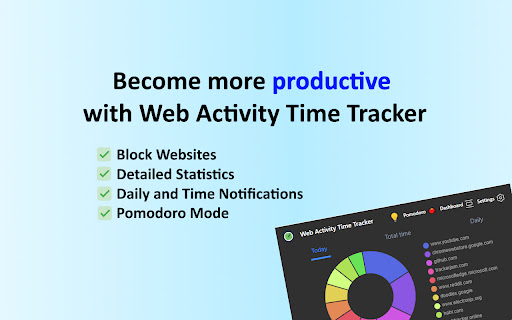
Web Activity Time Tracker keeps track of how you spend time on the web and presents the stats in a useful and intuitive way. Take control of your online time with Web Acitivity Time Tracker! Tracking and limiting your use of any website helps you stay productive and focused. Stay focused and maximize your productivity. Whether you're managing work projects, studying for exams, or simply want to understand your browsing habits better, this tool is your go-to companion. ✦ What is Web Activity Time Tracker? Web Activity Time Tracker is a powerful Chrome extension designed to help you monitor and optimize your online productivity. Effortlessly track the time you spend on each website, set goals, and get detailed reports to boost efficiency and focus. With a sleek, user-friendly interface and real-time insights, this tool empowers you to make the most of your web browsing. Stay on top of your online habits and achieve your productivity goals with ease! Web Activity Time Tracker is ad-free and open-source extension. You can set a daily visit limit for sites and block it after the expiration of the limit. Alternate work and rest times with Pomodoro Mode. Key Features: ✅ Real-Time Tracking: Get instant insights into the time spent on each website you visit. ✅ Daily and Hourly Reports: Receive summary reports that highlight your browsing habits and patterns. Comparison of time by day ✅ Limit and Block Distracting Websites: Set daily time limits for specific websites to help you stay focused. ✅ Usage Statistics. Effortlessly monitor the time you spend on different websites. ✅ Notifications for Websites and daily summary notification. Set goals and receive notifications to stay on track. ✅ Pomodoro Mode ✅ Track files in the browser, including .pdf, .png, .json and so on ✅ Export Data to CSV ✅ Privacy Focused: Your data is secure; we don’t share your browsing information. Web Activity Time Tracker helps you: 🧩 Stay focused 🧠 Understand how you use the internet 👀 Reduce distraction 🛑 Overcome web addiction ⏱️ Self-control 💯 Boost productivity 🚀 Increase your digital wellbeing 💪 Reduce wasted time Take control of your online habits and make every minute count with Web Activity Time Tracker. Extension doesn't track any information about you and does not send data anywhere. Chrome Local Storage is used to save your usage data in a simple format.
Web Activity Time Tracker - Block Websites, Pomodoro & Web Analytics screenshot 1Web Activity Time Tracker - Block Websites, Pomodoro & Web Analytics screenshot 2Web Activity Time Tracker - Block Websites, Pomodoro & Web Analytics screenshot 3Web Activity Time Tracker - Block Websites, Pomodoro & Web Analytics screenshot 4Web Activity Time Tracker - Block Websites, Pomodoro & Web Analytics screenshot 5

Reviews (24 cached)

★☆☆☆☆2026-02-26
William Huynh

Hijacks the button that turns of this extension. Installed malware on Chrome. Look away!

★☆☆☆☆2026-02-14
Y07C Theo Louis (Theo) BELLAYER

dont like it, however the free adblocker is fire

★☆☆☆☆2025-06-30
A. A.

This extension is a scam since 2025, when it was sold by previous developer.

★☆☆☆☆2025-05-21
Michael Zhao

The worst extension I ever had

★☆☆☆☆2025-02-21
Tony Bruce

App works fine on a PC. The limits feature does not work on phones (via a browser that uses the extension)

★☆☆☆☆2025-02-09
Yuki Kart

draining cpu resource a lot

★☆☆☆☆2024-12-01
Song Yifan

Inaccurate! Totally unusable

★☆☆☆☆2024-06-06
Michael Knight

There is a bug with the postponement button. It never comes up to say you can postpone. It always says "you can do it once per day" ... but it never gives me the 1 chance.

★☆☆☆☆2023-12-13
Goutham

Time tracking is inaccurate and displaying incorrect data.

★☆☆☆☆2022-08-30
Valenation

doesnt work

★☆☆☆☆2020-01-03
Loz Baker (GoSuLoZ)

This app crashed while I was in the middle of writing a very long comment, causing the browser to hang and my comment to be lost wasting over an hour of my time. In future I will be writing all comments in something like notepad++ before copying into a web browser, however I think you can reasonably expect a level of stability and don't generally expect an application especially one as basic and with as little utility as a time tracker to cause your entire browser to crash. This is actually the first time I've ever had an extension crash my browser in 10+ years of using chrome. Having a stable browser is of higher importance to me than knowing how much time I allocate to web browsing and if this is more important to you then I would recommend not using this extension.

★★☆☆☆2026-01-11
Czajnik

counts well but cant even check data from yesterday and downloading the data doesnt work

★★☆☆☆2024-11-02
s ravi

great app

★★☆☆☆2024-10-08
Mohamed Anan

Good, but the time and the sessions tracking aren't accurate. It calculates less time compared to actual high usage and also a lot of sessions. I don't know why! for example I tracked myself browsing for 1h but the extension calculate it about 40m even when I'm not idle !

★★☆☆☆2023-09-09
Matanica (Matanica)

The data seems really non-realistic at all.

★★☆☆☆2022-01-19
Martin Durco

I do not see the icon in the browser, so I have no possibility to access see the statistics. I went through all the settings twice and tried to click on everything to get it there, but without success.

★★☆☆☆2021-01-15
Bartek S

Too high cpu usage

★★★☆☆2025-01-18
Saptadeep Dutta

its noice but glitches at times

★★★☆☆2024-01-30
Soham Bhattacharya

Good but please add a quick whitelist button without having to go to the setting.

★★★☆☆2023-08-21
Fahmida Seraji

Sometime the time tracker icon does not work and I have to go to the settings and then uncheck and check the box icon. Please fix this issue. Overall the app is good.

★★★☆☆2023-07-25
Trendonor

Was awesome i've been using it for months , but why features removed in update and why its have became too much inaccurate in counting time , please fix this coz i love this ext

★★★☆☆2022-02-13
Dan

I needed an app that has aggregation features like being able to see weekly overviews for each website. I'd love if there was a way to tag different sites and aggregate the times for a category over the week, day, month, all time. As far as what it does, it does well. Simple, clean UI.

★★★☆☆2021-07-25
Lucie Vyskupová

It seems like a great extension but it doesn't track time on videos when it is on full-screen.

★★★☆☆2021-04-14
Gabriel Crossan

Useful statistics, but it's a real CPU hog unfortunately. If you check Chrome's task manager (not the OS task manager, but the one accessible from Chrome's title bar context menu or Shift+Esc), you'll see that the CPU use is way out of proportion with everything else. For me its CPU load was frequently >30%.

Permissions (8)

Permissions

activeTab Can access the current tab when you click the extension alarms Can schedule periodic background tasks idle Can detect when you're away from the computer notifications Can show desktop notifications offscreen storage Can store data locally in your browser tabs Can see your open tabs and their URLs unlimitedStorage

Details

Version 2.2.5
Updated Jun 27, 2025
Size 1.22MiB
First Seen Mar 31, 2026