
Description
Reviews (11 cached)
none of these trash software developers know how to do their job. pathetic industry
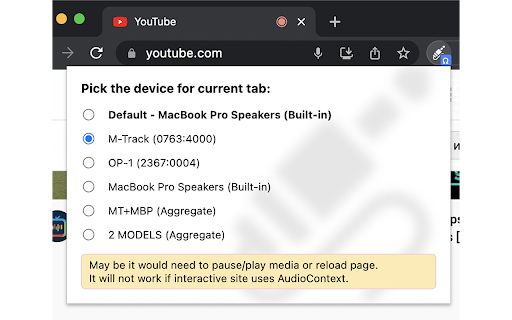
Do not work. When try to open it says: "Allow audio access for the current domain to enable functionality. You might not get prompted for permissions if it is explicitly blocked by your browser's settings." I have check all sound permissions of extension and site and nothing is blocked.
100 percent fail: It's supposed to let me select my audio output, but it doesn't even have a setting to select an audio output.
doesnt work on most websites
It stopped working please fix
Does what its supposed to do but suddenly my audio even with max volume is so low. uninstalling
Not work for Twitch.
Do not work for youtube app in windows 11
I would like some help. I'm on Brave release v1.74.51. I'm trying to use the extension on YouTube. But when I press the extension it says "To use this extension on this domain click "Allow" this site to use your audio. Also if a dialog doesn't appear, permission could be blocked explicitly with your browser settings.". Now, I do not know what needs enabled, everything is set to either Allow or Ask, so it should ask me right? Nothing asks though. I will update my reviews stars after this is resolved. My Goal: I'm trying to play audio from one tab to my speakers, and from another tab to my headset
doesn't work on most of the websites
This extension does not work with Facebook or Instagram videos / reels / stories. But it works very well with YouTube.
Permissions (4)
Permissions
Details
| Version | 0.4 |
| Updated | Mar 19, 2025 |
| Size | 26.08KiB |
| First Seen | Mar 31, 2026 |
More by ISh-

Popular in fun





Popular Extensions




