
⚠️Not updated in over 2 years ⚠️Below average rating
Description
Tired of getting interrupted by ads while watching a YouTube™ video ?
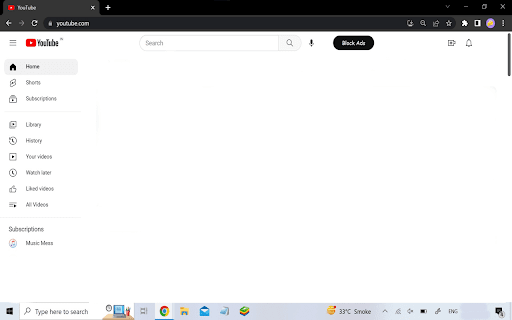
Don't worry, CleanTube is here to help you ! When you open YouTube™, you will see a 'Block Ads' button next to the mic button. Click on it and enjoy an Ad-Free experience on YouTube™ !
Reviews (4 cached)
★☆☆☆☆2025-12-20
Daniel Weigel
Fails at the second ad.
★☆☆☆☆2025-07-30
Philip Townsend
The button is there but the pp doesn't work. Shame because the Android version works vey well.
★☆☆☆☆2025-01-19
Todd
I use CT for my cellphone, absolutely does not work for Windows. I have the button for no ads, but it still plays ads.
★★★☆☆2025-03-03
Wayne S
Works great on android phone, but no longer works on Chrome PC 03/03/2025
Details
| Version | 2.0 |
| Updated | May 6, 2023 |
| Size | 8.06KiB |
| First Seen | Mar 25, 2026 |
More by Aquib Khan


Popular in workflow

Adobe Acrobat: PDF edit, convert, sign tools
by Adobe Inc.
331M
★ 4.40
workflow
331M
★ 4.40
workflow

AdBlock — block ads across the web
by AdBlock
62M
★ 4.48
workflow
62M
★ 4.48
workflow

Adblock Plus - free ad blocker
by eyeo GmbH
41M
★ 4.39
workflow
41M
★ 4.39
workflow

Chrome Remote Desktop
by Chrome Remote Desktop Release Managers
38M
★ 3.14
workflow
38M
★ 3.14
workflow

Microsoft Single Sign On
by Microsoft
36M
★ 2.27
workflow
36M
★ 2.27
workflow
Popular Extensions
Adobe Acrobat: PDF edit, convert, sign tools
by Adobe Inc.
331M
★ 4.40
workflow
331M
★ 4.40
workflow
AdBlock — block ads across the web
by AdBlock
62M
★ 4.48
workflow
62M
★ 4.48
workflow

Grammarly: AI Writing Assistant and Grammar Checker App
by Grammarly
42M
★ 4.50
communication
42M
★ 4.50
communication
Adblock Plus - free ad blocker
by eyeo GmbH
41M
★ 4.39
workflow
41M
★ 4.39
workflow
Chrome Remote Desktop
by Chrome Remote Desktop Release Managers
38M
★ 3.14
workflow
38M
★ 3.14
workflow