
⚠️Not updated in over 2 years
Description
Hide Activity Details
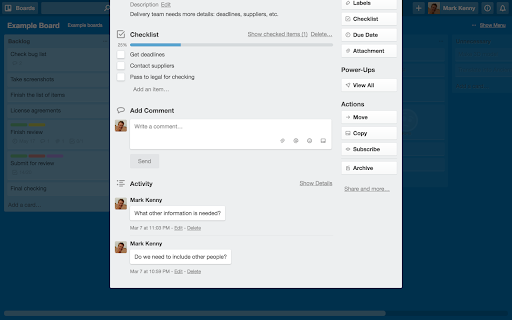
When viewing a card, everything that was ever done to that card is displayed at the bottom. This is far more much information than most people care about, and it cluttered it so that comments were swamped. You can hide this by clicking “Hide Details”, but Trello doesn’t always remember your choice. You can set this extension to click that link for you every time you open a card. Activity details are always there, if you need them. Just click “Show Details”.
Please note: this extension does not stop Trello tracking activity.
Hide Completed Items
I use checklists all the time, and only want to see the items I have left to do. You can hide completed items by clicking “Hide completed items” above the checklist, but Trello doesn’t hide them by default. You can set this extension to click that link for you every time you open a card. Your completed items don’t go anywhere, just click “Show checked items” to see them again. They’ll be hidden the next time you open the card.
Show or Hide Card Label Text
In list view, card labels are shown as a strip of colour. If you have given the label a name, this can also be displayed. This was always a hidden feature in Trello, and lately it appears Trello has removed this functionality. This option brings it back — switch it on display card label text, switch it off to hide it.
Place Cursor in Two Factor Auth field
If you have two factor authentication enabled, this option will place the cursor in the field when it appears.
This extension is only tested in the the most recent version of Chrome. If reporting a problem, please try to be as specific as possible (e.g. what is not working and where, in which circumstances, etc).

Reviews (1 cached)
★☆☆☆☆2025-03-20
Brandon Howard
Doesn't work. I used this a while back and it worked to auto hide checked items in checklists, but now it just flat out does not work.
Permissions (1)
Permissions
storageℹ Can store data locally in your browser
Details
| Version | 3.3.1 |
| Updated | Dec 14, 2023 |
| Size | 54.94KiB |
| First Seen | Mar 25, 2026 |
More by Mark Kenny


Popular in workflow

Adobe Acrobat: PDF edit, convert, sign tools
by Adobe Inc.
331M
★ 4.40
workflow
331M
★ 4.40
workflow

AdBlock — block ads across the web
by AdBlock
62M
★ 4.48
workflow
62M
★ 4.48
workflow

Adblock Plus - free ad blocker
by eyeo GmbH
41M
★ 4.39
workflow
41M
★ 4.39
workflow

Chrome Remote Desktop
by Chrome Remote Desktop Release Managers
38M
★ 3.14
workflow
38M
★ 3.14
workflow

Microsoft Single Sign On
by Microsoft
36M
★ 2.27
workflow
36M
★ 2.27
workflow
Popular Extensions
Adobe Acrobat: PDF edit, convert, sign tools
by Adobe Inc.
331M
★ 4.40
workflow
331M
★ 4.40
workflow
AdBlock — block ads across the web
by AdBlock
62M
★ 4.48
workflow
62M
★ 4.48
workflow

Grammarly: AI Writing Assistant and Grammar Checker App
by Grammarly
42M
★ 4.50
communication
42M
★ 4.50
communication
Adblock Plus - free ad blocker
by eyeo GmbH
41M
★ 4.39
workflow
41M
★ 4.39
workflow
Chrome Remote Desktop
by Chrome Remote Desktop Release Managers
38M
★ 3.14
workflow
38M
★ 3.14
workflow