
⚠️Not updated in over 2 years
Description
The Numerous.ai Google Sheets plugin lets you use AI to perform repetitive tasks and use spreadsheets like a power user. Here’s how:
PROMPT CHATGPT IN YOUR SHEETS
Use the =AI() function directly in your spreadsheet similar to formulas like =SUM() and =AVERAGE() to directly feed prompts to ChatGPT.
- Want to summarize a customer support message? =AI(“Here’s a message from a customer:”, A2, “summarize it in 1-2 bulletpoints”)
- Need to figure out what state a phone number is from? =AI(“What state is the phone number”, A2, “from?”)
And then you can just drag the function down and automatically do that for a hundred more cells.
HAVE THE AI DO YOUR TIME-CONSUMING TASKS BY SHOWING IT A FEW EXAMPLES
If you need to do mind-numbing busywork like:
- Format hundreds of cells by hand
- Categorize a thousand items
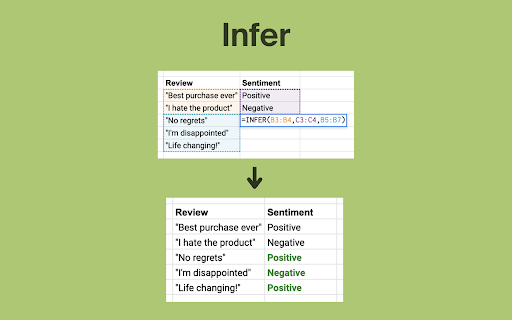
- Do sentiment analysis on lots of messages
You can teach the AI by providing it with 4 or 5 good examples, and using the “Infer” function to complete it for all the other cells.
WRITE TEXT USING AI
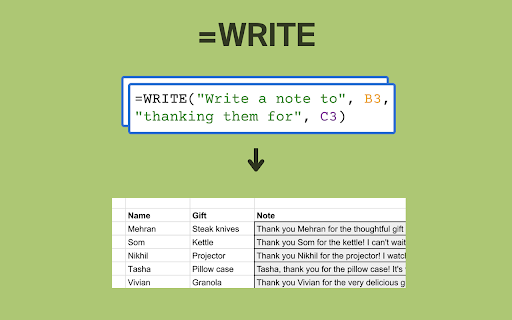
- =WRITE("a tagline for the brand",A3,"mentioning its top features such as",B3)
- =WRITE(“a message to”, A2, “thanking them for”, B2)
You can have AI write text for you, just by telling it what you want.
GENERATE FORMULAS USING PLAIN ENGLISH
Just write out what you want and Numerous.ai will generate the formula to do it. This works for even the most complex formulas: from SUM, COUNTIF, AVERAGE, to VLOOKUP, QUERY, REGEX, and more.
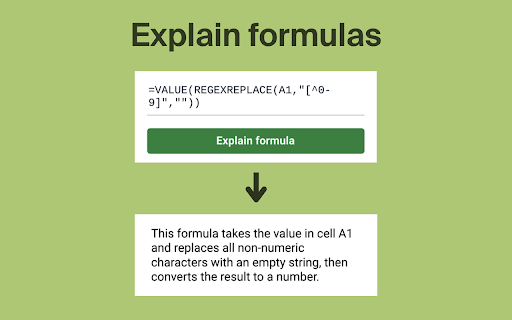
EXPLAIN COMPLEX FORMULAS
If you’ve received a spreadsheet from a colleague and have no idea what the formulas do, you can use the “Explain formula” function, and it will tell you what the formula does in plain English.
_________________________________________________
The Numerous.ai Chrome extension makes the experience of using the plugin faster and better.
Here is a list of the extension's features:
LAUNCH NUMEROUS FASTER
The Numerous.ai extension allows you to launch Numerous's Google Sheets plugin faster. Since Numerous is most useful when you are aware of its capabilities and its features are surfaced to the forefront, a faster launch experience means that you will be able to utilize Numerous sooner and more frequently, thus allowing you to accomplish more tasks that are only enabled by the use of Numerous.


Reviews (3 cached)
★☆☆☆☆2025-10-09
Nidhi Dani
It doesnt seem to be working
★☆☆☆☆2024-08-21
Erdoğan Özdemir
I became a member of the free trial period and a yearly withdrawal was made. Although I wrote to support, I did not receive a refund or return.
★☆☆☆☆2024-07-11
Romulo Pimentel
Annoying how it pushes you to add your payment info to start a free trial, even though there is a free usage tier. Uninstalling it.
Details
| Version | 2.3 |
| Updated | Apr 8, 2023 |
| Size | 30.95KiB |
| First Seen | Mar 25, 2026 |
Popular in workflow

Adobe Acrobat: PDF edit, convert, sign tools
by Adobe Inc.
330M
★ 4.40
workflow
330M
★ 4.40
workflow

Chrome Remote Desktop
by Chrome Remote Desktop Release Managers
38M
★ 3.14
workflow
38M
★ 3.14
workflow

Microsoft Power Automate
by Microsoft Corporation
10M
★ 1.99
workflow
10M
★ 1.99
workflow

Screencastify - Screen Video Recorder
by castify-ext-dev
9M
★ 3.95
workflow
9M
★ 3.95
workflow

LastPass: Free Password Manager
by LastPass
8M
★ 4.26
workflow
8M
★ 4.26
workflow
Popular Extensions
Adobe Acrobat: PDF edit, convert, sign tools
by Adobe Inc.
330M
★ 4.40
workflow
330M
★ 4.40
workflow
Chrome Remote Desktop
by Chrome Remote Desktop Release Managers
38M
★ 3.14
workflow
38M
★ 3.14
workflow

Cisco Webex Extension
by cisco.chromestore
24M
★ 2.34
social
24M
★ 2.34
social

Kami for Google Chrome™
by Kami
17M
★ 4.56
education
17M
★ 4.56
education

Read&Write for Google Chrome™
by Texthelp
17M
★ 3.44
accessibility
17M
★ 3.44
accessibility