
✅Recently updated
Description
Detailed Description
1. Opening Hook
Tired of copying and pasting job details? Job Tracker Helper automates the entire process with a single click.
2. Main Description
**What It Does:**
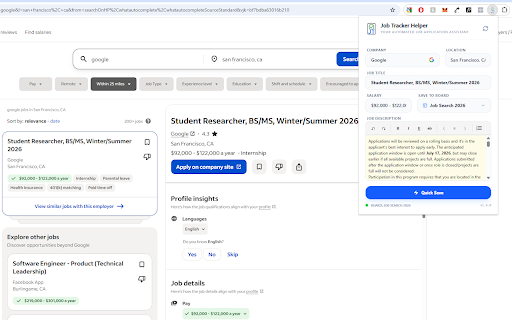
Job Tracker Helper is your intelligent job search companion that eliminates tedious manual data entry. While browsing LinkedIn or Indeed, simply click the extension icon and all job details—title, company, location, salary, and full description—are instantly saved to your Job Tracker application.
**Key Features:**
✅ **One-Click Job Capture**
No more copying and pasting. Extract complete job details instantly from any LinkedIn or Indeed posting.
✅ **Smart Tab Management**
Automatically reuses your existing Job Tracker tabs instead of cluttering your browser with duplicates.
✅ **Intelligent Salary Detection**
Captures real compensation data while filtering out promotional text and zero values. Supports multiple formats: $100K/yr, €55K-€65K, "Salary: Up to 70,000 EUR"
✅ **Complete Data Preservation**
Never lose information. Full job descriptions up to 10MB are stored securely—no truncation.
✅ **Company Logo Capture**
Automatically fetches company logos when available for a more visual job tracking experience.
✅ **Board Selection**
Choose which job board to save to, or let it go to your default board automatically.
✅ **Real-Time Sync**
Changes appear instantly in your Job Tracker dashboard. No delays, no confusion.
**Perfect For:**
- Active job seekers tracking multiple applications
- Career changers exploring new opportunities
- Recruiters managing candidate pipelines
- Anyone who wants to spend less time on data entry and more time on actual applications
**How It Works:**
1. Browse LinkedIn or Indeed job postings
2. Click the Job Tracker Helper icon
3. Select your target board (optional)
4. Click "Quick Save"
5. Done! View it in your Job Tracker dashboard
**Why Job Tracker Helper?**
- **Save Time**: Reduce manual data entry by 90%
- **Stay Organized**: All jobs in one place with full details
- **Never Miss Details**: Complete descriptions and salary information captured
- **Secure & Private**: Direct browser-to-app communication, no intermediary servers
- **Modern & Fast**: Built with the latest web technologies for speed and reliability
**Platform Support:**
Currently optimized for LinkedIn and Indeed. Works with most standard job posting formats. More platforms coming soon!
**Requirements:**
- Free Job Tracker account (sign up at [your-domain])
- Chrome or Edge browser
- Active internet connection
Transform your job search from tedious to effortless. Install Job Tracker Helper today!
### Version Information
**Current Version**: 1.6.6.
### Fixed
- **LinkedIn Single Job View Scraping - Post v1.6.5 Regression** ⚠️ CRITICAL BUG FIX
- **Issue**: LinkedIn single job view scraping completely broken after v1.6.5 deployment
- **Symptoms**: Location, salary, and description all empty; only company name captured
- **Root Cause**: LinkedIn changed DOM structure with dynamically generated CSS class names
- Class names like `_4d0262ae`, `bab11c20` change between page loads and versions
- All CSS class-based selectors became unreliable and returned `null`
- Content existed on page but was inaccessible via previous selectors
- **Solutions Implemented**:
- **Description Extraction**: Added attribute-based selectors resilient to class changes
- `div[componentkey*="AboutTheJob"]` - targets description container by component key
- `span[data-testid="expandable-text-box"]` - targets content by test ID attribute
- These attributes are more stable than dynamically generated class names
- **Location Extraction**: Implemented intelligent priority-based fallback chain
- **Priority 1**: Standard LinkedIn location line pattern "Location · X ago · Y people clicked"
- Searches all `<p>` tags for text with `·` separators + "ago" + "clicked"/"people" keywords
- Extracts first part before first `·` separator (e.g., "Germany" from "Germany · 1 day ago · 84 people clicked")
- Validates extracted text is not job type terms (full-time, part-time, contract) or standalone "Remote"
- **Priority 2**: Falls back to description search for "Location:" label only if standard line not found
- Ensures correct location prioritization: standard UI element first, description fallback second
- **Job Title Cleanup**: Removes LinkedIn suffix pattern
- Strips "| Company Name | LinkedIn" suffix from job titles
- Uses string split on `|` separator, takes only first part
- Example: "Software Engineer | Quik Hire Staffing | LinkedIn" → "Software Engineer"
- **Impact**:
- Restored full scraping functionality for LinkedIn single job view
- More resilient to LinkedIn's UI changes and dynamic class name generation
- Proper location extraction from standard UI position, not description
- Clean job titles without platform/company suffix clutter
- All fields now captured correctly: title, company, location, description, salary
- File: `src/content/scrapers.ts`
### Enhanced
- **Currency Support - Japanese Yen and Chinese Yuan**
- Added JPY (Japanese Yen) and CNY (Chinese Yuan) to `CURRENCY_CODE_REGEX`
- Added `¥` symbol to all salary extraction patterns (Patterns 1-5)
- Updated zero-value salary guard conditions to include `¥` symbol
- Now supports 8 currency codes: USD, EUR, GBP, CHF, CAD, AUD, JPY, CNY
- Now supports 4 currency symbols: $, £, €, ¥
- File: `src/content/scrapers.ts`


Reviews
Loading reviews...
Permissions (4)
Permissions
activeTabℹ Can access the current tab when you click the extension scriptingℹ Can inject scripts into web pages storageℹ Can store data locally in your browser tabsℹ Can see your open tabs and their URLs
Details
| Version | 1.6.6 |
| Updated | Feb 27, 2026 |
| Size | 3.99MiB |
| First Seen | Mar 24, 2026 |
Popular in functionality

Hola VPN - Your Website Unblocker
by Hola VPN LTD.
5M
★ 4.84
functionality
5M
★ 4.84
functionality

ChatbotsPlace: All-in-One AI Sidebar (ChatGPT, Claude & Gemini)
by ChatbotsPlace
500K
★ 4.80
functionality
500K
★ 4.80
functionality

Infinity New Tab
by Infinity Teams
400K
★ 4.57
functionality
400K
★ 4.57
functionality

Go Back With Backspace
by gobackwithbackspace
300K
★ 3.16
functionality
300K
★ 3.16
functionality

Google Search Maps Button
by Publisher54321
200K
★ 4.81
functionality
200K
★ 4.81
functionality
Popular Extensions

Adobe Acrobat: PDF edit, convert, sign tools
by Adobe Inc.
330M
★ 4.40
workflow
330M
★ 4.40
workflow

Chrome Remote Desktop
by Chrome Remote Desktop Release Managers
38M
★ 3.14
workflow
38M
★ 3.14
workflow

Cisco Webex Extension
by cisco.chromestore
24M
★ 2.34
social
24M
★ 2.34
social

Kami for Google Chrome™
by Kami
17M
★ 4.56
education
17M
★ 4.56
education

Read&Write for Google Chrome™
by Texthelp
17M
★ 3.44
accessibility
17M
★ 3.44
accessibility