
Description

Reviews (27 cached)
window cant be resized
only blank white window. Win10x32 Vivaldi stable
Can't position or close the window?
I want to minimize too.
can't move the app
Doesn't use existing browser sessions, which results in needing to use a password login on a third-party app. That's a recipe for disaster.
Does not work well on windows 10
The issue here is the window cannot be moved. This kills the experience for me
Unusable if chrome extensions do not work. Too much value being lost PLEASE FIX!
Liked it until I realized that other trello chrome extensions didn't work with it.
No window borders on Ubuntu. How can I even move this thing around?
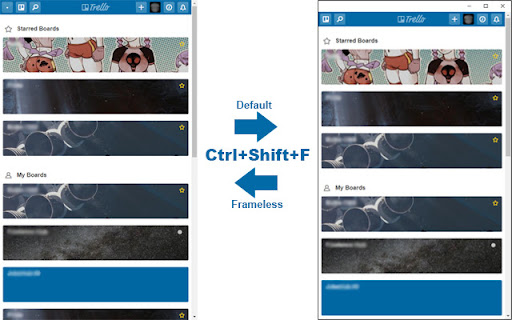
While I very much enjoy being able to launch Trello on its own, the absent window frame issue is incredibly aggravating. Not only can you not move the window around, minimize it, or even exit normally without executing a series of obscure commands, but those commands don't even work half the time! I have to keep a starred Trello board just for instructions (ctrl + shift + F for window frame, ctrl + W to exit, etc.) to make this app usable. It regularly takes 5+ tries (executing commands, reloading, exiting) for this app to add a frame. While writing Chrome apps is not my programming area of expertise, it seems that a simple line of CSS could fix this issue - i.e. it is either laziness or a desire to prioritize 'sleekness' over basic usability. I would totally give this app 5 stars if I didn't have to go through an incredibly frustrating sequence of steps - i.e. load Trello, open the board with the commands to add a frame and reload/exit the app, input commands, exit, repeat these steps over and over (literally sometimes up to 10 times) until it works - just to use it. Why hasn't this been fixed?
useless
cannot Alt+Tab to it... its just another chrome window... Why not just open a new Chrome Window? **Needs these features (then i would user it)** 1. Alt-Tab seperate window... There are chrome apps that function like this (floating youtube...) 2. Always On Top mode... this would be great for 2nd monitor mode so it never gets lost. 3. thats it!
One of the issues I've been having is that you can't move the window window screen around. Otherwise its a great program.
Very nice wrapper, would be perfect if I could use extensions with it.
From today I cannot resize the window and move window.... Ctrl Shift F also not works.
it just ok...not any more
Needs the ability to minimise easily rather than using key commands. Also the ability to move around on the screen is important and is non-existent at present.
App disconnects and unable to reconnect even when I am able to browse the web.
I think it would be better with just the standard window frame with the close, maximize and minimize buttons.
Unable to drag or resize in Mac El Capitan
It's working great but would be nicer if it was possible to drag the window by clicking the "Trello" title bar. I know that the dot at the left top corner was for dragging but it's too small to click every time and my natural instinct makes me to click the "Trello" title every time for dragging.
It was OK, but with the window unmovable in Windows 7, pretty useless to me.
In Windows 10 the app is resizable, but not movable. There is no buttons to close or minimize it!
In Windows 7 the app is resizable, but not movable. It is stuck dead center of my main monitor, instead of me being able to slide it off to a corner out of the way.
Very good at mimicking everything. The only glitch found was the immobility of the frame once open.
Permissions (7)
Permissions
Host Permissions
Details
| Version | 0.9.4 |
| Updated | Sep 1, 2018 |
| Size | 9.6KiB |
| First Seen | Mar 31, 2026 |
Popular in workflow




Popular Extensions
