
Description


Reviews (19 cached)
It does not work with the Google Chrome Tab Groups but add a different, less useful concept.
Sync Tab Groups is far more functional and easier to use... and STG has not been updated in years.
Literally use chrome://flags/#tab-groups
It does not handle Google Chrom Tab Groups but it defines a new / different Tab Group Concept.
It lacks some few important features. You can add a tab to a group many times. If link is added to previously defined group it does not close the tab :) you cannot sync between devices or save on cloud.
The export JSON from Chrome can't work in Edge.
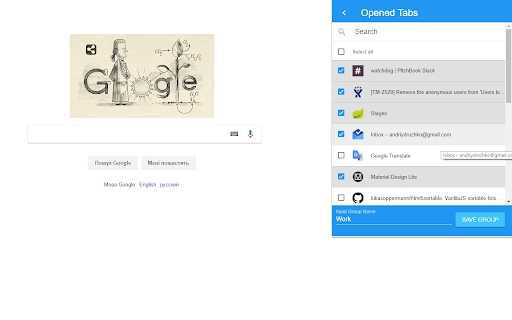
1 It will be great if I can search tab titles among the group. Now I can only export into a json file to search it manually. 2 Cannot append tabs into a existed group easily because you can only select tabs one by one to apppend. 3 Buggy. When you try to save a window of tabs into a group with "close tabs after save group", your tabs will be lost before it tells you cannot directly save a group with same name (cannot append directly)
totally useless, not a tab group extension but rather a bookmark manager
Not very useful or convenient. Even manual operating with bookmarks would be better. Nowadays exists much better tab management extensions and even browsers with grouping out of the box.
i dont see how this extension does anything beyond the capabilities of bookmark folders, its just happening in the box the extension button opens up but you cannot rearrange tabs or do anything besides saving and grouping bookmarks and opening tabs with them. i dont get it.
can only click each link one by one, there is not using ctrl or shift + left click to increase our speed at selecting desired tabs
Great extension, but import function is not working (Brave and Edge)
It was working fine for the first 2-3 months but recently it is not saving any of my new groups. I have tried multiple times to save it and even tried deleting some of my old groups thinking that would help but there has been no change. Kindly resolve this issue immediately
Would be perfect if there were a way to configure it to default to saving only tabs from the _current_ rather than giving you a list of _all_ windows. I keep a lot of windows open and it's kind of a pain to have to scroll through my list of 30+ windows to try to figure out which one is the one I'm currently working in that I want to save. I'd suggest making the current window the default with an "advanced button" to allow people to choose tabs from all windows or at least make it a config option.
I would like to see the following features which will improve I believe the extension: - Ability to export/import - Some kind of backup system (I was using OneTab and all my links are gone, that's how I got to your extension) - Ability to rename groups - Some message asking if you want to open the tabs when you click on the group. I did save tones of tabs and clicking there opened them all which wasn't my intention. - Ability to choose if you want to open on a new window, in same window or in private window. I believe that's all :) It looks good and has potential. Thanks for the hard work. I hope you are able to make some of those adding to the extension.
You should seriously implement a lot of these suggestions you're seeing. This has potential, but it's not quite there yet. There should be a way to edit the names of the chromes after creating them. Also (and I think this is even MORE IMPORTANT), when clicking the make a group button, every tab is listed without organization. People can have tabs in other windows, and so the tabs should be listed as groups based on the window there open in. So instead of having each tab listed one after the other, there can be a "group all open tabs in this window" button. So you can click that to select all tabs that belong to a particular window. This could also save time instead of having to check mark each tab individual (especially confusing when there's no break to separate them based on what window they're open in). Really hope you guys implement these changes (not just mine, read the reviews).
"Select all" is horribly broken. Pressing it check the "Select all" box itself, clicking it again un-selects the "Select all" box and selects everything else. When using the search and then pressing "Select all" (twice in this case) I'd expect ONLY the searched items to be selected. In other words, "Search" should actually be a "Filter". Apart from that, the UI is to big and looks way out-of-place. All that said, I like the general idea and certainly see it's usefulness.
It just stopped working. Why?
A very useful Extension, but it would be nice, if I could change the groups oder delete them (the bin dosn't show)
Permissions (3)
Permissions
Details
| Version | 1.3.3 |
| Updated | Oct 15, 2022 |
| Size | 1.32MiB |
| First Seen | Mar 31, 2026 |
Popular in workflow




Popular Extensions
