
Swoosh Cookie and Local Storage Specialist
Description
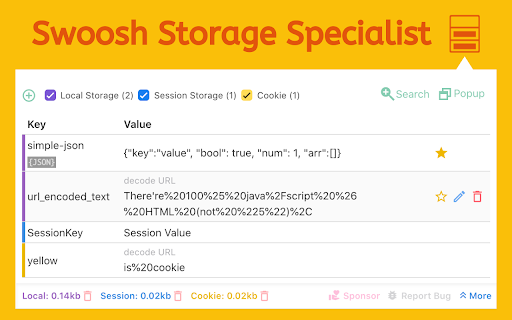


Reviews (17 cached)
I'm uncomfortable with no source code at Git Hub (https://github.com/steampunck/). I'll consider changing my rating if you publish the code.
Untrustworthy Chrome extension: collecting and exposing data without users knowledge. I highly recommend removing it immediately. Your privacy is not safe for anyone using it.
It just not working
Not working in Chromium 58.
indexedDB functionality does not work. It opens a "404" url
Doesn't refresh automatically
You can't undo any of your actions. I accidentally added something to a key then it all disappeared. Like Poof. I lost all my data thanks to this extension.
Can no longer edit cookies. Can no longer clear all keys/values at once.
Could not read / modify IndexDB
This extension is out of date now.
I see only one key of the session data instead several keys I expected
It had promise, but I primarily wanted something that parsed JSON strings into objects. This promises to do that by sending it to the console where it can be inspected (I guess), but it just didn't do anything when I pressed the 'dump json' button.
I'm not sure what the indexedDB application would do, and cannot experiment with it because it does not come up. When I click the "Open in new Window" button, nothing happens!
Not for me. Get the same indexedDB error mentioned (404 not found due to opening the new window on the server the original page is from. Plus does not work at all if the page has a frame that does all the local storage operations from and comes from a different server than the main page; but the Dev tool sees it all
Gives no extra functionality compared to built-in dev tools.
I have upgraded my rating to 2 starts because the developer contacted me within 24 hours. My issue is being investigated; the issue exists on 2 Chromebooks and 1 Windows 7 device. Original entry: The indexedDB tab returns the following error on 2 different Chromebooks: '404. That’s an error. The requested URL /chrome-extension-localstorage-manager-popup-404.html was not found on this server. That’s all we know.' I would like to change this to 5 stars. Let me know when this is fixed. Thanks.
Still need a little work and bugs to be eliminated.
Permissions (4)
Permissions
Details
| Version | 3.0.1 |
| Updated | Oct 28, 2025 |
| Size | 558KiB |
| First Seen | Mar 31, 2026 |
More by Extension Rocks



Popular in developer





Popular Extensions




