
⚠️Not updated in over a year
Description
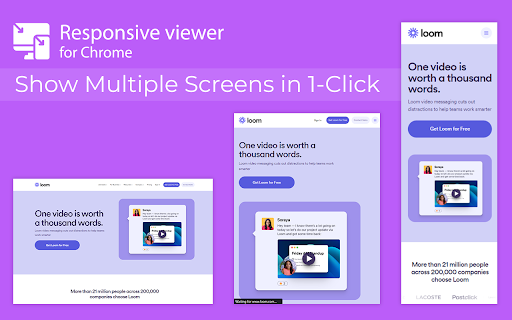
In 2025, ensuring your website looks flawless across all devices is more important than ever. Don’t let your website look ugly when viewed in different devices, you can use Responsive Viewer for Chrome extension. As a device necessary for developers, you have the ability to display several sizes on the screen at once, which makes testing of work in responsive design faster. With two to three clicks, assess and improve broad site structure across different screens, for the best usability.
Key Features:
Multiple Screens in One View: See all the screen resolutions on one page, from mobile-first to desktop-first, if you want to test responsiveness.
Quick Layout Assessments: Exhibit 2 A time saver delivering layout problems in real time respecting device, screen and orientation.
Customizable Configurations: Make your screens, specific resolutions, and spatial orientations correspond with the intended devices.
Enhanced Development Workflow: Be able to easily identify and address problems regarding responsiveness in order to enhance the design operation.
How to Use:
Install the Extension: To get the Responsive Viewer Chrome Extension, go to Chrome Web Store and install it.
Open the Website or App: Open the website or the application that you wish to and it ready for testing.
Activate Responsive View: In your Chrome bar you will see the icon of Responsive Viewer.
Customize View: Orientation and scaling and resizing options are available to help the user in specific and more detailed forms of testing.
Review and Optimize: Make sure that the same layout appears uniformly in all your displays and adjust your site in terms of how well it is user-friendly on each of the devices.
Test with Ease: To minimize discrepancies in performance across different devices, the configurations have to vary.
Why Use Responsive Viewer?
As was described, the Responsive Viewer is intended to simplify the work of testing responsiveness. Developers and designers can now check how their designs work on various devices without flipping between screens. Cut hours off your schedule, make your work more efficient, and make your users’ experience on any device seamless.
FAQs
What is the Responsive Viewer extension?
The Responsive Viewer is a Chrome extension that allows developers to view multiple screen resolutions simultaneously, making it easier to test website responsiveness.
Can I customize screen sizes and orientations?
Yes, you can easily customize the screen sizes, orientations, and resolutions to match the devices you’re testing.
Is it free to use?
Yes, the Responsive Viewer is free to install and use for all Chrome users.
Does this work with any website?
Absolutely! You can test responsiveness on any website or web application by simply activating the extension.
Who can benefit from this extension?
Web developers, designers, and anyone working on responsive web designs will find this tool invaluable for quick and accurate layout testing.
Reviews (4 cached)
★☆☆☆☆2025-11-10
Andre Wilson
Needs alot of work
★☆☆☆☆2024-07-20
ahmed samir
Need too much work to be an extension
★★☆☆☆2023-12-26
Max Powerz
This removes the checkbox inside Gmail's list of emails.
★★★☆☆2024-07-19
Mark Ballew (XSites WebAfford)
To confirm Max Powerz, I experience this same issue, causing some render blocking of checkbox control.
Permissions (2)
Permissions
activeTabℹ Can access the current tab when you click the extension scriptingℹ Can inject scripts into web pages
Details
| Version | 0.0.1 |
| Updated | Jan 23, 2025 |
| Size | 25.34KiB |
| First Seen | Mar 24, 2026 |
Popular in workflow

Adobe Acrobat: PDF edit, convert, sign tools
by Adobe Inc.
322M
★ 4.40
workflow
322M
★ 4.40
workflow

AdBlock — block ads across the web
by AdBlock
62M
★ 4.48
workflow
62M
★ 4.48
workflow

迅雷下载支持
by Shenzhen Xunlei Network Technology Co., Ltd.
59M
★ 2.77
workflow
59M
★ 2.77
workflow

Adblock Plus - free ad blocker
by eyeo GmbH
40M
★ 4.39
workflow
40M
★ 4.39
workflow

Chrome Remote Desktop
by Chrome Remote Desktop Release Managers
37M
★ 3.13
workflow
37M
★ 3.13
workflow
Popular Extensions
Adobe Acrobat: PDF edit, convert, sign tools
by Adobe Inc.
322M
★ 4.40
workflow
322M
★ 4.40
workflow
AdBlock — block ads across the web
by AdBlock
62M
★ 4.48
workflow
62M
★ 4.48
workflow
迅雷下载支持
by Shenzhen Xunlei Network Technology Co., Ltd.
59M
★ 2.77
workflow
59M
★ 2.77
workflow

Grammarly: AI Writing Assistant and Grammar Checker App
by Grammarly
42M
★ 4.50
communication
42M
★ 4.50
communication
Adblock Plus - free ad blocker
by eyeo GmbH
40M
★ 4.39
workflow
40M
★ 4.39
workflow