
✅Recently updated
Description
Weflow – The Fastest Way to Log Activities & Update Salesforce
Weflow’s Chrome extension enhances your workflow by turning your new tab into a command center for Salesforce. Update your pipeline, take notes, manage tasks, and add records—all synced with your favorite sales CRM.
Key Features
✅ Save hours each week updating Salesforce.
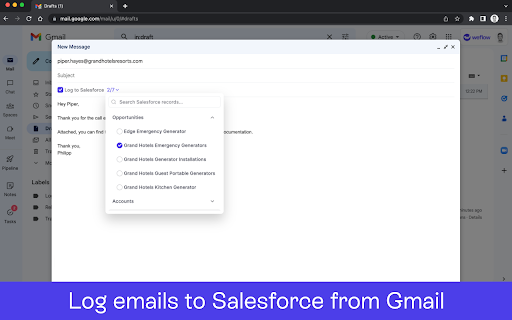
✅ Log emails/meetings from Gmail and Calendar to Salesforce.
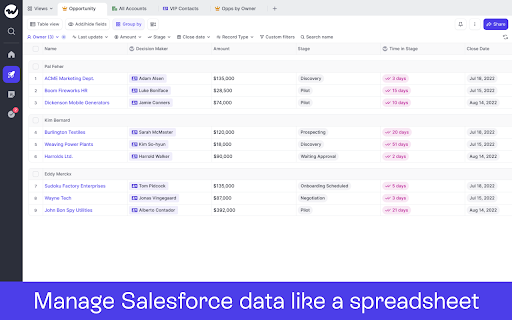
✅ Manage your pipeline with spreadsheet or kanban views.
✅ Take sales notes and sync them with one click.
✅ Use templates to qualify deals and structure meetings.
✅ Update records in your CRM while writing notes.
✅ Stay on top of deals with an intuitive task manager.
✅ Works out-of-the-box with Salesforce.
How It Works
1️⃣ Install the Chrome extension and sign in with your Salesforce account (SSO).
2️⃣ Click on the Weflow icon to open a new tab to access Weflow’s command center.
3️⃣ Use the shortcut CMD+J (Mac) or ALT+J (Windows) to launch global search from LinkedIn, Salesforce, Gmail or the Google Calendar.
4️⃣ View your pipeline, create notes, manage tasks, and update records instantly.
5️⃣ All changes sync automatically with Salesforce.
Security & Privacy
Weflow is built with security in mind. Your data remains safe with strict security guidelines, automated processes, and third-party audits.
About Weflow
Our mission is to help revenue teams run a repeatable, efficient, and predictable revenue process - instead of wasting time with non-selling activities, internal meetings, or cleaning CRM data.


Reviews
Loading reviews...
Permissions (4)
Permissions
scriptingℹ Can inject scripts into web pages storageℹ Can store data locally in your browser tabsℹ Can see your open tabs and their URLs webNavigationℹ Can monitor navigation events
Details
| Version | 3.6.1 |
| Updated | Mar 24, 2026 |
| Size | 20.38MiB |
| First Seen | Mar 25, 2026 |
Popular in workflow

Adobe Acrobat: PDF edit, convert, sign tools
by Adobe Inc.
331M
★ 4.40
workflow
331M
★ 4.40
workflow

AdBlock — block ads across the web
by AdBlock
62M
★ 4.48
workflow
62M
★ 4.48
workflow

Adblock Plus - free ad blocker
by eyeo GmbH
41M
★ 4.39
workflow
41M
★ 4.39
workflow

Chrome Remote Desktop
by Chrome Remote Desktop Release Managers
38M
★ 3.14
workflow
38M
★ 3.14
workflow

Microsoft Single Sign On
by Microsoft
36M
★ 2.27
workflow
36M
★ 2.27
workflow
Popular Extensions
Adobe Acrobat: PDF edit, convert, sign tools
by Adobe Inc.
331M
★ 4.40
workflow
331M
★ 4.40
workflow
AdBlock — block ads across the web
by AdBlock
62M
★ 4.48
workflow
62M
★ 4.48
workflow

Grammarly: AI Writing Assistant and Grammar Checker App
by Grammarly
42M
★ 4.50
communication
42M
★ 4.50
communication
Adblock Plus - free ad blocker
by eyeo GmbH
41M
★ 4.39
workflow
41M
★ 4.39
workflow
Chrome Remote Desktop
by Chrome Remote Desktop Release Managers
38M
★ 3.14
workflow
38M
★ 3.14
workflow